
Shopping Assistant for nopCommerce Turn Product Search into Intelligent, Conversational Shopping.
The nopStation Shopping Assistant Plugin transforms traditional product search into an intuitive, conversational shopping experience. Instead of navigating through multiple categories, filters, and product pages, customers can simply describe what they need in everyday language, refine results through follow-up questions, preview products with Quick View, and add items directly to their cart.
Built specifically for nopCommerce, the Shopping Assistant works with your existing catalog, pricing, inventory, customer roles, and shopping cart. It provides fast, deterministic product discovery without requiring external LLM services or recurring AI token costs.
Whether customers are looking for a product by brand, price, category, attribute, or a combination of requirements, Shopping Assistant helps them move from “What should I buy?” to “Add to cart” with fewer steps.
PRE-REQUISITES
- The plugin requires you to install the Nop-Station Core plugin first.
INSTALLATION
- Download the Shopping Assistant Plugin from our store https://nop-station.com/customer/downloadableproducts.
- You can learn more about the installation and licensing here.
- Go to Administration → Configuration → Local plugins.
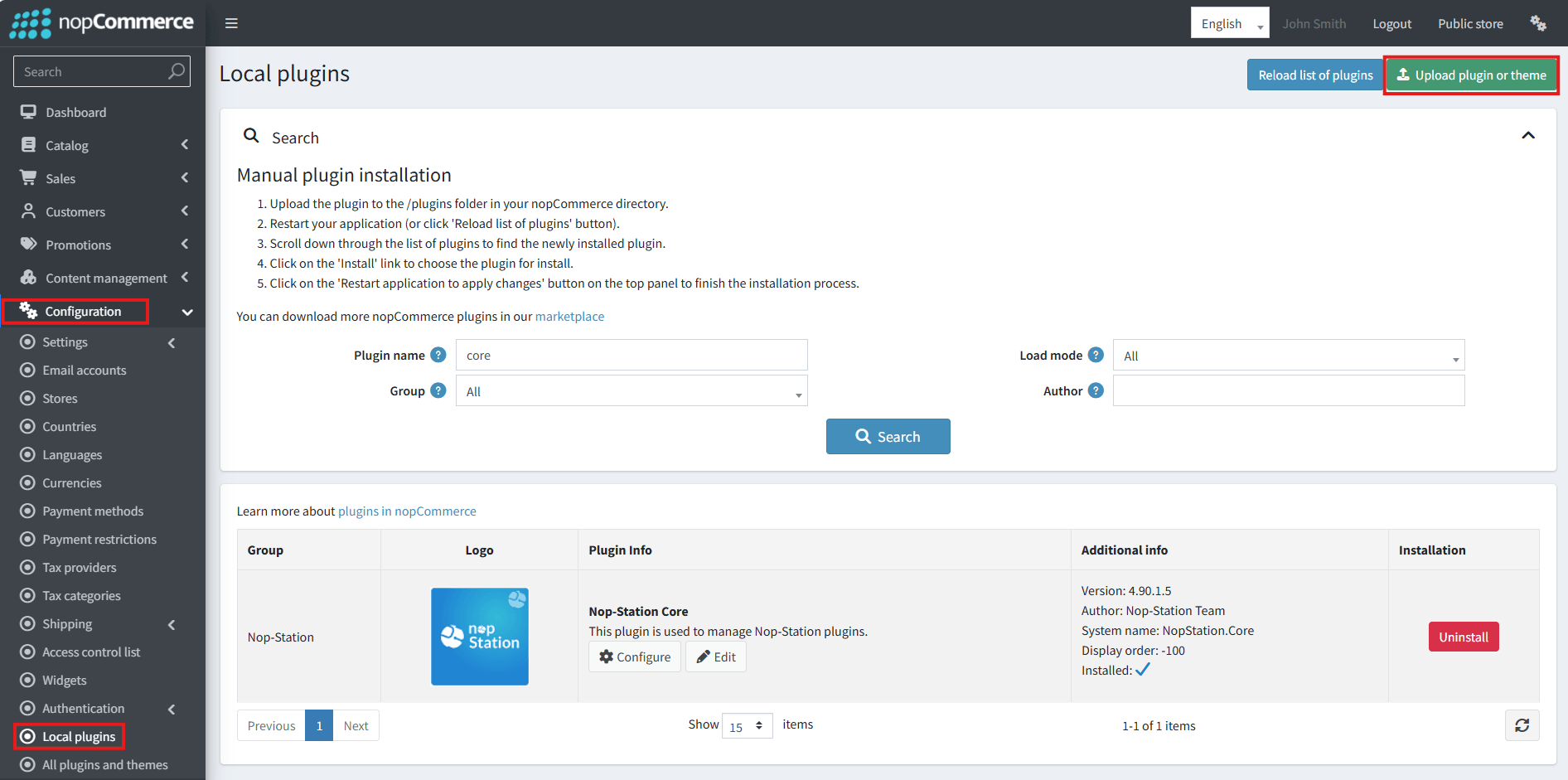
- Select the NopStation.Core file and upload it by clicking the 'Upload plugin or theme' button.
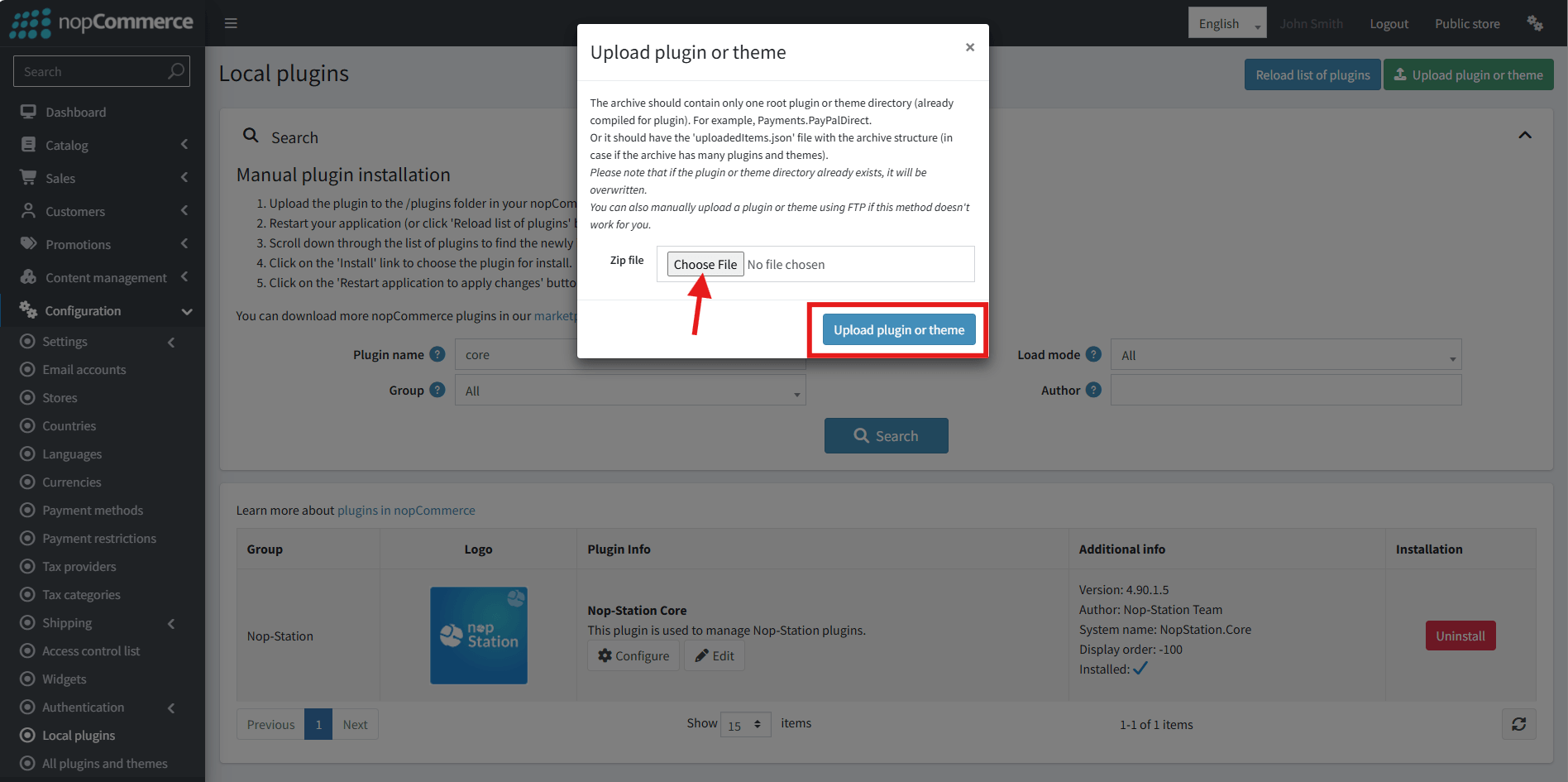
- Select the NopStation. Shopping Assistant Plugin file.
- Upload the file using the 'Upload plugin or theme' button.
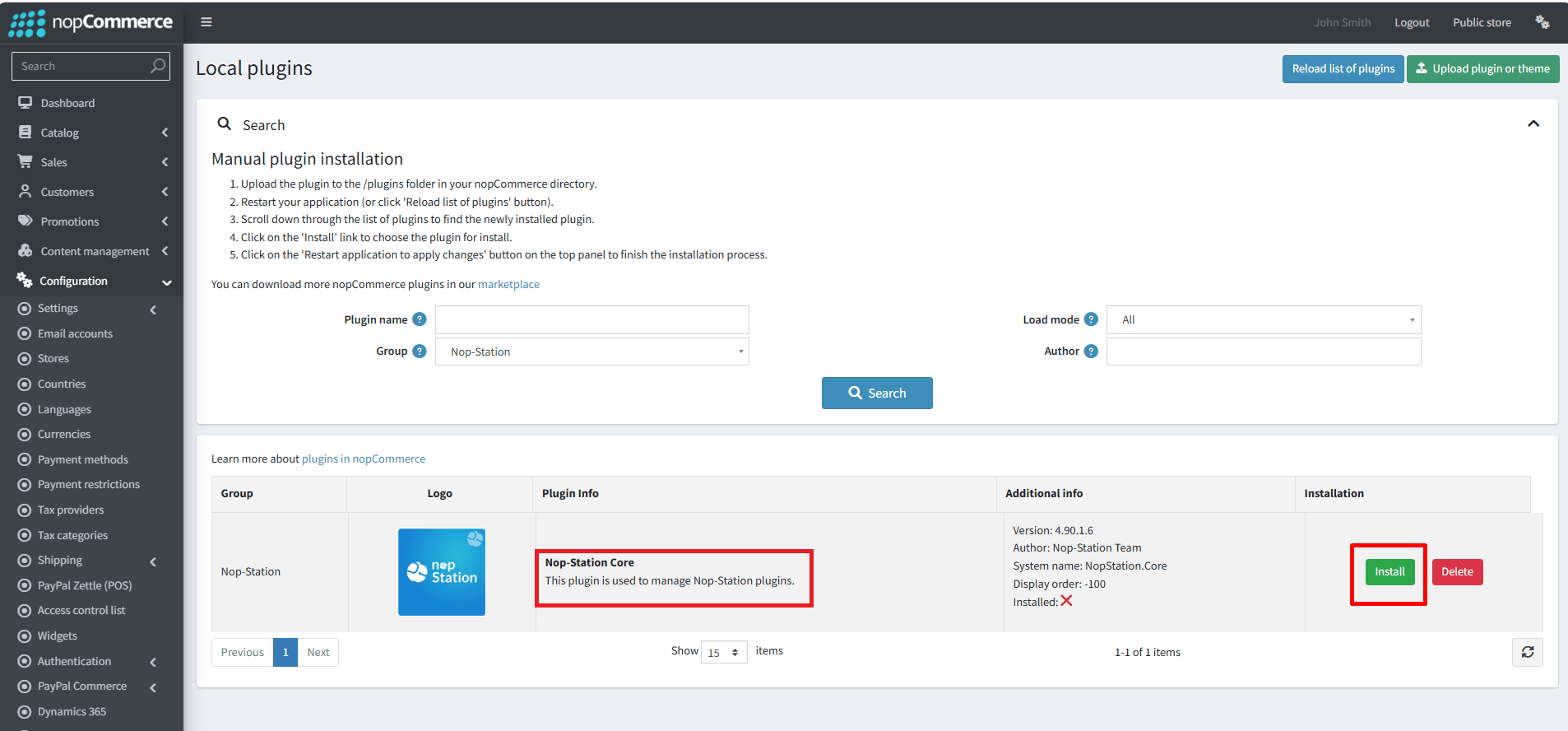
- After uploading the plugin, go to the Administration. Install 'Nop-Station Core' Plugin first and then install ' NopStation. Shopping Assistant plugin.
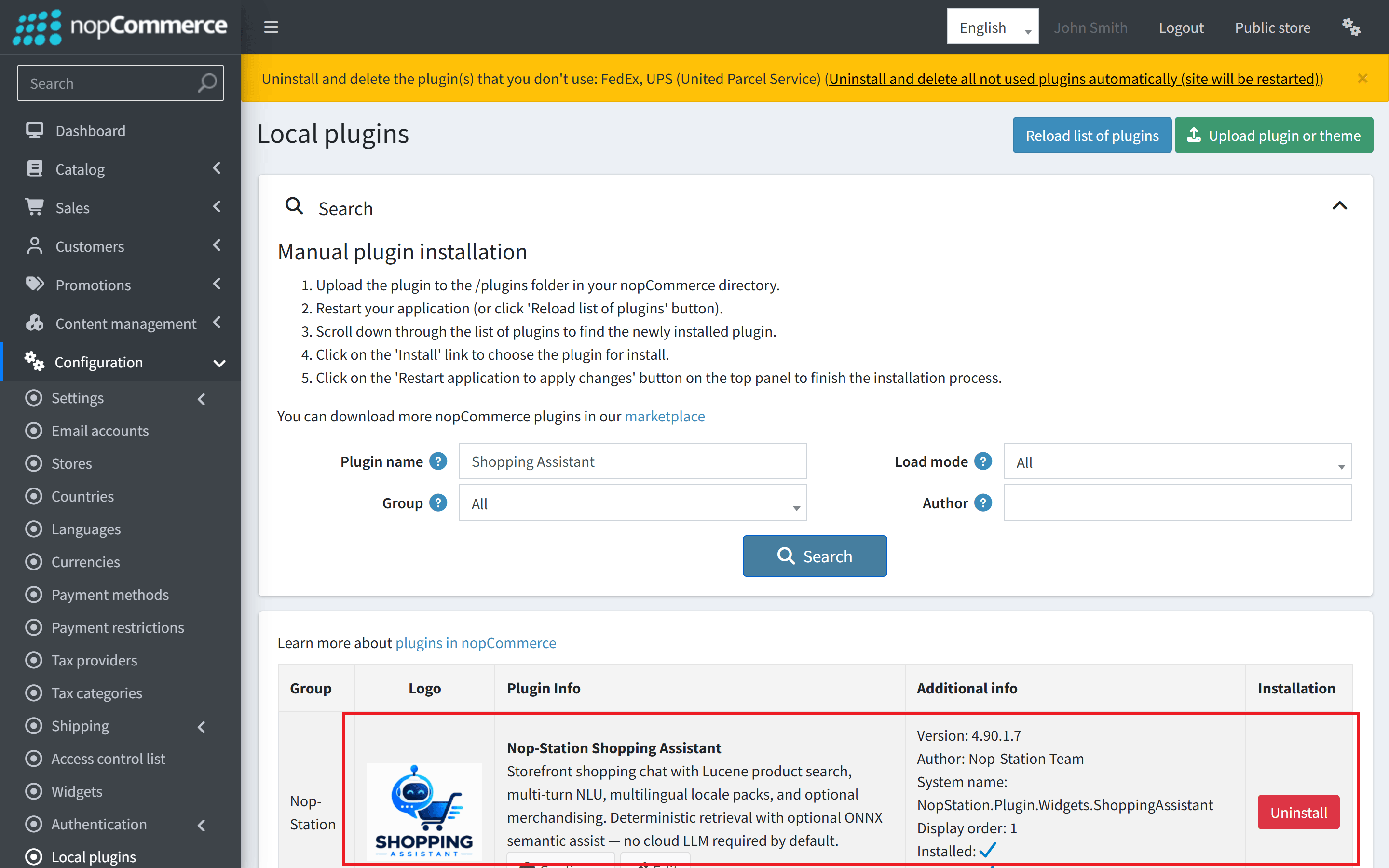
- To make the plugins functional, restart the application.
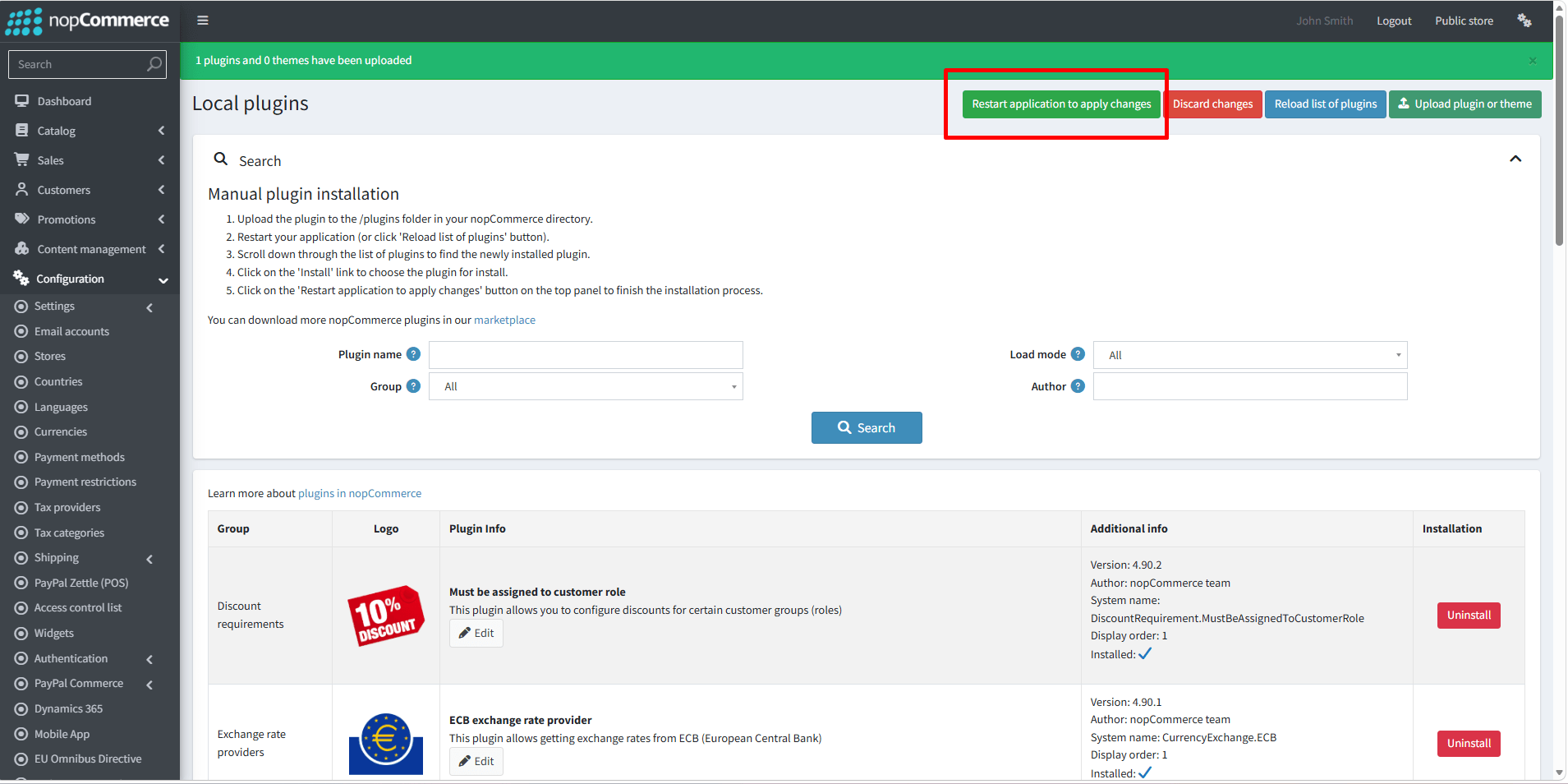
- You can configure the plugin by clicking on Configure from the Local Plugins page. Alternatively, go to nopStation → Plugins→ NopStation. Shopping Assistant → Configure NopStation. Shopping Assistant Plugin, enable the required options, and click Save.
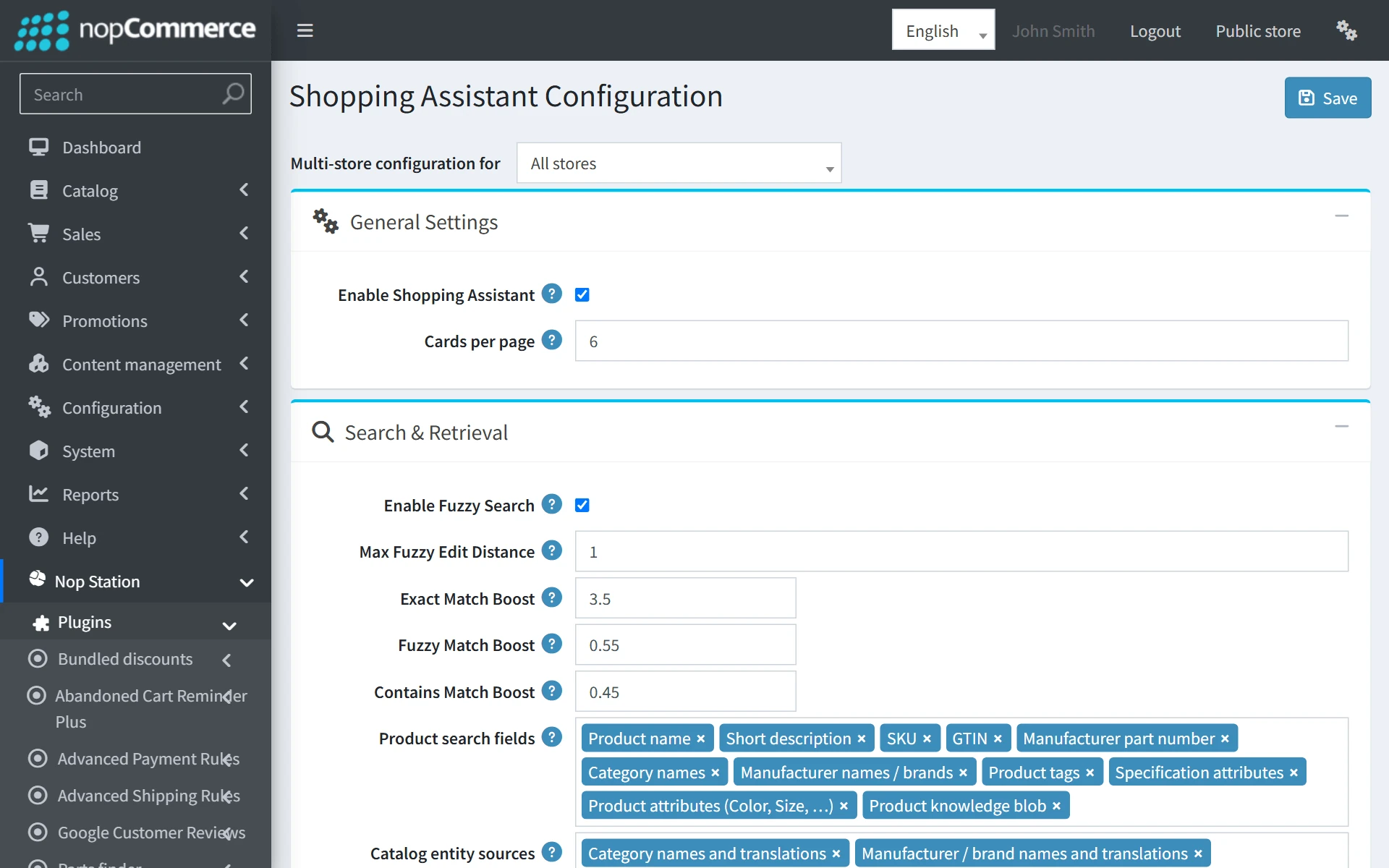
General Settings
| Setting | Default | Description |
|---|---|---|
| Enable assistant | true | Global toggle to activate or deactivate the storefront chat widget launcher across public pages. |
| Page size | 6 | The number of product cards returned per conversational response before offering pagination / "Show more" suggestion chips. |
| Max search results | 50 | Maximum candidate products retrieved from the internal search index before post-filtering and live validation. |
| Show related in Quick View | true | When enabled, the Quick View modal renders related products and cross-sells underneath the primary product details. |
| Delete data on uninstall | true | If checked, uninstalling the plugin removes all assistant tables and deletes the index directory. |
Relevance & Search Settings
| Setting | Default | Description |
|---|---|---|
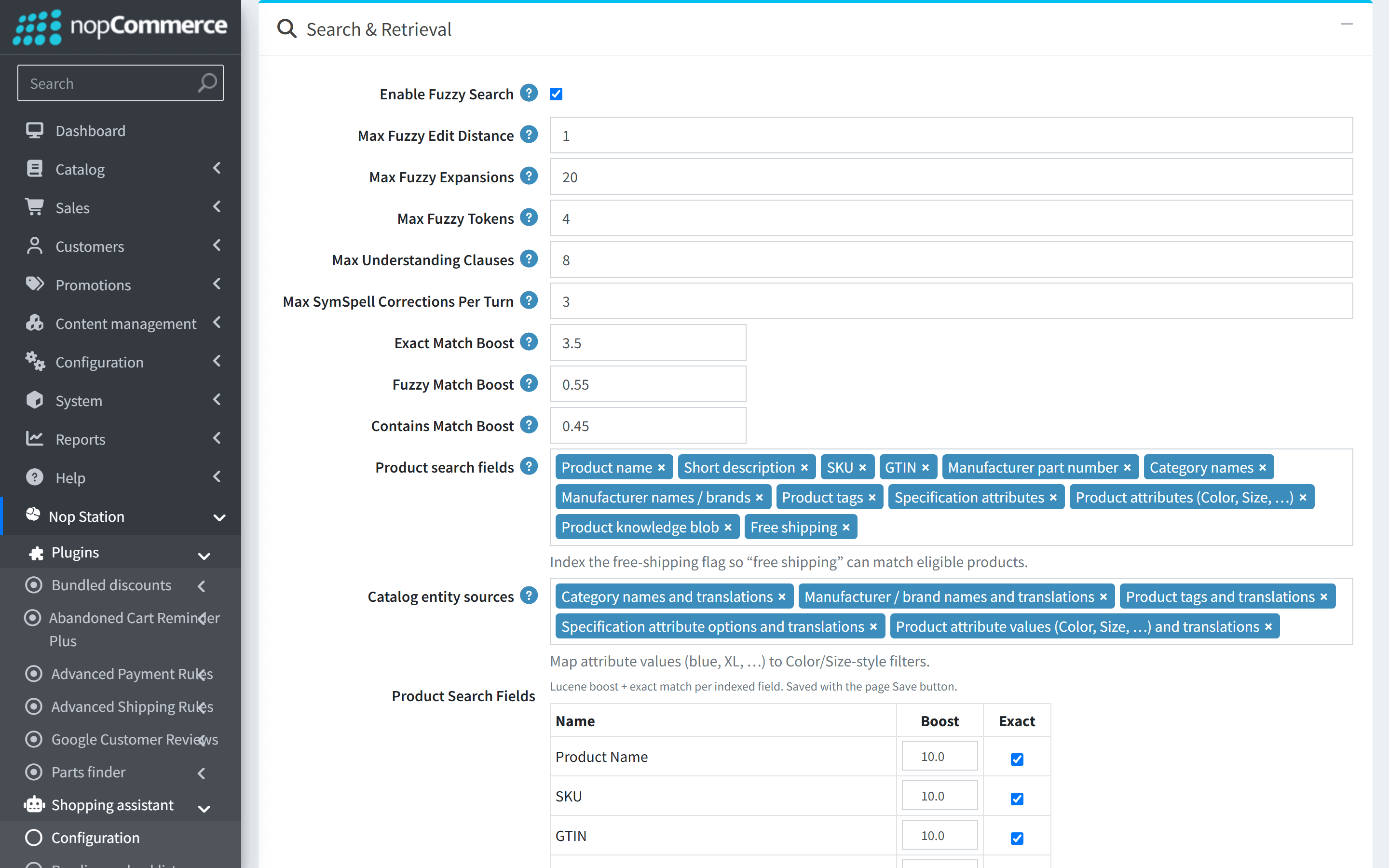
| Enable fuzzy search | true | Enables tolerance matching for misspelled words absent from the catalog term dictionary. |
| Max fuzzy edit distance | 1 | Maximum allowed edit distance for fuzzy term queries (1 or 2). Default 1 ensures high precision without query bloat. |
| Exact match boost | 3.5 | Relevance boost when tokens match a field exactly. Keep clearly above fuzzy/contains so correct spelling wins. |
| Fuzzy match boost | 0.55 | Relevance multiplier for typo / near-miss matches (edit distance ≤ Max fuzzy edit distance). |
| Contains match boost | 0.45 | Boost for sub-string / n-gram matches. Requires Enable N-Gram Match. |
| Indexed product fields | Name, Sku, ShortDesc, Mpn, Gtin, Manufacturer, Category, … | Which product document text Lucene indexes and searches (“find products that mention …”). Rebuild the product index after changing. |
| Indexed dictionary entities | Categories, Manufacturers, ProductTags, Specs, ProductAttributes | Which catalog lists can be recognized as filters/slots in the store language (brand, category, color, …). NLU entity recognition. |
Product Search Fields (Boost & Exact)
On the Configuration page (Search card), the Product Search Fields table controls Lucene relevance per indexed field. Edit multiple rows, then click the top-level Save button — there is no separate Apply or per-row save.
| Name | Boost Score (default) | Exact Search Enabled (default) |
|---|---|---|
| Product Name | 10.0 | Yes |
| SKU | 10.0 | Yes |
| GTIN | 10.0 | Yes |
| Manufacturer Part Number | 10.0 | Yes |
| Category Names | 7.5 | No |
| Manufacturer Names | 8.5 | Yes |
| Product Tags | 4.5 | No |
| Specification Attributes | 3.5 | No |
| Product Attributes | 3.5 | No |
| Short Description | 2.0 | No |
- Name — read-only localized field label.
- Boost Score — editable non-negative number (decimals allowed, e.g. 10.0, 5.5). Used as Lucene field weight (Name^10, Sku^10, …).
- Exact Search Enabled — when checked, an exact match in that field scores higher than fuzzy/partial matches (ExactMatchBoost × 2 vs ExactMatchBoost). For SKU, GTIN, and Manufacturer Part Number, exact + prefix are preferred over fuzzy. Default install also enables Exact on Product Name and Manufacturer Names so title/brand hits outrank soft description noise.
Invalid (negative / non-numeric) boost values are rejected on Save. Setting key: SearchFieldBoostConfigJson (store-overridable with the standard override checkbox).
Session & Security Settings
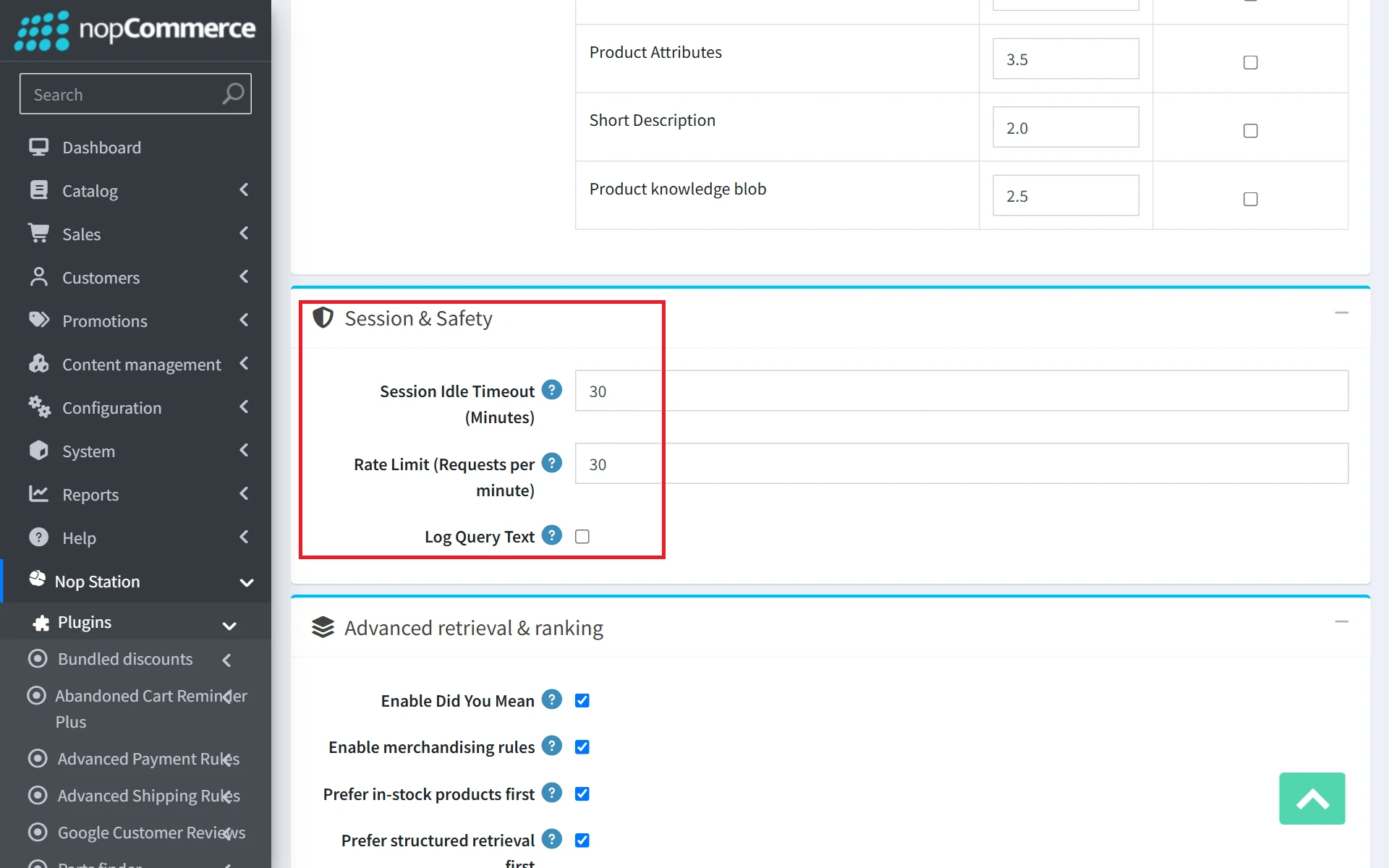
| Setting | Default | Description |
|---|---|---|
| Session idle (minutes) | 30 | Duration of inactivity before an assistant conversation session is considered expired and archived. |
| Rate limit per minute | 30 | Maximum chat messages allowed per IP/session per minute to protect the server from automated scraping or excessive traffic. |
| Log query text | false | Enables detailed logging of raw customer queries for debugging and audit purposes. |
Advanced Semantic & Structured Retrieval Settings
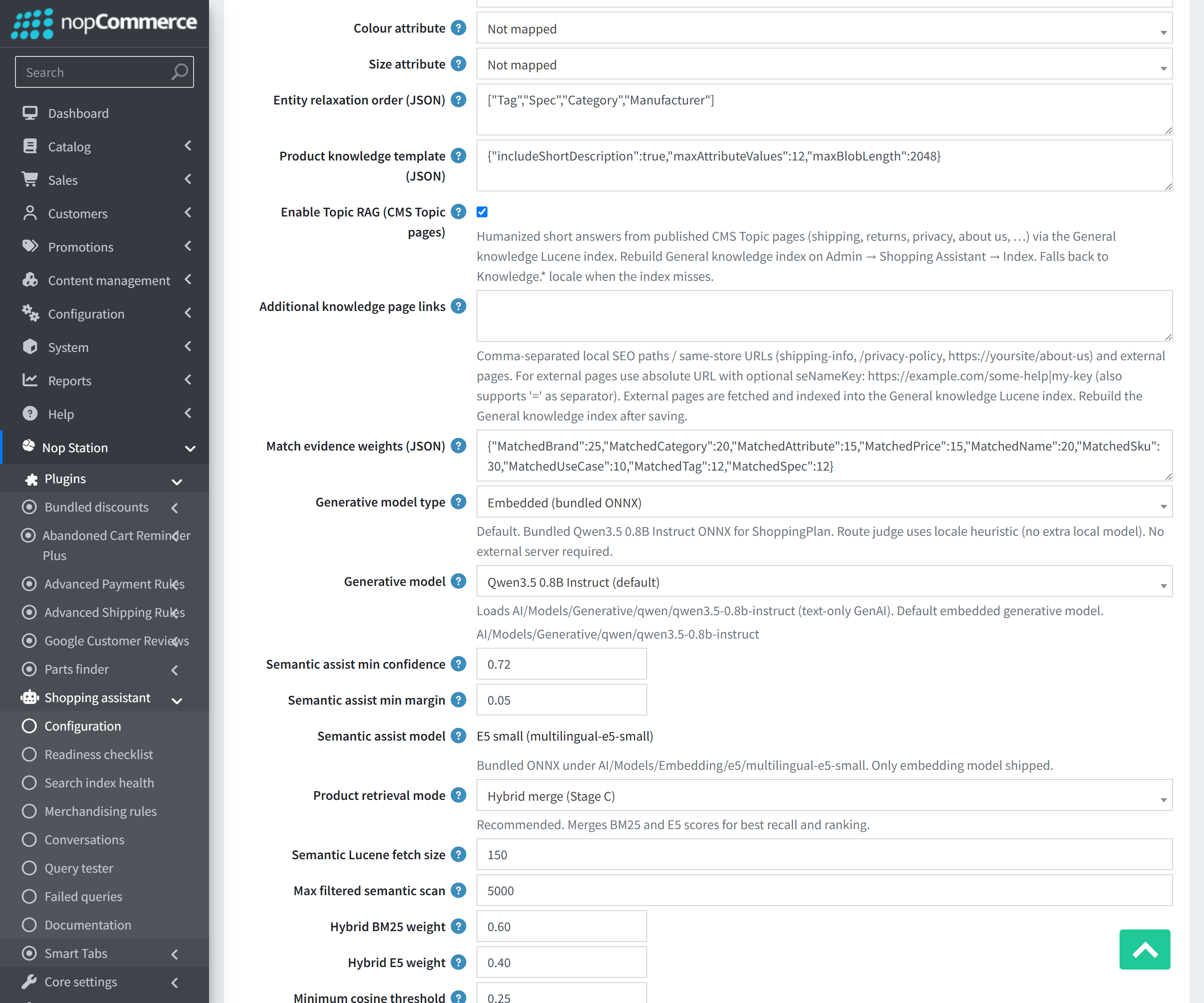
The Advanced configuration card enables fine-tuning of the Layer 3 structured retrieval engine, entity relaxation rules, and match evidence scoring:
| Setting | Default | Description |
|---|---|---|
| Enable did-you-mean | true | Activates SymSpell catalog-grounded spelling correction on zero initial hits to suggest or auto-correct to valid catalog terms. |
| Enable merchandising rules | true | Enables merchant Pin, Boost, Demote, and Exclude ranking adjustments during result evaluation. |
| Prefer in-stock first | true | Ranks available in-stock inventory ahead of out-of-stock items. |
| Prefer structured retrieval first | true | Directs the assistant query planner (Layer 3) to execute structured catalog entity filtering (category, manufacturer, specs, tags) first, falling back to lexical search. |
| Min entity confidence (%) | 70 | Confidence threshold required for an extracted entity to be applied as a hard constraint filter. |
| Min evidence score for results | 40 | Threshold score for match evidence before candidate products are considered sufficiently relevant for customer display. |
| Max context merge turns | 5 | Maximum conversational turns preserved for multi-turn slot state accumulation. |
| Entity relaxation order JSON | ["Tag","Spec","Category","Manufacturer"] | Order in which entity constraints are progressively relaxed if strict multi-slot filtering returns zero products. |
| Product knowledge template JSON | (Preconfigured) | JSON template defining structured document blobs indexed in Schema v3 for deep semantic discovery. |
| Evidence weight config JSON | (Preconfigured) | JSON configuring relative scoring weights across brand, category, specification, price, and lexical signals. |
Chat Response Messages & NLU Multi-Language Resources
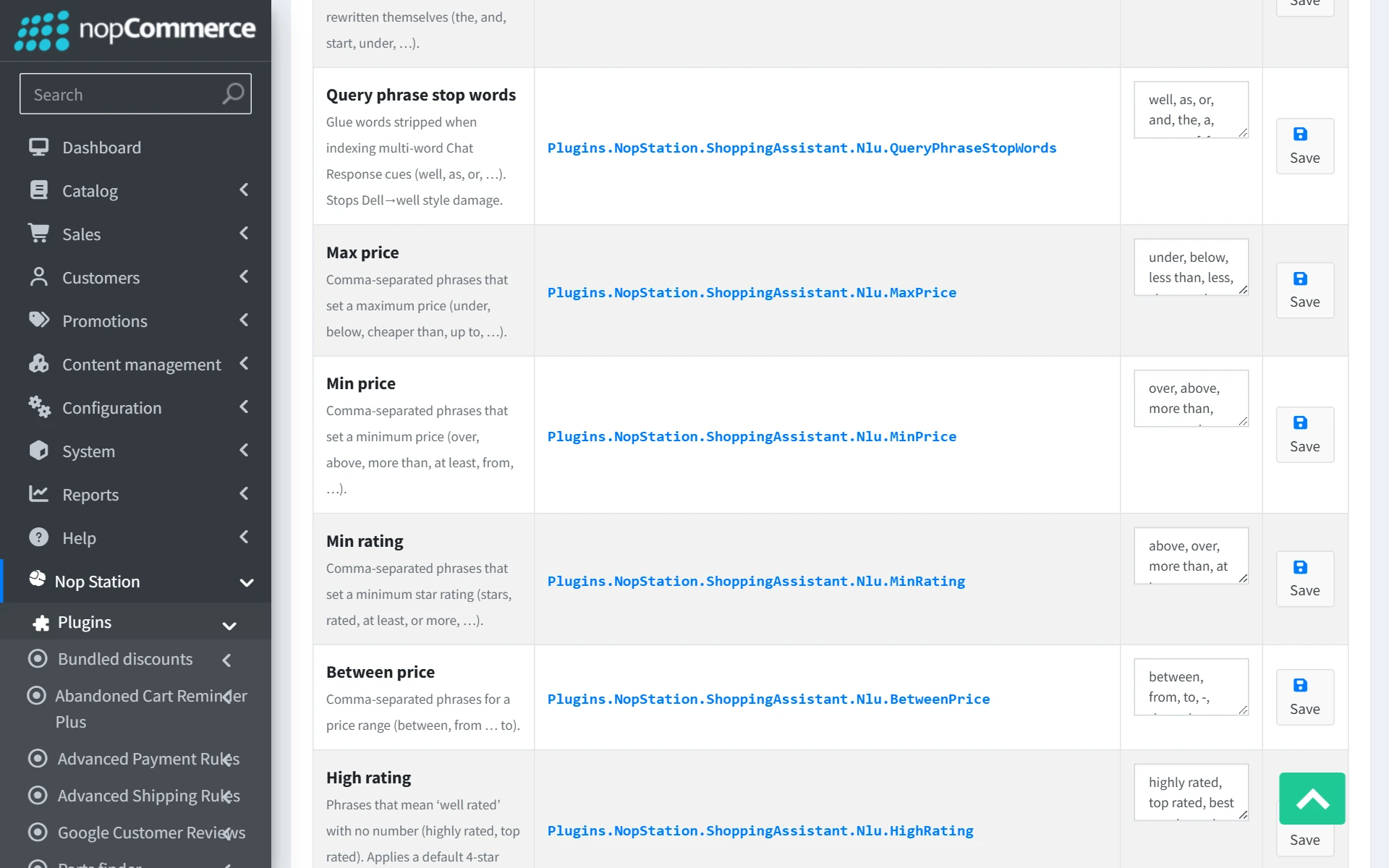
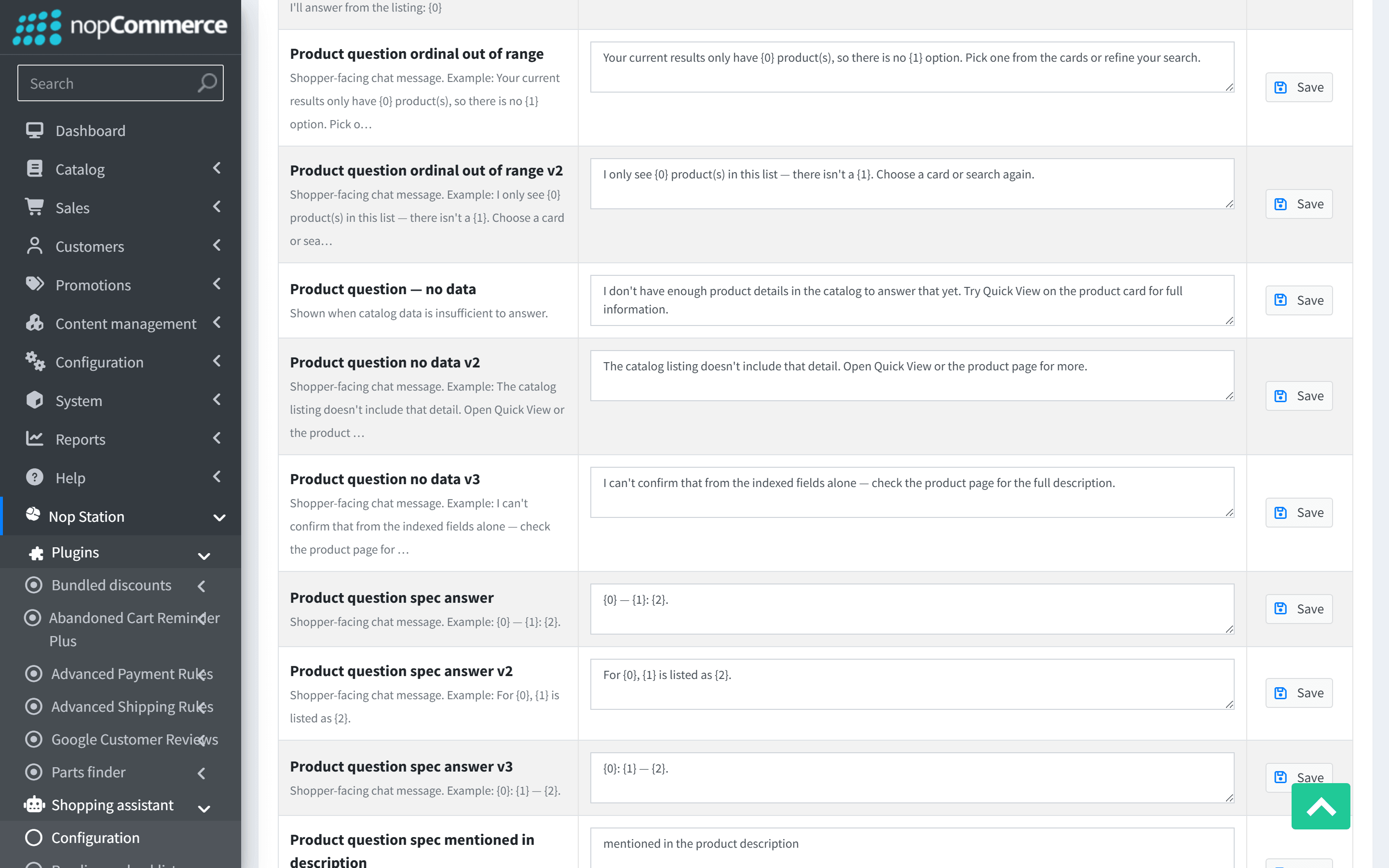
The Chat response messages card provides a comprehensive, interactive management console for all customer-facing assistant phrases, greeting prompts, suggestion chips, and NLU query-understanding keywords across all store languages.
- Language Selector: Switch between configured store languages (English, Bengali, Arabic, German, French, Spanish, etc.) with a single click.
- Export JSON: Download the complete NLU dictionary and localization pack as a portable JSON file.
- Import JSON: Upload a localized dictionary JSON file to instantly configure or update new languages.
- Inline Editing: Edit prompts, category hints, connector phrases, or greeting templates directly in the grid and click Save. Saving query-intent resources automatically rebuilds the Query Phrase index in the background.
Search Index & Maintenance
Navigate to NopStation → Shopping assistant → Search index health (/Admin/ShoppingAssistant/Index) to inspect and maintain the plugin's three specialized search indexes.
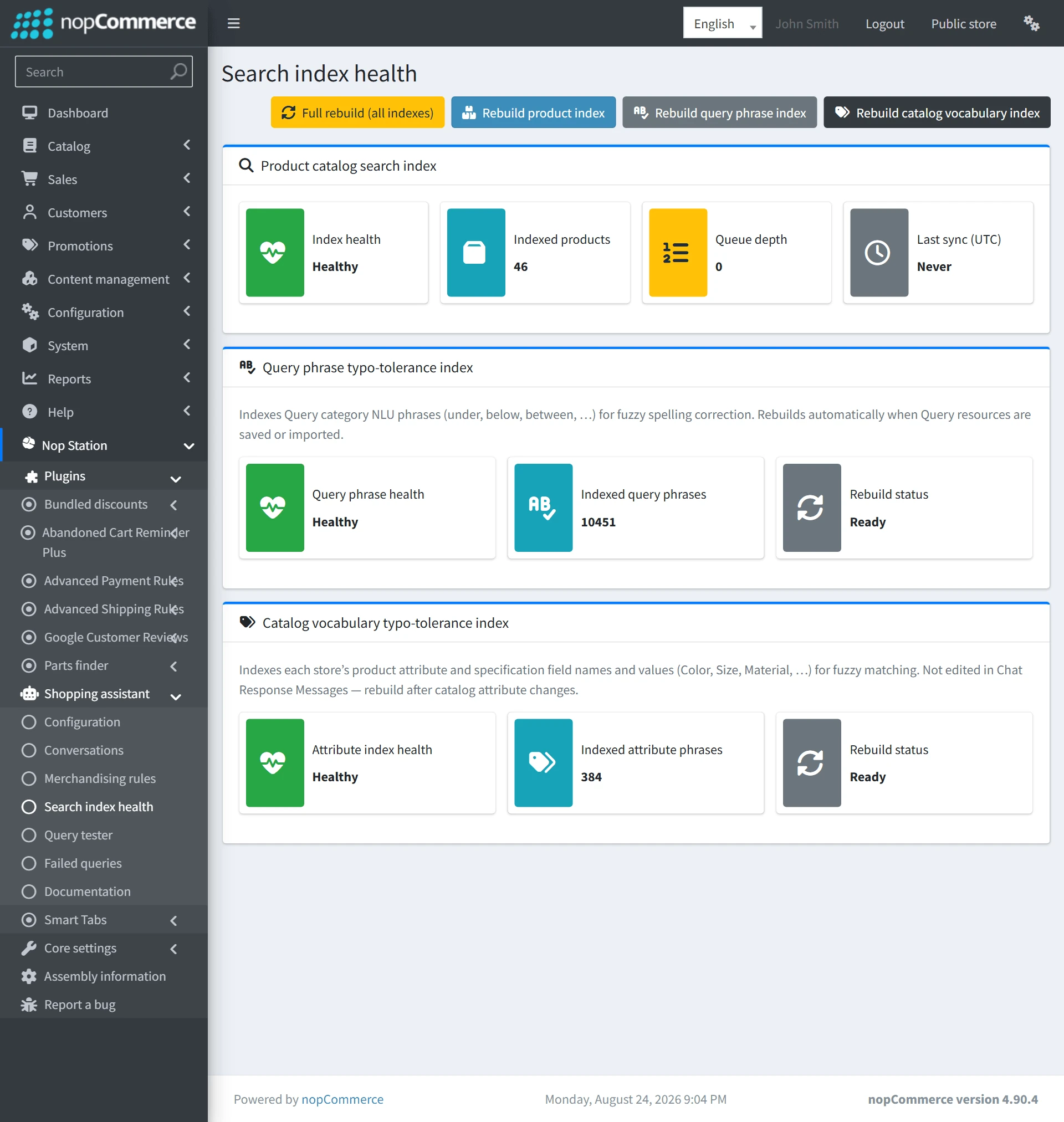
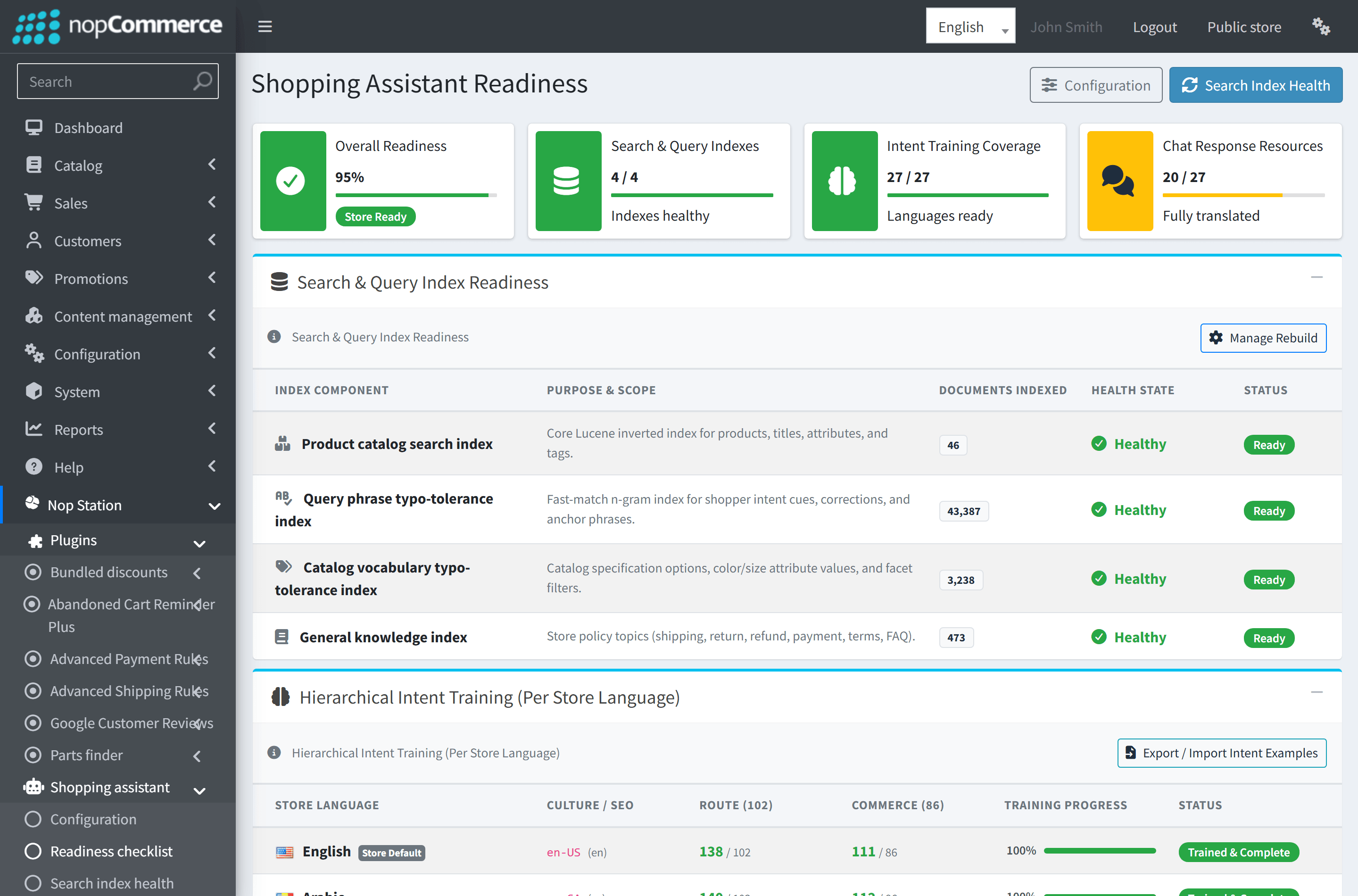
| Index | Purpose | Rebuild & Maintenance Trigger |
|---|---|---|
| Product Search Index | Core catalog lexical search (BM25 scoring) across titles, descriptions, SKUs, manufacturers, categories, and price bands. | Automatic incremental updates via event consumers + 300s sync task. Full manual rebuild available via Rebuild Product Index. |
| Query Phrase Index | Typo-tolerant matching of conversational intent phrases, intent connectors, refine patterns, and greeting triggers. | Rebuilt automatically when saving NLU chat resources or via Rebuild Query Phrase Index. |
| Attribute Values Index | Matching of product specification attributes, color names, sizes, brands, and variant values. | Rebuilt during full catalog sync or via Rebuild Attribute Index. |
Customer Conversations & Audit
Open NopStation → Shopping assistant → Conversations (/Admin/Conversation/List) to view, filter, and audit shopper conversations.
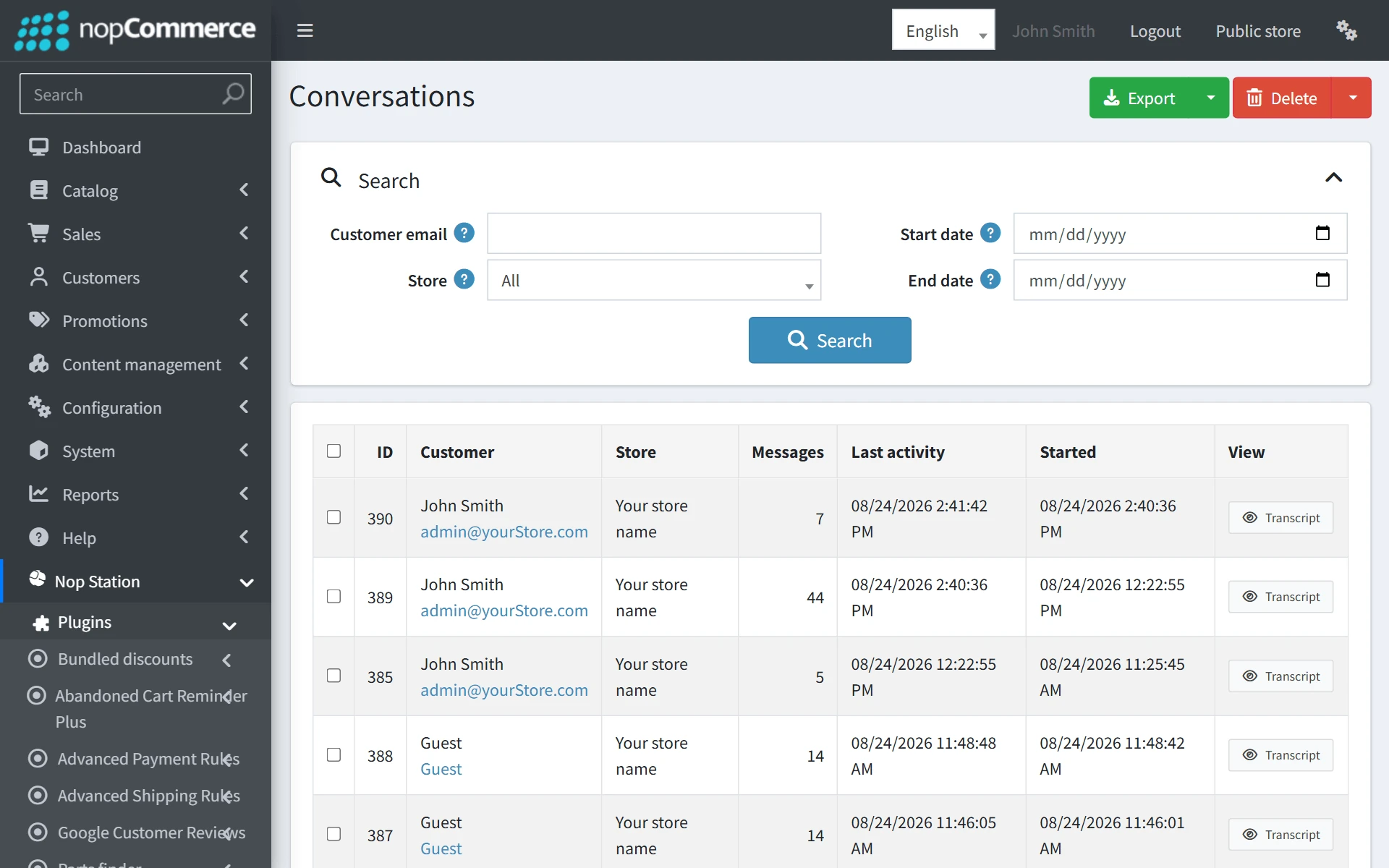
Conversations List Features
- Search Filters: Filter conversations by customer email, store scope, and creation date range (From / To).
- Customer Identity: In accordance with standard nopCommerce conventions, the Customer column displays the customer's full name and a direct clickable email link leading to the customer edit page (/Admin/Customer/Edit/{id}). Guests are identified as Guest shoppers.
- Export to JSON: Export all or selected conversations to a structured JSON file for analytics and customer journey research.
- Bulk Deletion: Safely purge old conversations individually or in bulk.
Conversation Detail View
Click View on any conversation row to inspect the full transcript (/Admin/Conversation/Detail/{id}).
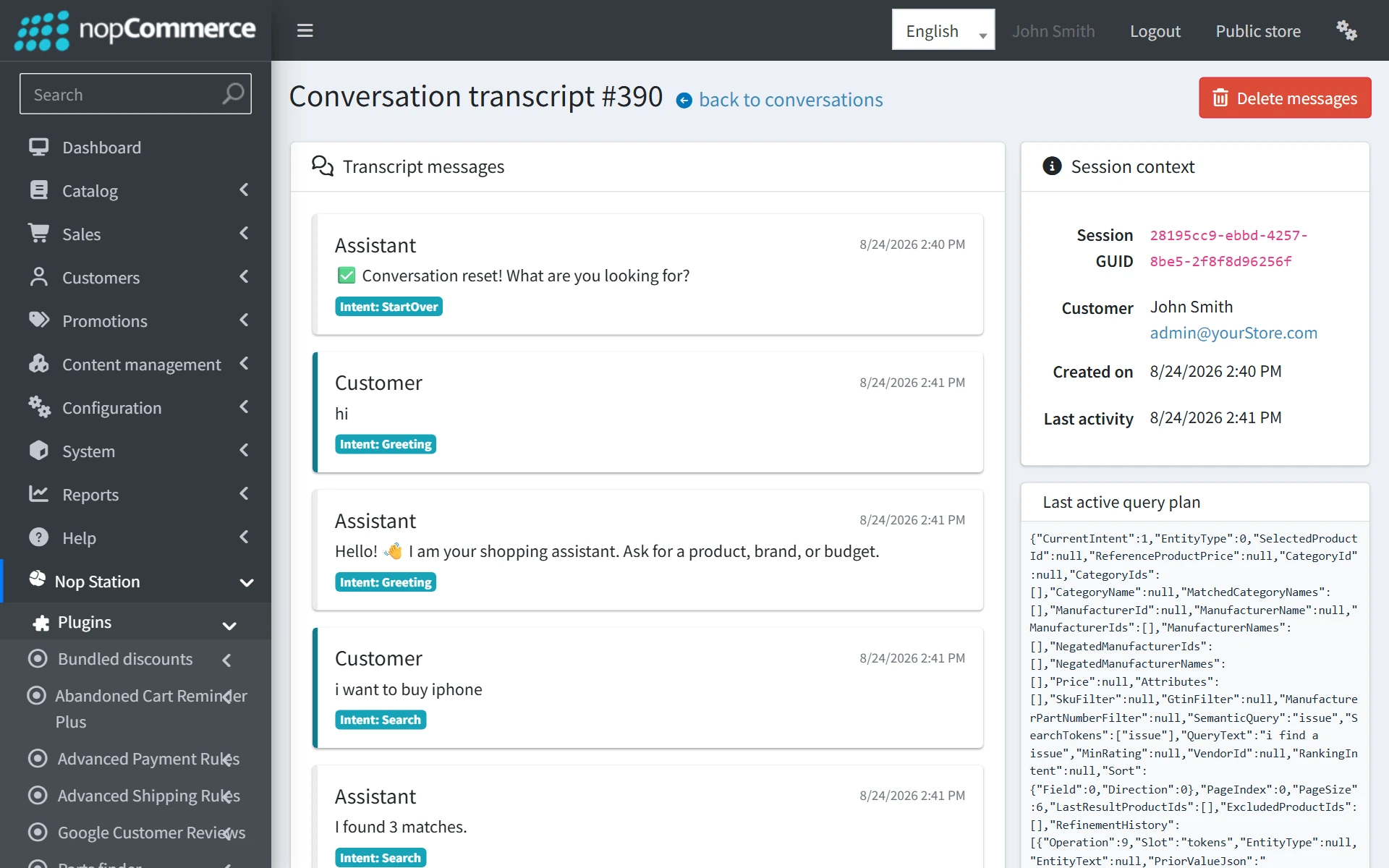
- Chronological Timeline: Clear distinction between Customer callouts (blue) and Assistant responses (gray).
- Intent Badges: Displays the classified intent (e.g. Search, Refine, Greeting, Help) and extracted slot constraints.
- Product Cards Preview: Shows the exact product cards, images, prices, and stock status presented to the shopper during that turn.
Merchandising Rules (Pin, Boost, Bury, Exclude)
Open NopStation → Shopping assistant → Merchandising rules (/Admin/Merchandise/List) to exert fine-grained merchant control over assistant search rankings.
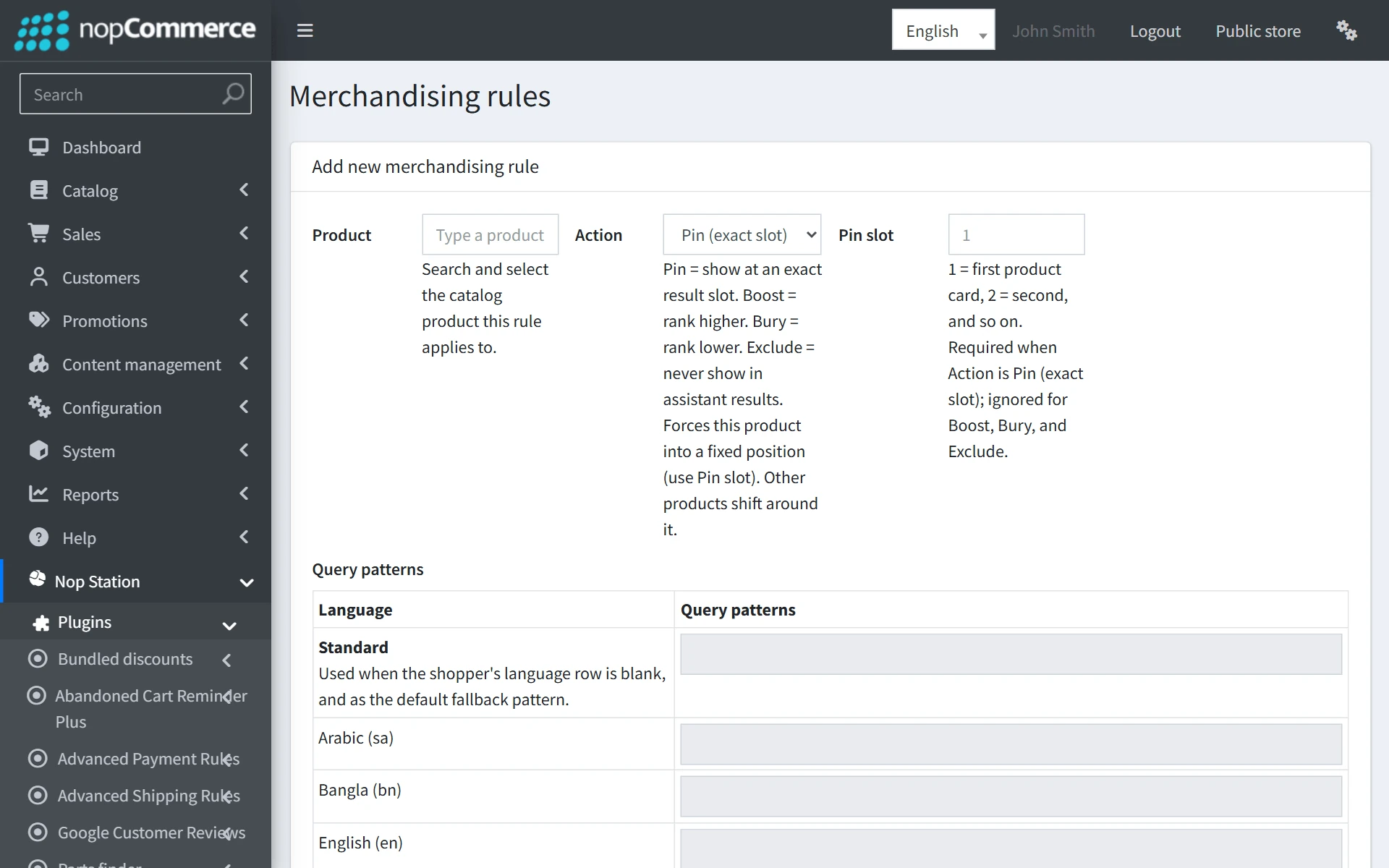
| Action | Effect | Typical Use Case |
|---|---|---|
| Pin | Forces the specified product into an exact display slot (e.g. Slot 1) when the query matches the pattern. | Promote flagship products, sponsor items, or new product launches at the very top of search results. |
| Boost score | Multiplies the relevance score by a configurable boost multiplier (e.g. 2.5). | Elevate high-margin or trending items in search results without completely pinning them. |
| Bury (Demote) | Lowers the relevance score so the product appears toward the bottom of the result set. | Demote older inventory, refurbished products, or low-margin items. |
| Exclude | Completely strips the product from assistant search results for matching queries. | Hide seasonal or discontinued items from conversational recommendations. |
Query Tester & NLU Diagnostics
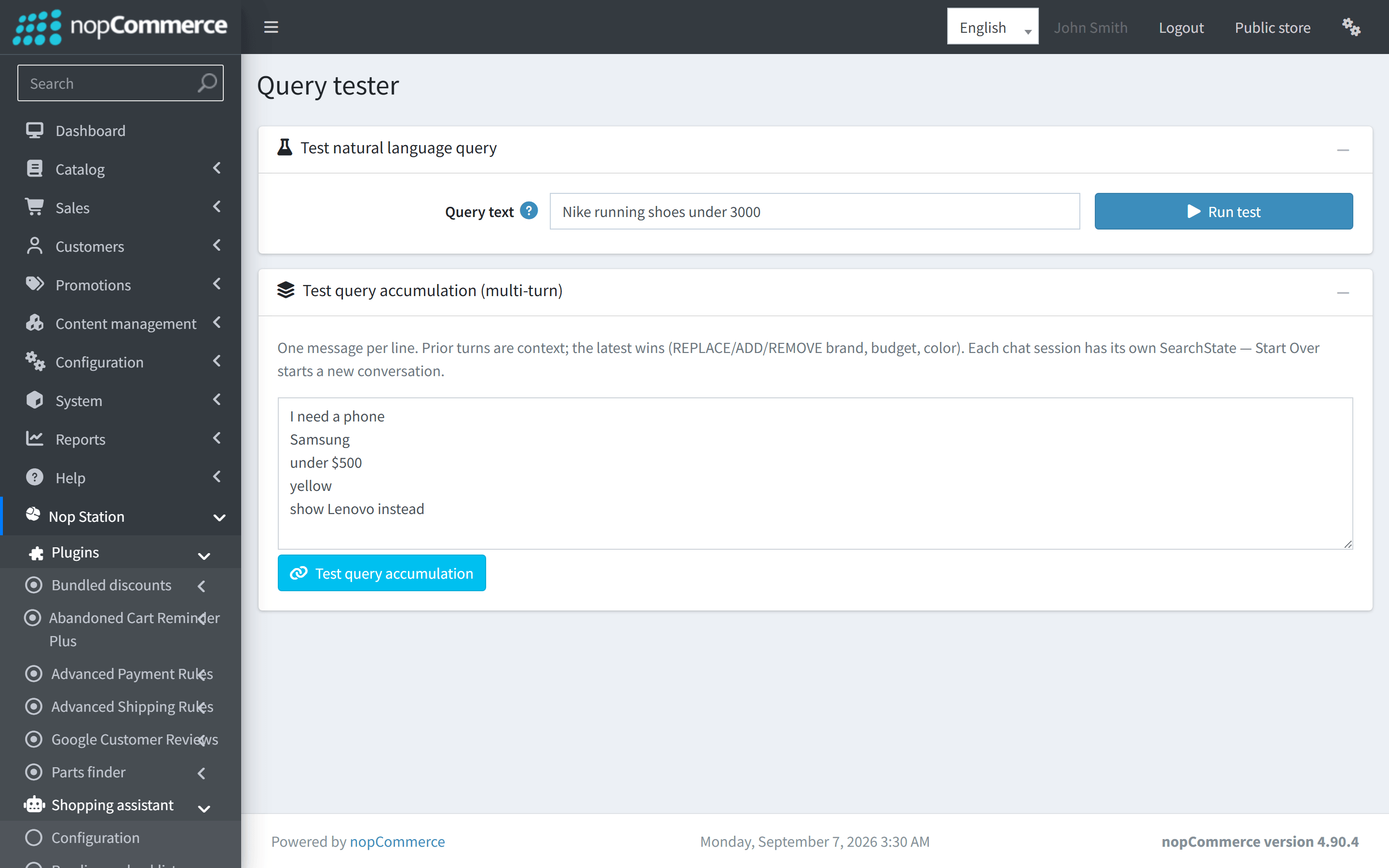
Open NopStation → Shopping assistant → Query tester (/Admin/ShoppingAssistant/QueryTester) to test and validate query parsing and search retrieval before going live.
- Single Query Mode: Type any customer query (e.g. "Nike running shoes under 3000") and inspect the normalized tokens, detected intent, extracted price/rating/brand entities, and candidate search documents.
- Multi-Turn Accumulation Mode: Simulate a progressive conversation across multiple lines (e.g., "I need a laptop" → "Lenovo" → "under $800" → "16GB RAM") to verify that slot state merges accurately across conversational turns.
Failed Queries Log
Open NopStation → Shopping assistant → Failed queries (/Admin/ShoppingAssistant/FailedQueries) to monitor queries that resulted in zero hits or required fallback suggestions.
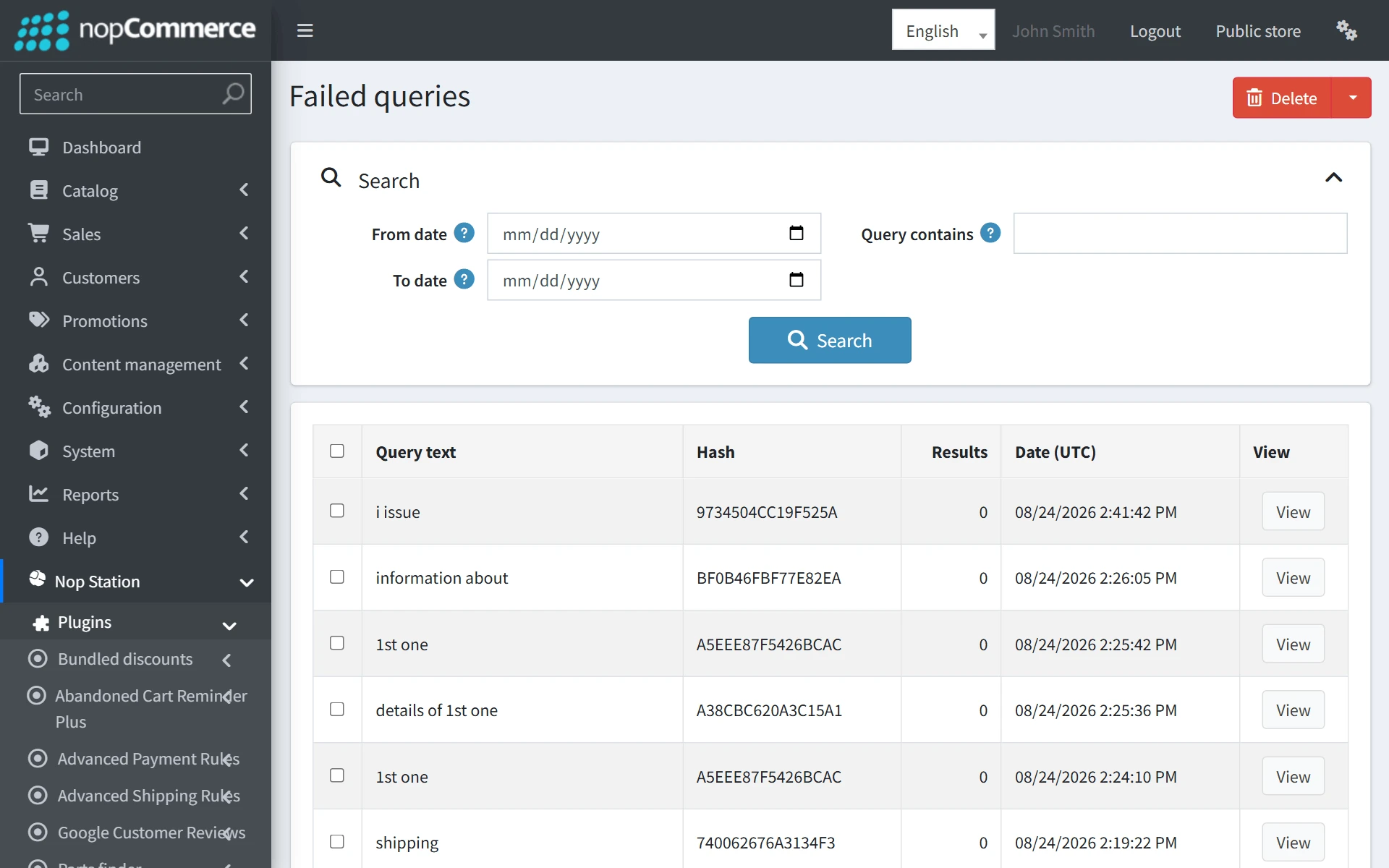
Reviewing failed queries helps store managers identify missing catalog synonyms (e.g. shoppers typing "sneakers" when catalog products are named "trainers"), out-of-stock product demands, or new category trends.
Storefront Shopping Experience
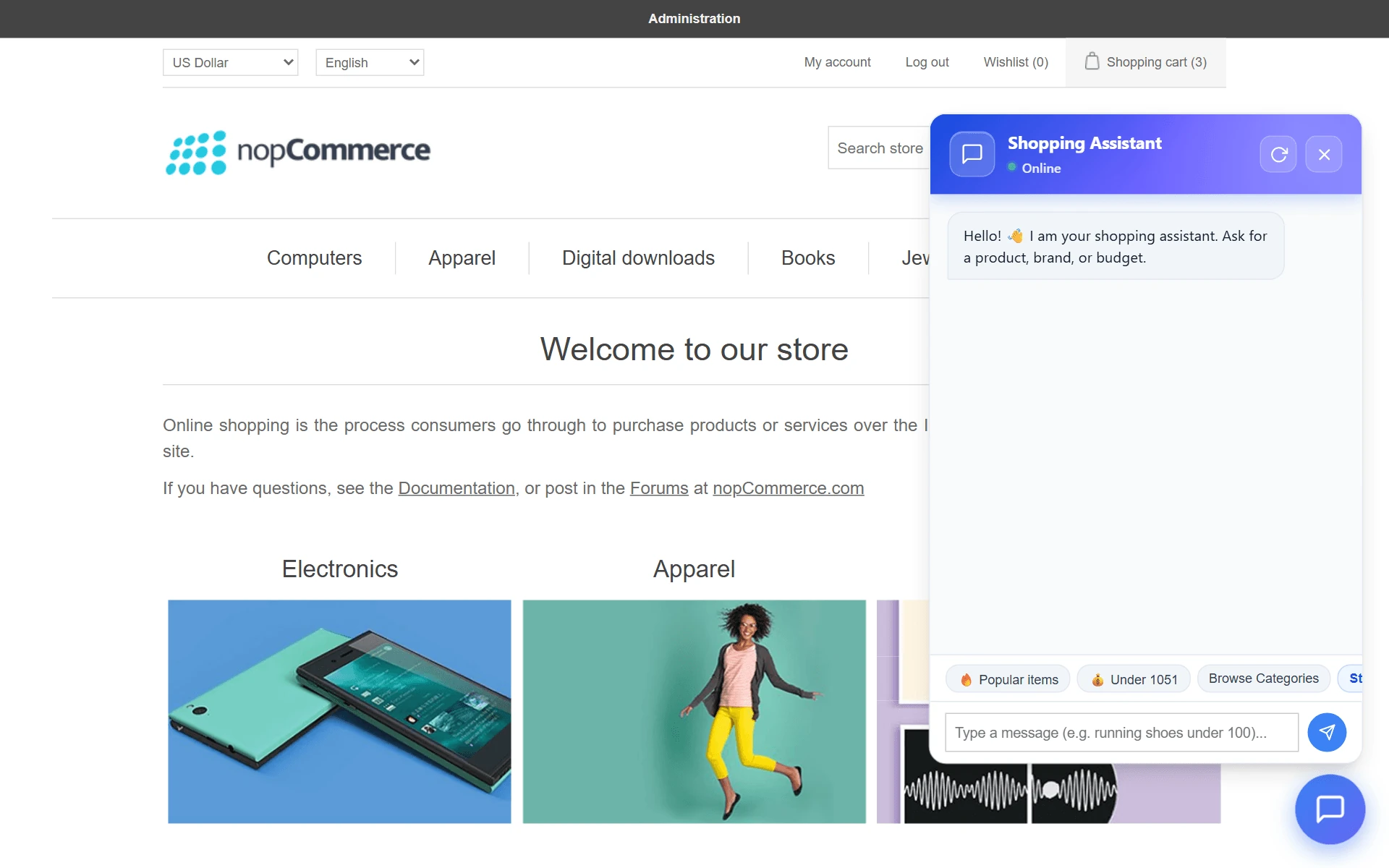
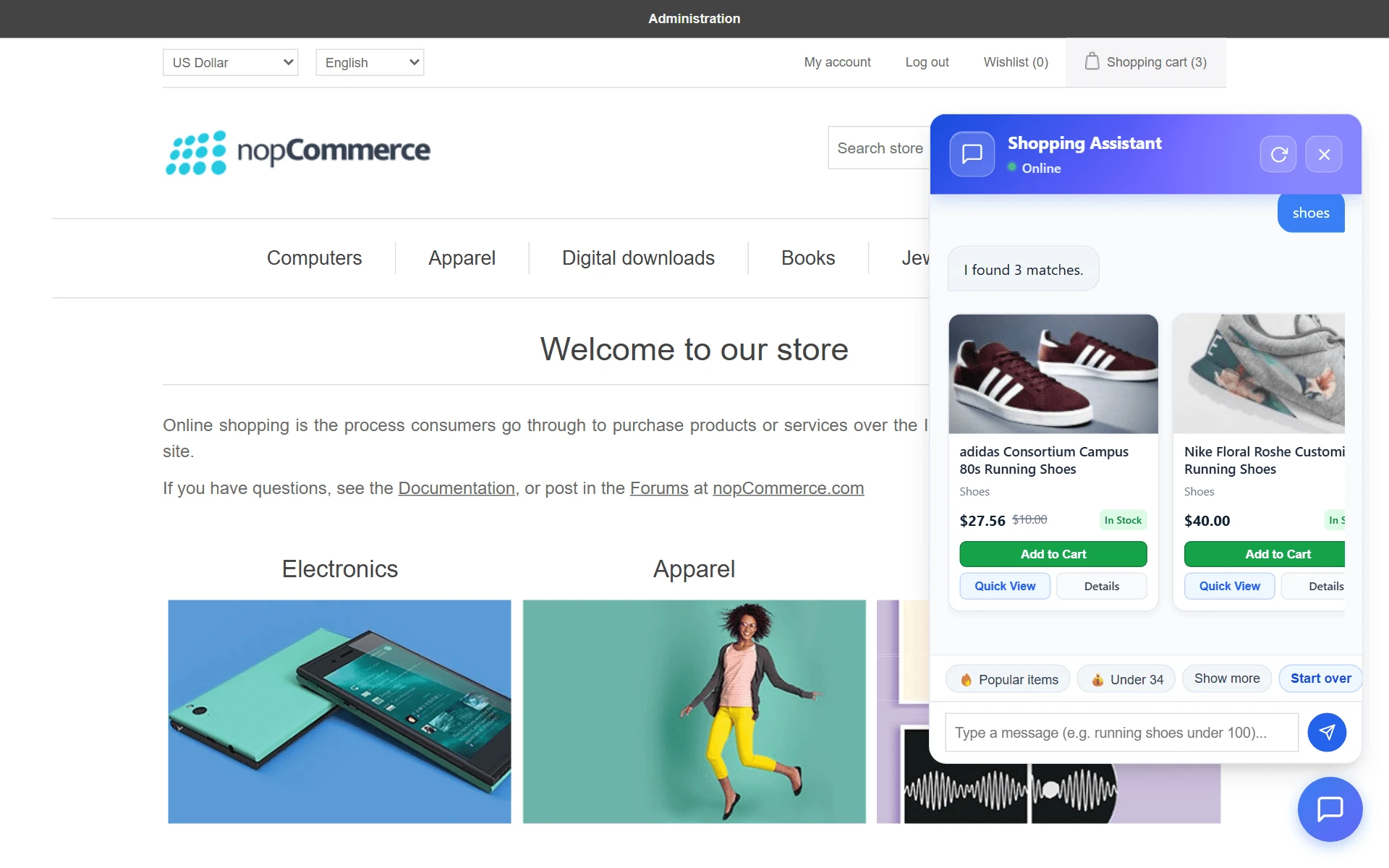
On the public storefront, the assistant renders as a clean, unobtrusive floating launcher in the bottom-right corner of every page.
Customer Interaction Highlights
- Proactive Suggestion Chips: When opened, the assistant welcomes shoppers with personalized chips (e.g., "Popular products", "Under $50", "Browse categories").
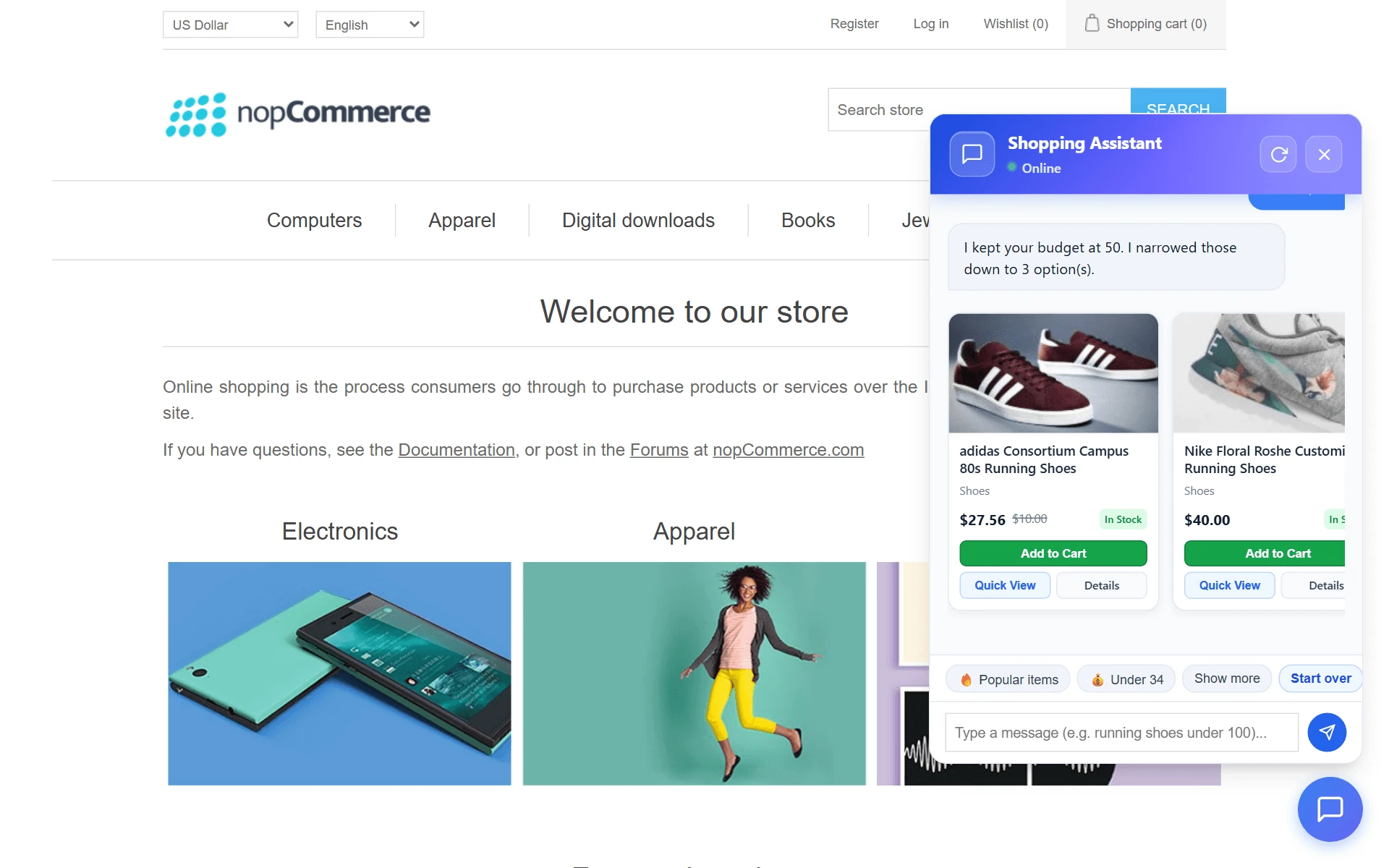
- Interactive Product Cards: Matching products appear as rich visual cards featuring high-resolution images, real-time prices, in-stock badges, an Add to cart button, and a Quick view button.
- Live nopCommerce Cart Integration: Clicking Add to cart on simple products instantly adds the item to the native nopCommerce shopping cart and updates the header flyout cart without page refreshes.
Self-Contained Quick View Modal
For products requiring attribute selections (such as size, color, RAM, or gift card recipient info), clicking Quick view opens a full-featured modal directly over the chat interface without redirecting the customer away from the conversation.
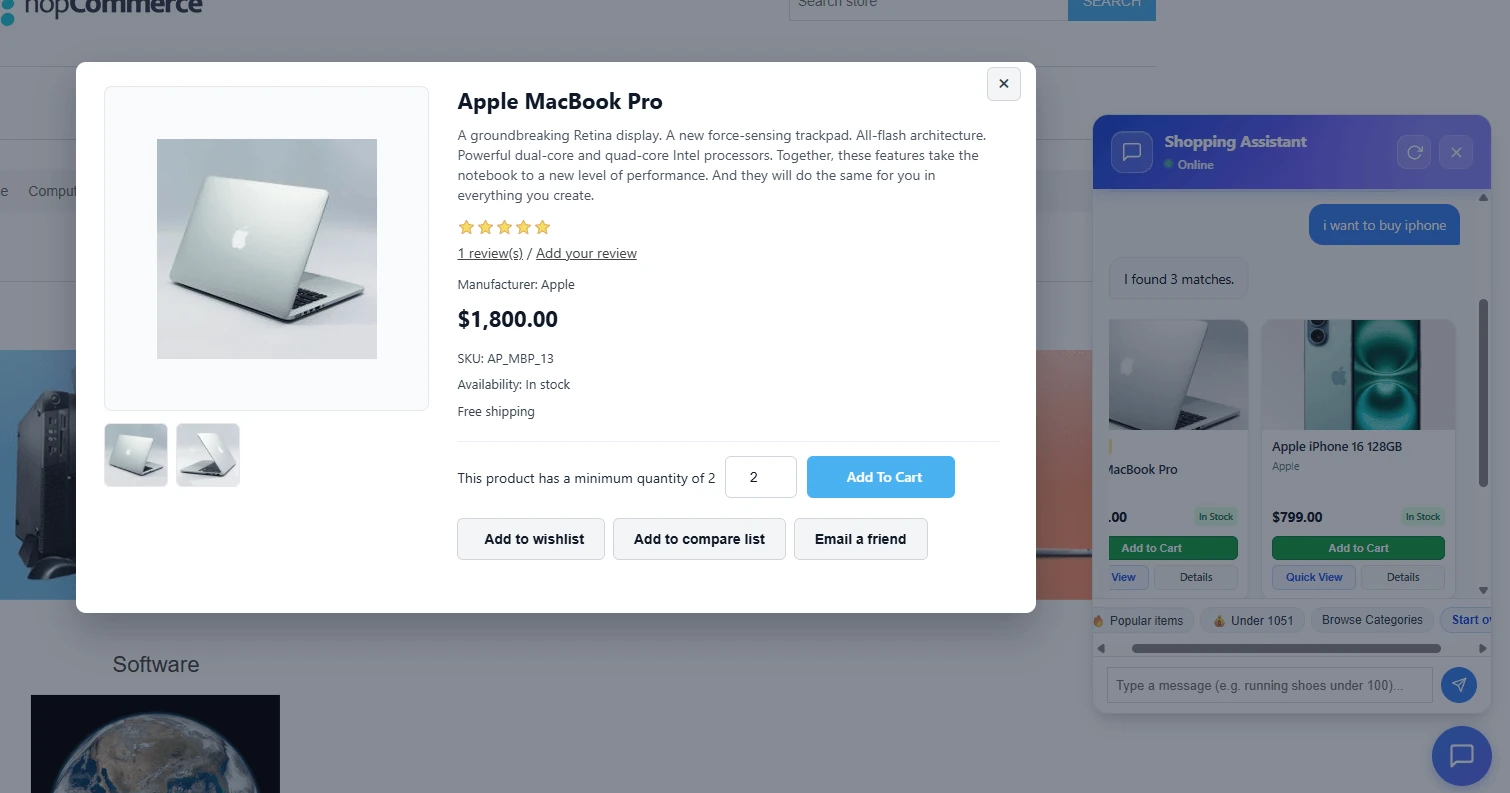
- Attribute Selectors: Full support for drop-down lists, radio lists, check boxes, color squares, and image squares. Dynamic attribute price adjustments calculate instantly.
- Image Gallery Lightbox: Interactive picture thumbnails with zoom and lightbox preview.
- Cross-Sells & Related Products: Optional carousel of related products configured in the admin panel.
Conversational Refinements & Semantic NLU Engine
The assistant supports multi-turn conversational commerce with deterministic query understanding. Shoppers can iteratively narrow down or alter their search using natural qualifiers without repeating previous context.
Multi-Layer Query Understanding Pipeline
- Query Type Classification (QueryTypeClassifier): Evaluates whether the user's message is a catalog product search, an exploratory request, or a non-product service inquiry (such as returns, shipping policy, or store hours). Non-product queries trigger direct helpful support responses without mutating catalog search state.
- Entity & Constraint Extraction (QueryUnderstandingService): Extracts categories, manufacturer brands, product tags, specification attribute options (RAM, storage, display size), colors, price bounds (Min / Max / Cheaper than), and star rating constraints.
- Semantic Query Planning (SemanticQueryInterpreter & QueryPlan): Generates a structured execution plan. When Prefer structured retrieval first is active (Layer 3), the engine queries exact entity indices before falling back to lexical search. If strict multi-slot criteria return zero hits, constraints are gracefully relaxed according to the Entity relaxation order.
- Continuity & Operation Routing (SearchContinuityDecision): Determines the precise state mutation operation (Set, Add, Replace, Remove, Clear, Undo, Alternative, or Select) to maintain conversational context seamlessly across turns.
- Match Evidence & Response Planning (MatchEvidenceService & ResponsePlannerService): Scores each candidate product across lexical and structured dimensions, validates minimum evidence thresholds, and composes journey-aware replies with dynamic suggestion chips.
Deterministic State Merge & Operation Matrix
| Shopper Input | Intent & Operation | State Mutation Action |
|---|---|---|
| "running shoes" | Search (Set) | Initializes SearchState: keywords="running shoes", Category: Shoes, Tag: Running. |
| "under $50" or "cheaper ones" | Refine (Add / Set) | Retains category and tags; applies MaxPrice = 50.00 filter constraint. |
| "only Nike" | Refine (Set) | Retains price and category; sets Manufacturer = "Nike". |
| "show Lenovo instead" | Refine (Replace) | Replaces Manufacturer slot with "Lenovo". |
| "without black ones" | Refine (Remove) | Excludes "black" attribute/color from active candidate results. |
| "clear price limit" | Refine (Clear) | Removes the active MaxPrice filter while preserving other product criteria. |
| "start over" | StartOver | Resets active session SearchState and presents the initial greeting chips. |
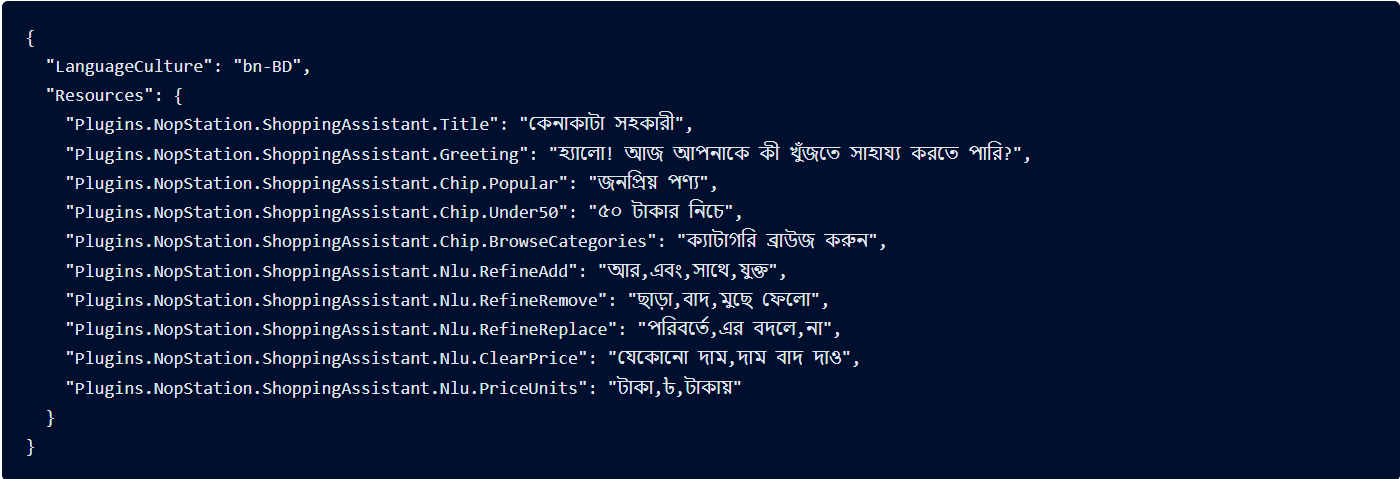
Multilingual Localization & JSON Schema
The plugin provides an automated, comprehensive multi-language NLU architecture:
- Automatic Seeding on Language Creation: When a new language is added to nopCommerce (via Configuration → Languages), default chat and NLU resources are automatically seeded for that language.
- Multi-Script Tokenization: Non-Latin scripts (such as Bengali bn, Arabic ar, Urdu ur, Hebrew he, Thai th, Vietnamese vi) are processed using universal Unicode normalization and script-aware tokenization.
- Export / Import JSON: Merchants can export the complete NLU dictionary as a structured JSON file, translate it into new locales, and re-import it with a single click.
Sample NLU Resource JSON Format
Troubleshooting & Diagnostics
- Widget Launcher Not Appearing: Ensure Enable assistant is checked under Configuration and verify that the plugin is activated in /Admin/Widget/List for the PublicWidgetZones.BodyEndHtmlTagBefore zone.
- Zero Search Results: Check Search index health (/Admin/ShoppingAssistant/Index). If the document count is 0, click Rebuild Product Index.
- Typo Recovery Not Working: Confirm that Enable did-you-mean and Enable fuzzy search are checked in Configuration.
- Rate Limit Triggered: If shoppers receive temporary rate limit notices during load testing, increase the Rate limit per minute value in Configuration.
- Localization Keys Showing Raw Names: Navigate to Local plugins and click Update to reload all default locale resources.
Frequently Asked Questions (FAQ)
- Does this plugin require an OpenAI API key or paid AI subscription?
No. The plugin is 100% self-contained and operates entirely on-premise using an embedded in-process search engine, dictionary-based spelling correction, and rule-based NLU. You will never receive external API bills. - Does the assistant hallucinate products or fabricate prices?
No. The assistant is strictly deterministic. It searches your real catalog, and all displayed prices, discounts, taxes, and inventory counts are evaluated live through nopCommerce core services. - How fast is the conversational search response?
Because queries run in-process without outbound cloud network hops, 95th-percentile (p95) response latency is typically under 150 milliseconds on standard server hardware. - Can I customize the greeting message and suggestion chips?
Yes. All chat responses, greetings, button labels, and suggestion chips are fully editable under Configuration → Chat response messages per language. - Does it support multi-store and customer role access control (ACL)?
Yes. Search results strictly enforce nopCommerce store mappings, customer role ACL, and published status so shoppers only see products they are permitted to view.

