
Stafast Machinery QR- A story of Transforming After-Sales Machine Support with QR Self-Service and AI
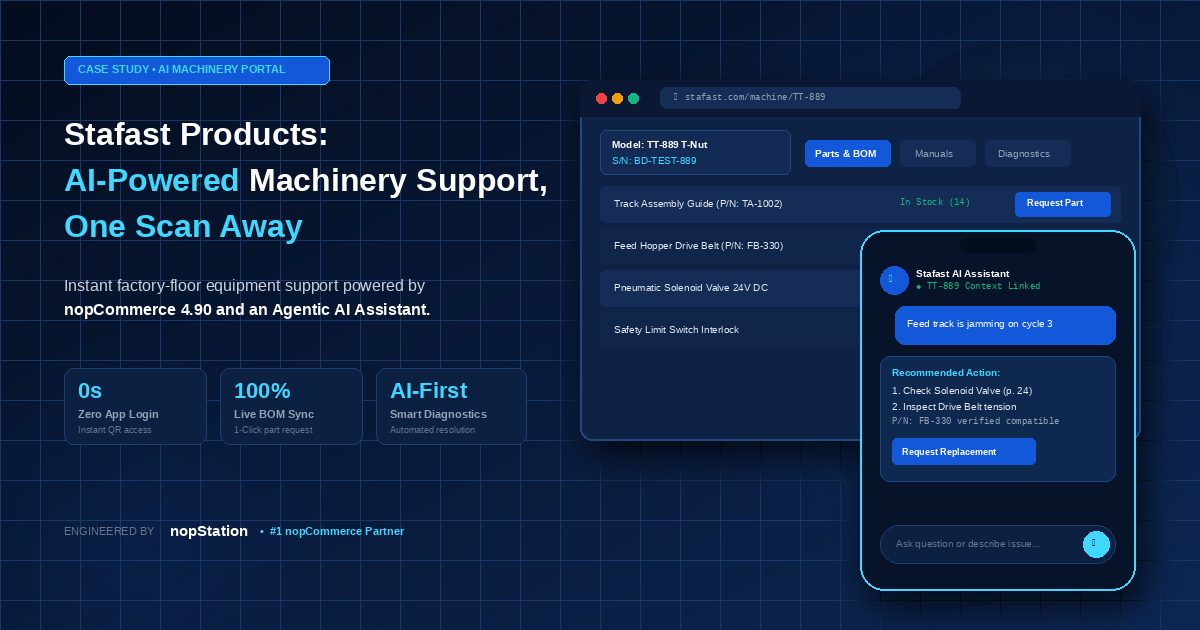
Ask the machine.
Stafast Products builds T-nut installation machines that run on factory floors across six support regions. Until this project, the fastest way to fix one was a phone call.
A nopStation case study on what it took to put a trustworthy answer on the machine itself.
 One scan
 No login
 No app
 Uploads up to 200 MB

Everything Stafast builds ends up somewhere they cannot see.
Stafast Products, Inc. builds T-nut installation machines: C-Frame drill-drives, vibratory feeder bowls, escapements. They leave the plant and go to work on production lines across six support regions, and Stafast is not in the room when one of them stops. Alongside the machinery business, Stafast runs an online store selling T-nuts, fasteners, bolts, and related industrial components to manufacturers nationwide.
Stafast and nopStation had worked together before, so when Stafast’s product team turned to after-sales machine support, they came back with a question rather than a specification: what if every machine they sold could identify itself, explain itself, and even help fix itself?
Four things stood between that question and an answer the person at the machine could trust.
support regions
T-nut installation machines
Online store
T-nuts, fasteners, bolts, and industrial components for manufacturers nationwide.
Support that lived on a phone number.
A machine jams in the middle of a production run. From that moment, someone on the line is doing one of four things, and none of them is fixing the machine:
Hunt for the paper manual that shipped with the machine.
Guess which page might match the symptom.
Call the regional technician.
Wait for a response, sometimes a truck roll, while the line stays down.
Every minute on this clock costs money, and the customer is still on a phone line.
Stafast wanted that replaced with something simpler: point a phone at the machine, describe the problem or photograph the broken part, and get a trustworthy answer in seconds. Simple to say. Four things made it hard to build:
Instant access for customers, without accounts
Portal access had to be effortless: scan the QR sticker on the machine and the page opens. No login, no app, no forgotten passwords. Yet this is a private B2B portal, so anonymous access had to be carved out securely, with each QR code unlocking exactly one machine.

One machine, many branded portals
Stafast distributes machines under multiple web addresses (domains). The same physical machine, same serial number and same model, can appear in several portals, and each portal must show only its own data. Serial numbers must stay unique per portal, yet be reusable across portals. No off-the-shelf feature in the underlying platform handled this.

Wrong answers are worse than no answers
For the AI assistant to be trusted on a factory floor, it could never invent a part number, a torque value, or a safety step. And it could only ever answer from that machine’s own documentation: a C-Frame question must never be answered from a feeder-bowl manual. Most chatbot designs fail exactly here: their underlying document readers scramble tables and skip diagrams, then the AI confidently improvises. Stafast’s manuals are full of two-column troubleshooting tables and schematic drawings, precisely the content that breaks conventional approaches.
Evidence uploads at factory scale
When customers do escalate an issue, they need to attach proof: PDFs, photos, and videos up to 200 MB per ticket. That volume has to upload reliably from a phone on a factory floor and land safely in the support team’s inbox.
The answer came in two parts, and only one of them was the AI.
Built as two. Working as one.
nopStation delivered the project in two parts: first the Machinery QR portal, branded “MachineLink”, then an AI assistant built directly into it. It was built as a dedicated, standalone product, separate from the online store but on the same commerce platform Stafast already uses, so there was no new system for the team to learn.
A QR code that opens everything.
A QR sticker on every machine opens a private web page for that exact machine.


Everything the customer sees is managed from one admin console. Pick a module to explore it.
Machine management
- A clean admin panel to register machines: the system auto-generates a unique QR code ID for each, with search, status filters, and summary counters.
- Spreadsheet import/export: onboard or audit hundreds of machines at once, and QR codes are generated automatically on import.
- Ownership transfer: when a machine changes hands, the admin re-links it to the new owner’s email and both parties are notified.


Bulk QR label generation
- Bulk QR label generation: pick a portal domain, tick the machines, and print-ready labels appear with logo, model, serial, and a clean, scannable code, downloadable as a PDF.


Parts catalog
- A parts catalog with live stock status (in stock / out of stock follows quantity automatically) and category tagging.


Bill-of-materials mapping
- Bill-of-materials mapping: attach parts to each machine, set quantities used, and link related machines. This is exactly what powers the customer’s Parts & BOM list.


Manuals and videos
- Manuals and videos management: attach the right documents to the right machine, per portal domain.


Requests and tickets
- Full request and ticket workflows: part requests and diagnostic tickets land in queues with Pending / In Progress / Fulfilled / Closed pipelines, summary counters, and admin notes.


Settings
- Settings the team controls themselves: notification toggles, email templates, the diagnostic questionnaire, portal domains, and support contact locations.
 General
  Diagnostic Form
  Email Templates
  Sync Setting
The Sync Setting tab connects the portal to Stafast’s ERP, shown below.
The portal stays aligned with the system of record.
The portal also connects to Stafast’s Microsoft Dynamics 365 (Finance & Operations) system. Machines and their parts can be synchronized automatically on a schedule or triggered on demand: inserting new machines, updating existing ones, batching large catalogs, and auto-creating missing parts, with a clear success/error summary after every run. The portal stays aligned with the system of record, without anyone re-typing data.
 Scheduled or on-demand sync
The portal could now tell a customer what a machine is. It still could not tell them why it stopped.
The intelligence · The AI Assistant
An assistant that already knows your machine.
Built into the same portal, the AI assistant (“Stafast Assistant”) already knows which machine the customer scanned, so every answer is about that machine. Never another model. Never generic advice. A chat bubble sits right inside the machine’s portal page, ready the moment a problem occurs, and it accepts both text and photos.

Four ideas make it different from an ordinary chatbot:
Idea 01
It reads manuals the way a person would
Most systems “scrape” text out of a PDF, which scrambles tables into nonsense and skips diagrams entirely. Ours looks at each page the way a human would. Tables stay tables. Wiring diagrams and pneumatic schematics become searchable descriptions. The result: 36% more usable knowledge captured from the same manual, and more than double on diagram-heavy pages. A 29-page technical manual is learned in under 30 seconds, once, at upload.

Idea 02
It recognizes parts from a photo
A technician photographs a worn or unknown part. The assistant compares the photo directly against images of that machine’s own parts, not against text descriptions, and only for that machine, which shrinks the problem from “any part in the world” to “this machine’s parts.” If the match isn’t strong enough, it says so rather than risking the wrong part. This photo matching runs locally, with zero AI cost per lookup.
$0 AI cost per lookup · runs locally

Idea 03
It never makes things up
The AI works out what the customer is asking and which machine or part they mean, but every fact it shows (price, stock, ticket status, manual page) comes straight from the live system at that moment, and answers point back to the machine’s own documents.
No invented part numbers.No guessed specifications.No improvised safety steps.
Ever. And it doesn’t just answer, it acts: customers can check a support ticket’s status or submit a part request right in the chat.

Idea 04
Its knowledge updates itself
Upload a revised manual and the assistant learns it automatically. Delete a document set and it is completely forgotten: no leftover data, no orphaned knowledge. Admins manage everything from the portal: upload manuals, troubleshooting guides, or FAQ notes; map each knowledge set to exactly the machines it applies to; the indexing keeps up without engineers running scripts.


And the team stays in control
Every conversation, reviewable
Every conversation is logged and reviewable, per machine, per customer, per day, so the support team can see what customers actually ask, spot recurring issues, and step in whenever needed. Admins control the assistant end to end: turn it on or off, manage its knowledge, and set how long conversation history is kept.


What it takes to make one scan work.
Add the machine
Stafast adds a machine (or imports a spreadsheet, or syncs from their ERP). A unique QR code is generated automatically.
Label goes on
The printed QR label goes on the machine. Any customer scanning it lands on that machine’s private portal: parts, manuals, diagnostics, contact.
Ask and get it done
The AI assistant answers from that machine’s own documents, identifies parts from photos, checks ticket status, and files part requests, while every queue, template, and notification stays under the admin team’s control.
Then it had to prove it worked.
The part that could be measured.

client acceptance pass rate
The project passed its client acceptance test with a 100% pass rate: 18 of 18 feature checks for the QR portal, 9 of 9 for the AI assistant. On Stafast’s own manuals, the AI assistant’s engineering team measured this:
more usable knowledge captured from the same manual when the AI reads pages visually instead of scraping text, and 2.1× more on diagram-heavy pages.
A 29-page technical manual fully learned in under 30 seconds, once, at upload.
faster document ingestion thanks to parallel page processing.
Photo-based part recognition with zero ongoing AI cost per lookup (it runs locally).
client acceptance checks passed across the portal and the AI assistant.
The goal that drove it all: a technician at a jammed machine gets an answer in about 30 seconds, not a phone call.
Beyond the numbers, the way of working changed:
Customers self-serve: manuals, parts, diagnostics, and contact are one scan away, with no accounts and no phone queue.
The support team works from organized queues, requests and tickets with clear statuses and counters, instead of an inbox of phone notes.

Admins run the portal themselves: machines, parts, documents, questionnaire, templates, domains, and contacts, with no engineer needed for daily operations.

The assistant’s answers can be trusted on the factory floor, because it cites its sources and never invents facts.
Scan. Ask. Fixed.
Built for places where mistakes are expensive.
Safety-first AI
It never invents part numbers, measurements, or safety steps, and it shows its sources, so answers can be trusted where mistakes are expensive.
Machine-locked answers
The assistant is technically unable to answer from another machine’s documents. Scope is enforced by the architecture, not by good behavior of the model.

Zero-cost photo recognition
Part images are matched by a local model: no per-lookup AI fees, no waiting on a remote API.

One system, not two
Machines, parts, stock, requests, and tickets live in the same commerce platform (nopCommerce) that powers the store, and ERP sync keeps it aligned with Dynamics 365.

Honest engineering
The AI team documented where conventional approaches failed (silently scrambled tables, unreliable photo matching) before proving what worked, a level of candor rarely seen in AI projects.
One system, not two.


Could this work for your products?
If your products outlive their manuals, or your support team still lives on the phone, we’d love to show you what this looks like for your catalog. Talk to nopStation about a Machinery QR portal and AI assistant for your business.
Talk to nopStation →

