QuickBite Hyperlocal Marketplace — Complete Guide
Document Control
| Role | Responsibility |
|---|
| Product / Solutions | Owns Parts A–B (business & product story) + G6 packaging |
| Implementation / Support | Owns Part C (configuration & runbooks) + Part F support/admin playbooks + G2/G5 |
| CX / Training | Owns Part F persona playbooks + G1 visuals |
| Engineering / Architecture | Owns Part E + domain invariants in A8 + F7 + G3 API samples |
| QA / Loop Engineering | Aligns Part E test gates with FS_* / FS_TC_* in the enterprise spec |
| Localization | Owns G4 i18n checklist |
How to Read
- Customer (end user) → Part F — F1
- Merchant / kitchen → Part F — F2
- Rider (delivery man) → Part F — F3
- Platform admin / ops → Part A → Part C → F4 → Part E
- Affiliate / referrer → Part F — F5
- Marketing → Part F — F6
- Developer / SRE → Part A → Part B → Part C → Part E → F7
- Support agent → Part F — F8 (+ Part C troubleshooting)
- Executive / sales → Part A · Part B · Part E
- Partner / PM → Part A → Part B → Part E → G6
- Trainer → G1 · Part F
- Mobile app engineer → G3 · Part B · F7
Table of Contents
Part A — Business · Part B — Product · Part C — Configuration · Part D — Reference · Part E — Enterprise · Part F — Persona playbooks · Part G — Annexes
| Part | Audience Focus |
|---|
| A | Everyone — how the marketplace business works |
| B | Product buyers / architects — plugins & features |
| C | Implementers / admins — install & configure |
| D | Lookup — settings, Q&A, glossary |
| E | Enterprise — security, NFR, release, RACI |
| F | Role-based "I am a …" how-to |
| G | Annexes — Figma + staging checklists, emails/SMS, API samples, i18n, DR, SOW, changelog |
Part A — Business
A1. The Marketplace in One Page
QuickBite is a hyperlocal food marketplace:
- The platform lists many restaurants (merchant warehouses) that serve defined zones.
- A customer sets an address → sees eligible restaurants → chooses Delivery, Pickup, or Dine-in → orders from one restaurant at a time (warehouse-scoped stock).
- Checkout is one page (tip + kitchen notes optional); payment via enabled methods (including optional wallet, all-or-nothing).
- Kitchen accepts and prepares; rider delivers and proves delivery (POD: photo and/or OTP).
- Platform keeps commission; merchants get payouts; riders get tips; marketing may add deals, cashback, referrals, wallet credit.
- One sentence: geo decides who can sell; warehouse decides what can be sold; order status decides who is working; commission decides who earns.
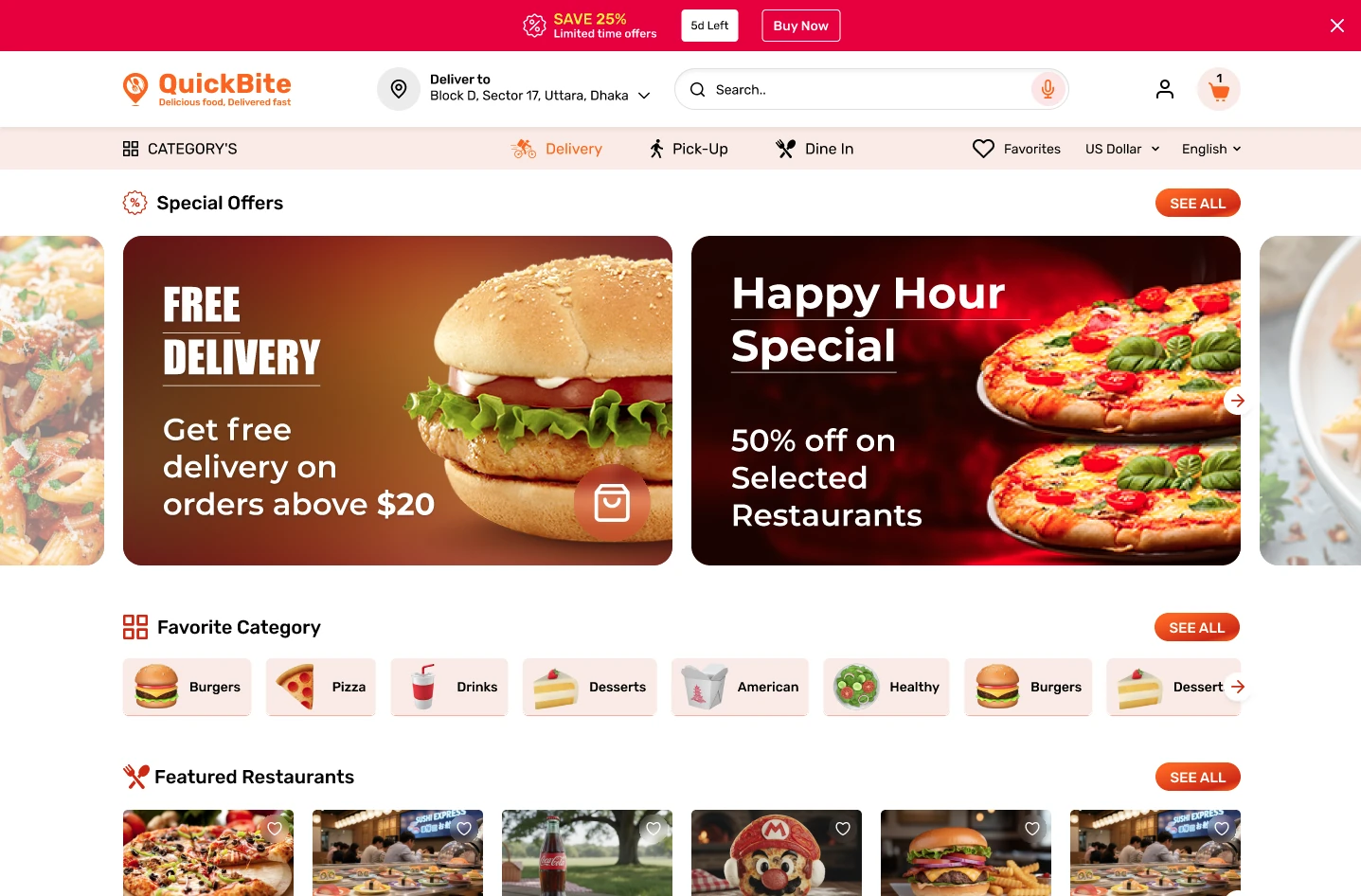
QuickBite storefront — the marketplace as the customer sees it
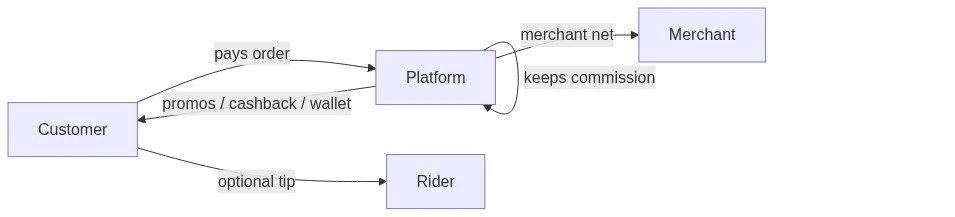
Money flow
Value-chain overview
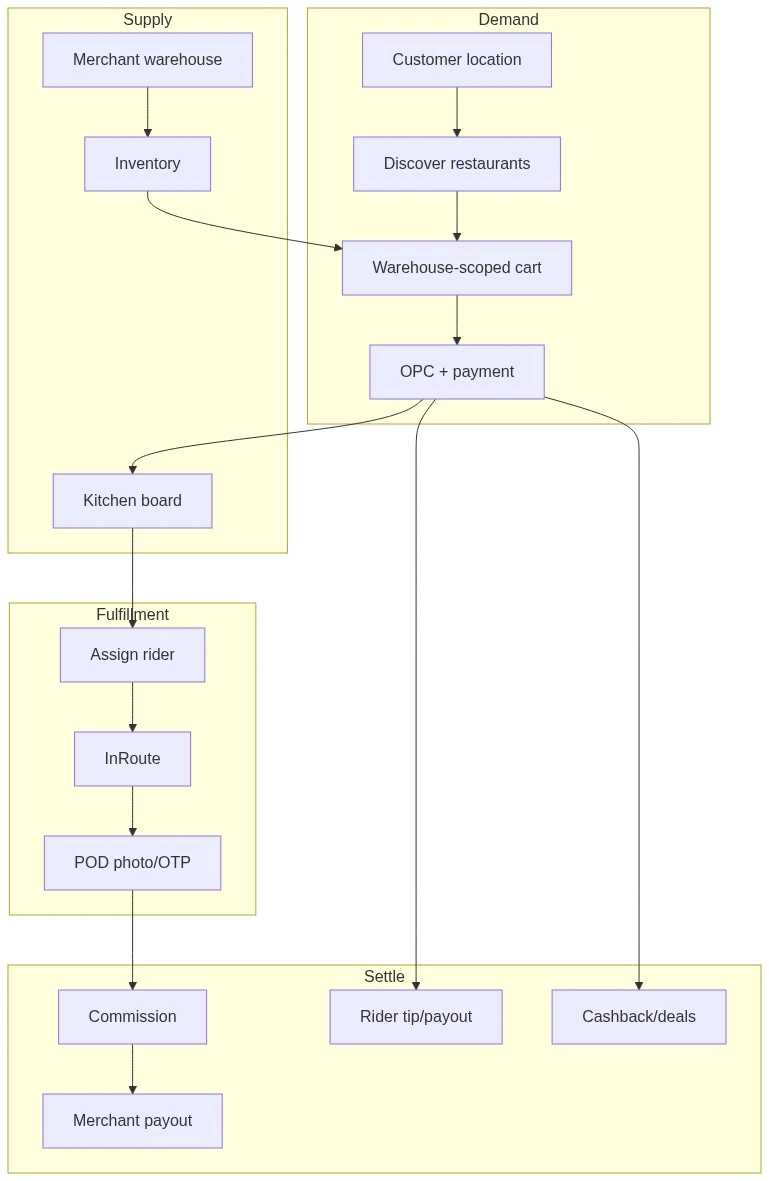
Value-chain overview
A2. Personas
| Persona | Job | Success | Main Surfaces |
|---|
| Customer | Order nearby food | Arrives; tracking works | Merchants, OPC, Track Order, app |
| Platform admin | Run city marketplace | Coverage filled; take rate; few disputes | Configure + Order dashboard |
| Merchant / kitchen | Sell & cook | Orders + stock + fair payout | Warehouse, order board, chat |
| Rider | Deliver + tip | Assigned orders only; easy POD | Deliveryman/orders, tips |
| Dispatcher | Assign riders, SLA | Low Missed; COD reconciled | Dashboard, Cash collection |
| Growth | Acquire / retain | Deals, referrals, cashback used | Promotions, Shop |
| Developer | Extend safely | Geo, warehouse scope, statuses intact | FoodShop plugins |
A3. How Money Moves
Customer pays (gross)
Food + delivery/pickup/dine-in fees + tax − discounts + rider tip (tip is rider economics, not kitchen food commission).
Credit Wallet must cover the full payable amount (no split tender with card).
Platform commission (take rate)
Merchant Commission calculates platform cut vs merchant owed:
| Mode | Meaning |
|---|
| Catalog rates | Product/category (merchant overrides); max of categories when multiple |
| Rule mode | Fixed/% rules by product or order total |
| Tax inclusive | Optional; confirm UI on your build |
Payout is a separate ops step from calculation. Refunds may not auto-reverse commission unless implemented.
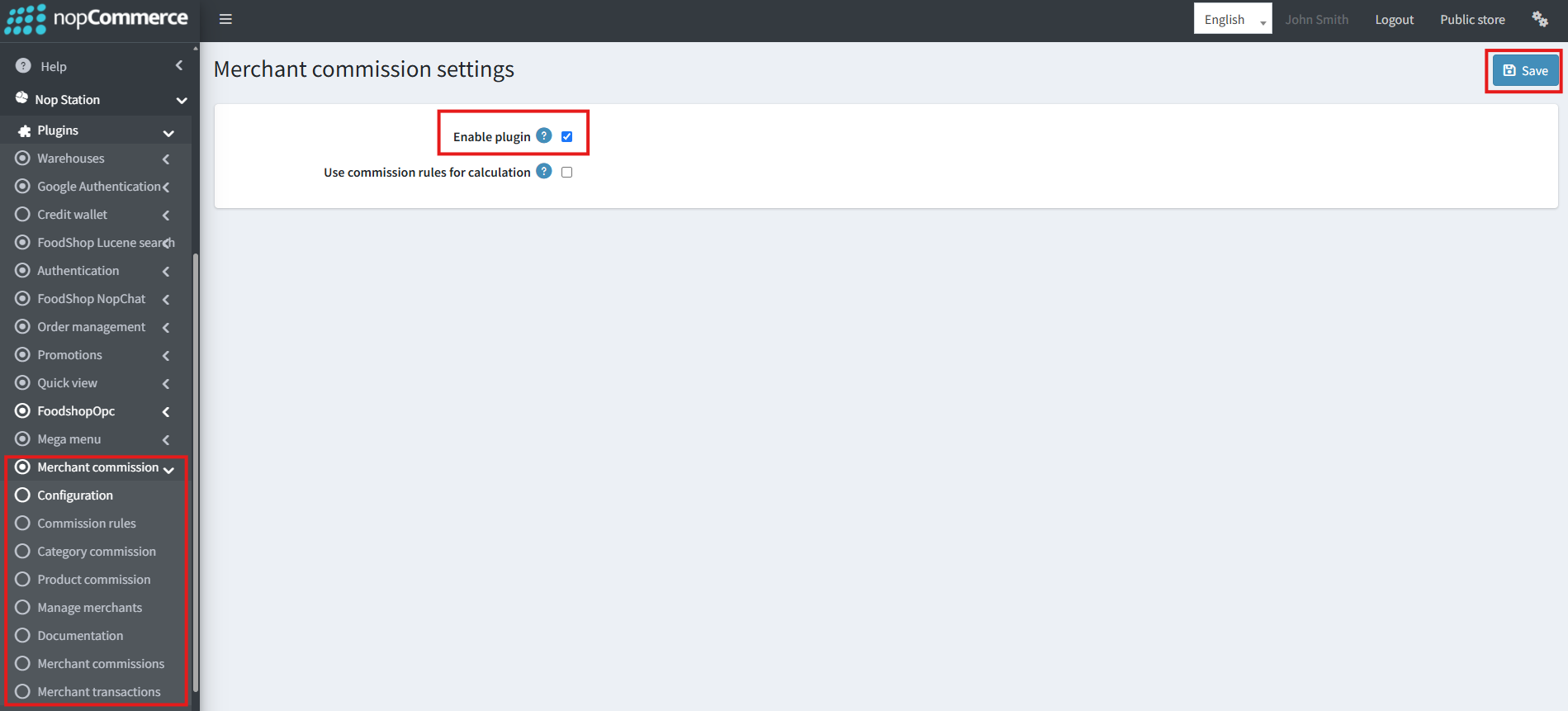
Merchant commission settings (admin)
Promotions cost margin
| Lever | Economic Effect |
|---|
| Refer-and-earn / affiliate | Acquisition cost / partner commission |
| Cashback | Liability until redeemed |
| Cashback → wallet | Spendable credit (needs Credit Wallet) |
| Deals / tiers / ribbons | Discount or points liability |
| COD | Cash collection reconciles cash held by rider/merchant — ops for money, not commission math. |
Example (illustrative)
Food $20 + delivery $2 + tip $3 = $25 paid → ~15% food commission ≈ $3 platform → merchant ~$17 food → rider $3 tip. Exact ledgers to follow your rate tables.
Commission decision flow
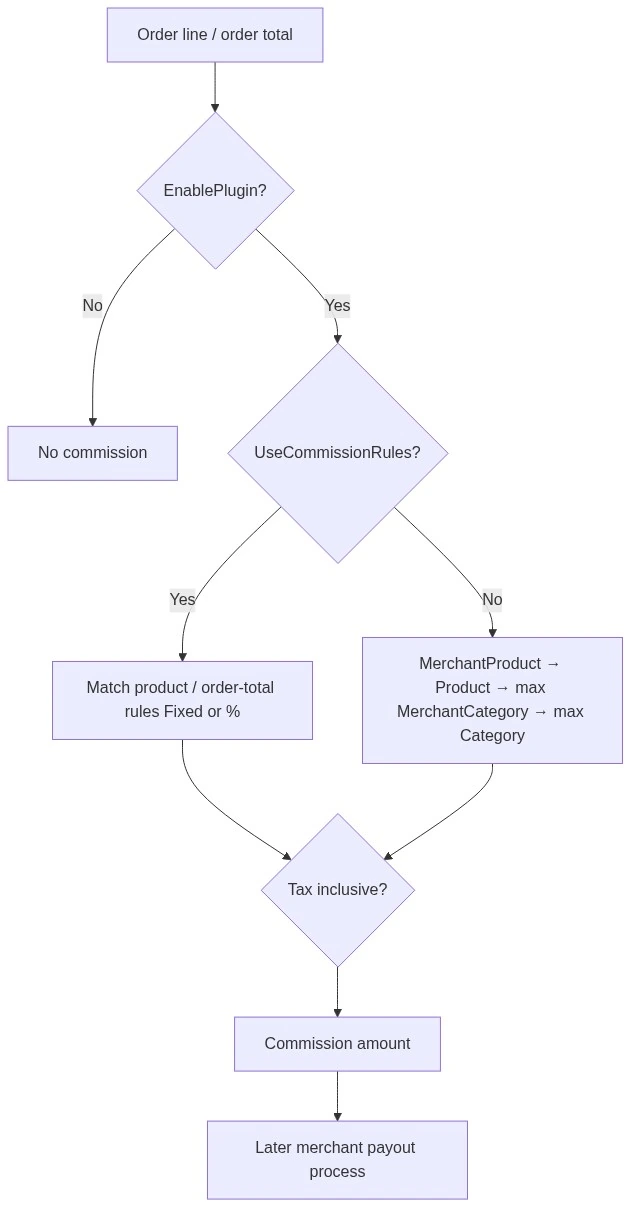
Commission decision flow
Tip vs food revenue

Tip vs food revenue
A4. Journeys & Serving Types
| Serving Type | Customer Promise | You Must Configure | Last Mile |
|---|
| Delivery | Food to my pin | Coverage + AllowShipping + rates + riders + POD | Rider |
| Pickup | I collect | AllowPickup (+ fee); PickupInStore | Customer |
| Dine-in | Eat on site | AllowDineIn + service charge % | On-site |
Delivery journey: address → in-coverage restaurants → cart → OPC → track → POD. Pickup: serving type Pickup → pickup point → pay → collect (no rider POD). Mobile: same via Web API (JWT/NST); phone OTP needs Authentication; force-update per OS.
⚠ Warning
Turning on Delivery without riders/POD breaks the promise. Pickup without AllowPickup hides the point.
Geo & serving-type eligibility
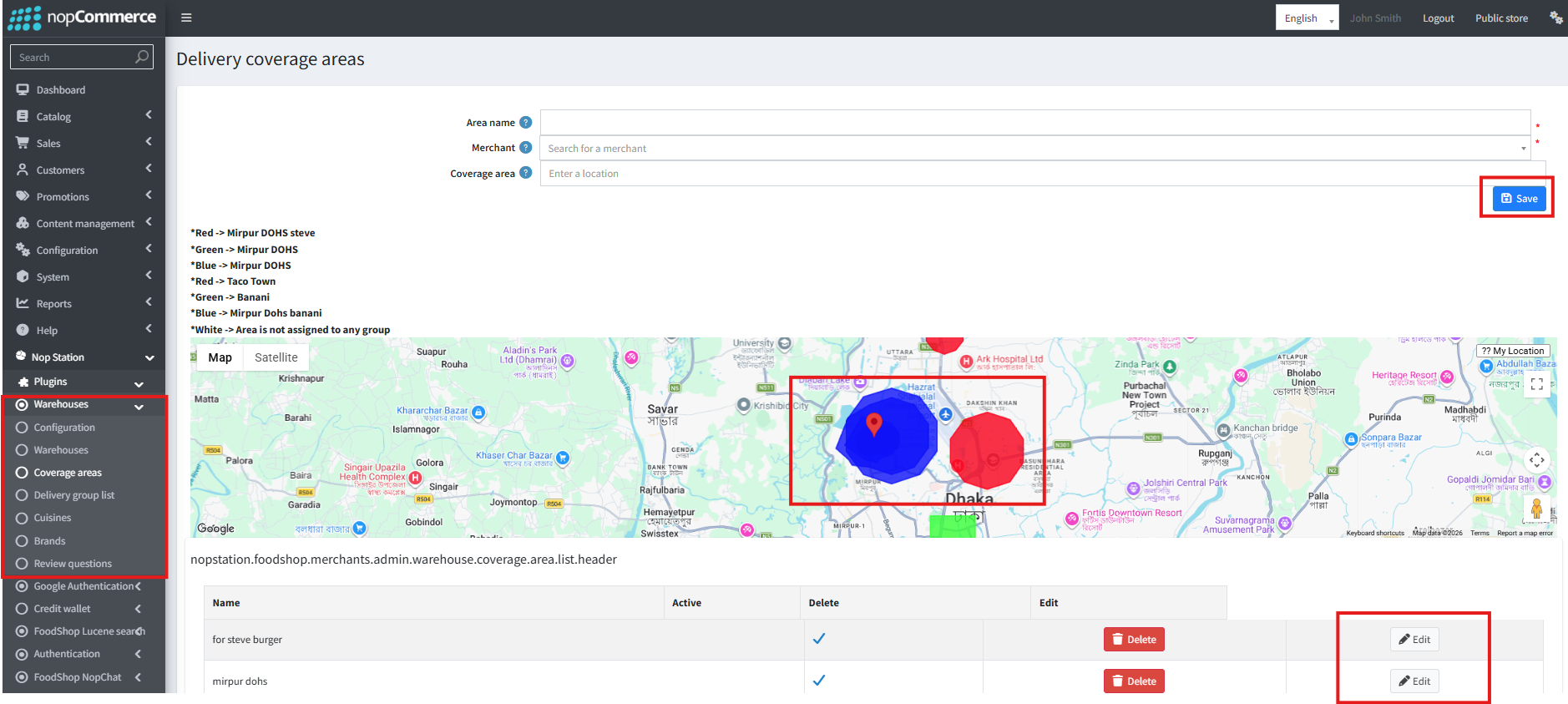
Delivery coverage areas (admin) — zones that decide eligibility
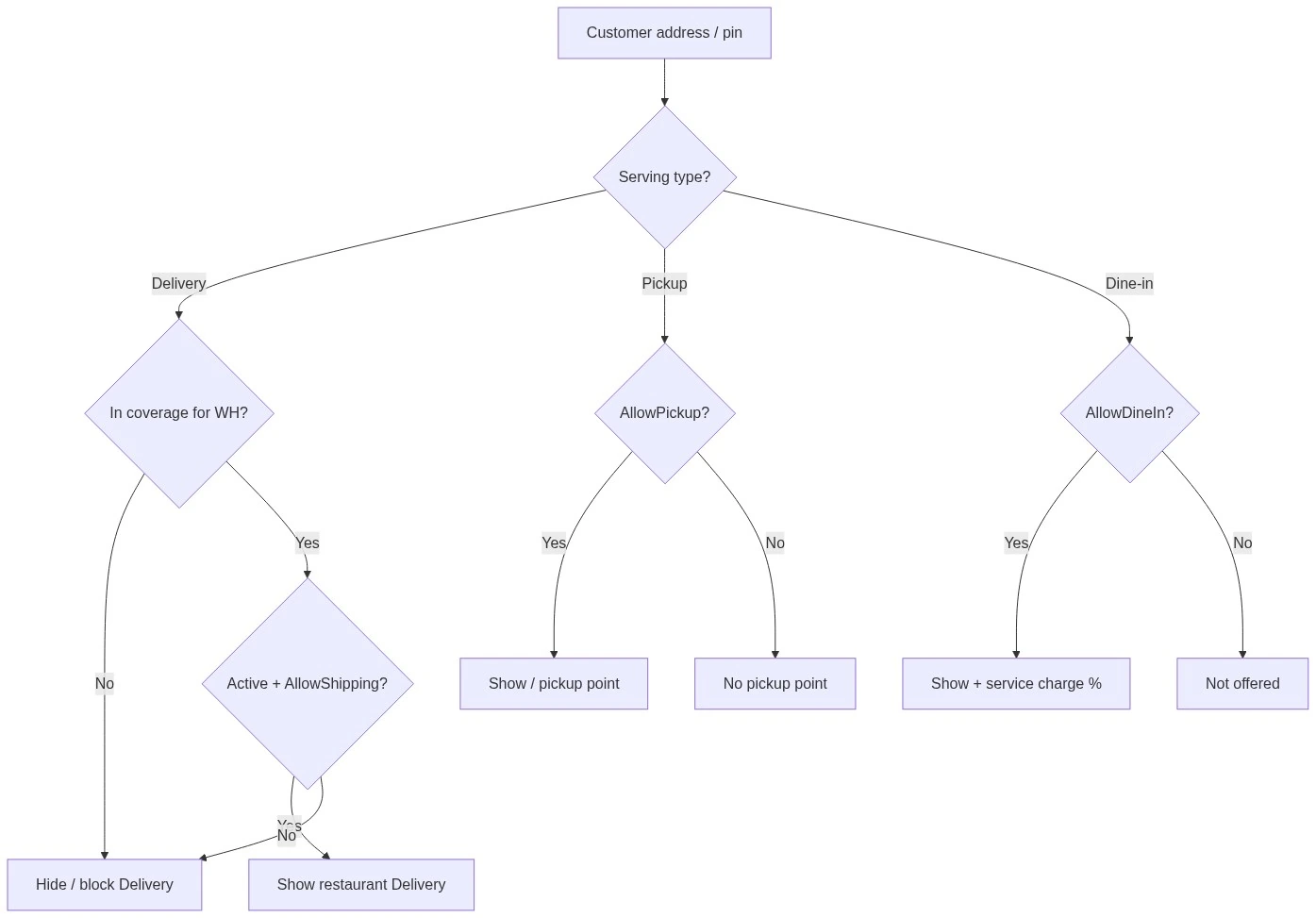
Geo & serving-type eligibility
Merchant onboarding swimlane
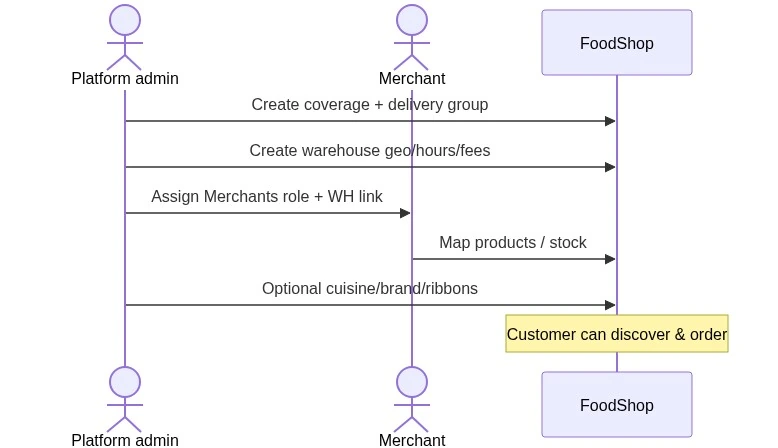
Merchant onboarding swimlane
A5. Order Lifecycle (Kitchen + Rider)
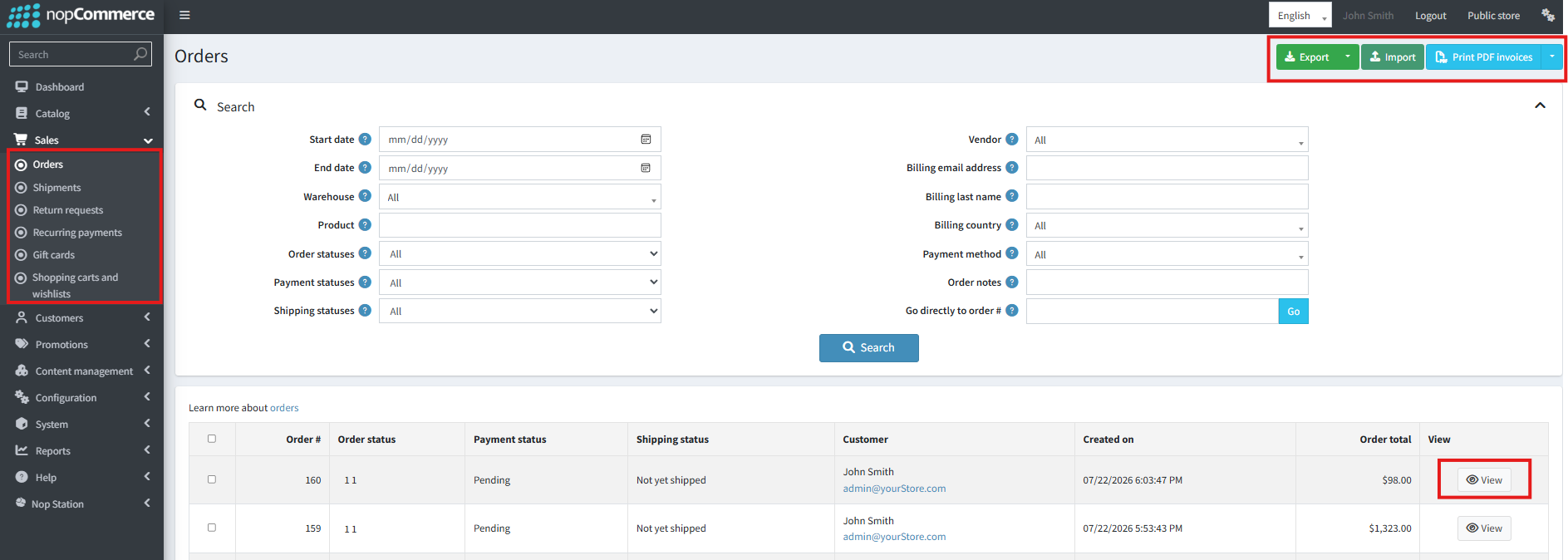
Sales → Orders — where order statuses show up in admin
| Status | Id | Who | Meaning |
|---|
| Pending | 10 | System/payment | Not ready for kitchen |
| New | 11 | Kitchen | Must accept |
| Processing | 20 | Kitchen | Cooking |
| Ready | 21 | Kitchen done | Ready for pickup/rider |
| InRoute | 22 | Rider | Out for delivery |
| Complete | 30 | Done | Closed |
| Cancelled | 40 | Stopped | Auto/manual cancel |
| Missed | 50 | Failure | New ignored too long (auto) |
Auto-missed: clears stuck New (kitchen SLA).
Auto-cancel clears stale Pending/New. Tune minutes to real kitchen speed (e.g. 15–30 for QSR New; install defaults are 24h/48h).
Order state machine
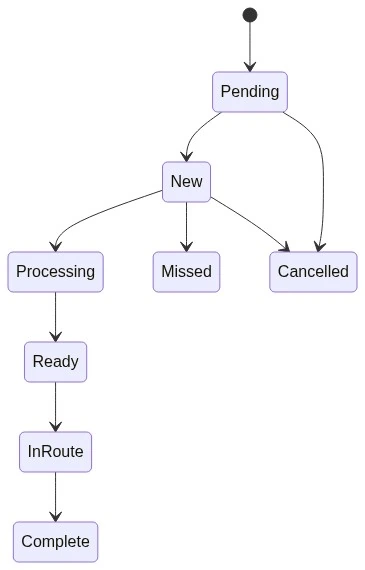
Order state machine
A6. Business Rules & Daily Ops
Non‑negotiable rules
- One restaurant context per cart (warehouse-scoped inventory).
- Delivery visibility = coverage ∩ active warehouse ∩ delivery flags.
- Pickup may bypass delivery coverage when Allow Pickup.
- Wallet all-or-nothing.
- Tip ≠ kitchen commission.
- POD is a trusting policy (Photo / OTP / Both).
- Commission ≠ payout.
- Don't assume refund reverses commission.
- Merchants don't edit global take rates (typical ACL).
- Riders see only assigned orders.
Ops day
| When | Do | Why |
|---|
| Morning | Maps/coverage/Active WH; riders available | Lunch readiness |
| Morning | Dashboard Pending/New | Stuck overnight |
| Rush | Assign riders at Ready | ETA |
| Rush | Watch Missed/Cancelled | SLA/staffing |
| Afternoon | COD cash collection; payouts if payday | Trust/finance |
| Evening | Deals/sliders | Growth |
| Weekly | Lucene rebuild; review timers; wallet liabilities | Health |
Healthy marketplace: zone always has ≥1 open restaurant; New→ Ready within SLA; high Complete; COD matches; merchants paid on schedule.
Merchant day
Active warehouse + stock → New→ Processing→ Ready → Pickup handoff or wait for rider → chat → own payout lines (not global rates).
A7. Admin vs Developer Ownership
| Decision | Owner |
|---|
| Zones, restaurants, Active, fees | Admin |
| Take rate, payout schedule, POD, SLA minutes | Admin / finance / ops |
| Theme, homepage, deals | Admin / marketing |
| Payment gateways | Admin (+ dev for new gateways) |
| Multi-restaurant cart, new serving type, refund-commission automation | Developer (product change) |
| JWT secrets, force-update, Redis Lucene | Mobile / SRE / admin |
Rule: Configure screen or warehouse form → admin. New behavior or invariant break → developer.
A8. Developer Domain Map & Invariants
| Business Context | Plugin | Think |
|---|
| Restaurants & geo | Merchants | Merchant Warehouse, coverage, Customer Location, shipping |
| Checkout | OPC | One page, tip/notes attributes |
| Fulfillment | OrderManagement | Statuses, riders, OTP/POD, cash, SignalR |
| Take rate / tips | Merchant Commission | Rates/rules, tips, payouts |
| Growth | Promotions | Affiliate, referral, cashback, deals, tiers |
| Store credit | Credit Wallet | Balance, invoices, payment method |
| Merchandising | Shop + Theme | Sliders, ribbons, colors |
| Nav / PDP | Smart Mega Menu, Quick View | Menu, modal |
| Search | Lucene | Index docs |
| Mobile | Web Api | REST, JWT |
| Pickup points | Pickup Instore | PickupPointProvider |
Business asks → Start in
| Business Ask | Start In |
|---|
| Hidden outside zone | Merchants' coverage / serving filters |
| Cross-restaurant cart | Merchants warehouse scoping |
| Tip on checkout | OPC attributes |
| Auto Missed | OM auto-miss task |
| Rider OTP | OM POD + SMS/email |
| 12% on burgers | Commission rates/rules |
| Cashback → wallet | Promotions soft helper → Credit Wallet |
| Force app update | Web Api OS flags |
| Search typos | Lucene fuzzy/contains + rebuild |
Hard Deps: Merchants Hub; Commission→ OM; Shop→ Promotions; Web Api last (Auth, Shop, OM, Menu, OPC). Soft: Promotions→ CreditWallet (must not crash if wallet is missing).
Invariants (do not break)
- Status Ids 10–50; Ready/In Route survives core Check Order Status (spec §6.8).
- No silent cross-warehouse cart merge.
- Don't "fix" empty Delivery lists by ignoring geo.
- OPC refreshes shipping/payment only for listed address fields.
- Buy Now ≠ Bypass cart (independent).
- No invented wallet split tender.
- Pickup hours display ≠ enforce unless you build enforcement.
- Document commission precedence; don't invent refund reverses.
- JWT/NST when enabled; OTP needs Authentication.
- Follow plugins/AGENTS.md.
- Multi-store overrides; no cross-store location leaks.
- GDPR: Purge Food Shop PII on customer delete (wallet, chat, favorites, location, subscribers, referrals).
Part B — Product
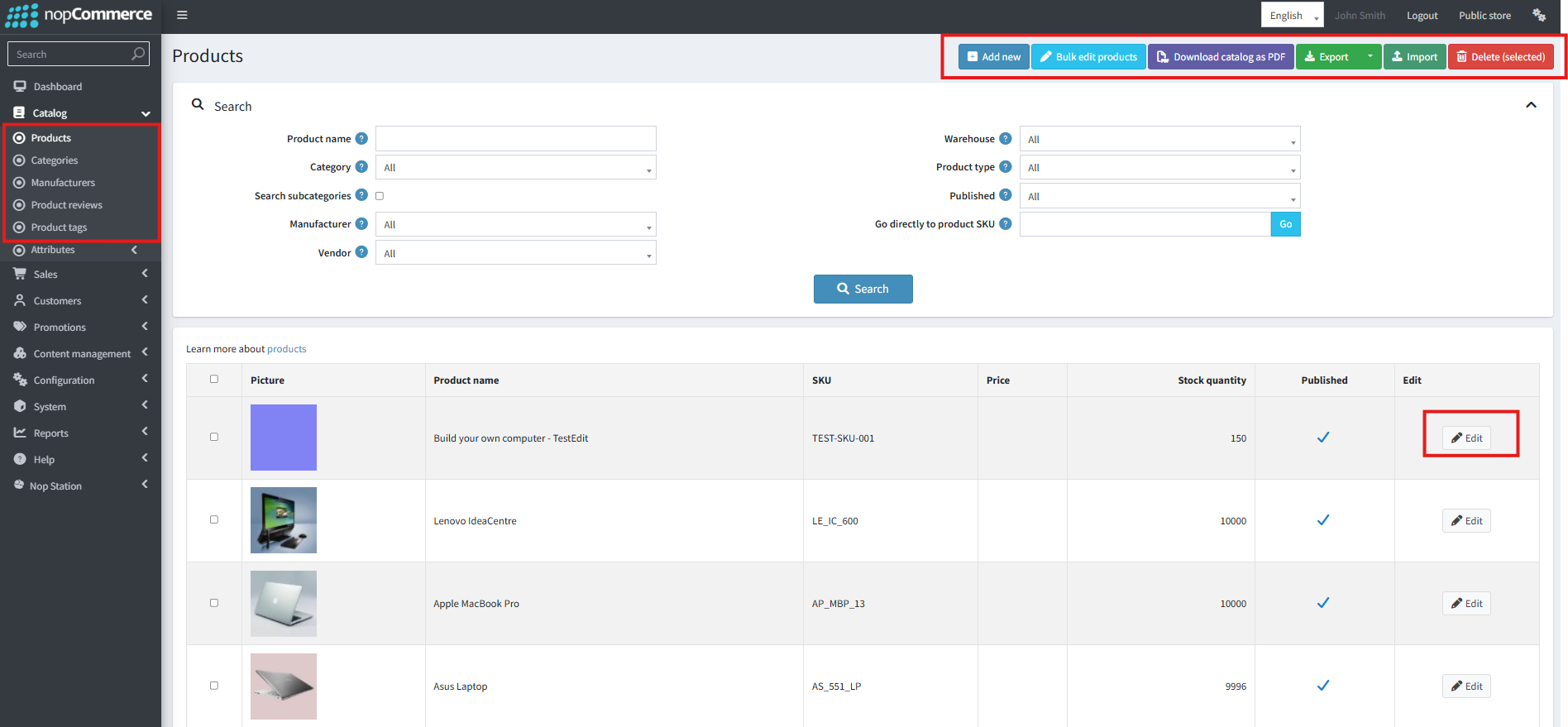
Catalog → Products — the catalog behind the marketplace
B1. Product Positioning & Why QuickBite
| Dimension | Value |
|---|
| Category | Hyperlocal multi-merchant food / QSR marketplace |
| Host | nopCommerce 4.90 (multi-store capable) |
| Surfaces | Food Shop theme web + Web API mobile |
| Hub | Merchants (inventory, geo, serving types) |
| Delivery | Own fleet ops (OTP, POD, cash, SignalR) |
| Monetization | Commission, tips, affiliate/cashback/deals |
Who buys it: city marketplace operators, multi-restaurant brands, white-label agencies, mobile teams needing API parity.
Why: hyperlocal primitives first-class; modular plugins; ops stack included; web + mobile one backend; nopCommerce ecosystem; Quick Bite Figma-aligned UX.
Tech: net9.0; Repository/linq2db; Fluent Migrator; SignalR; Lucene (+ optional Redis); Authentication for app OTP.
B2. Plugin Inventory & Features
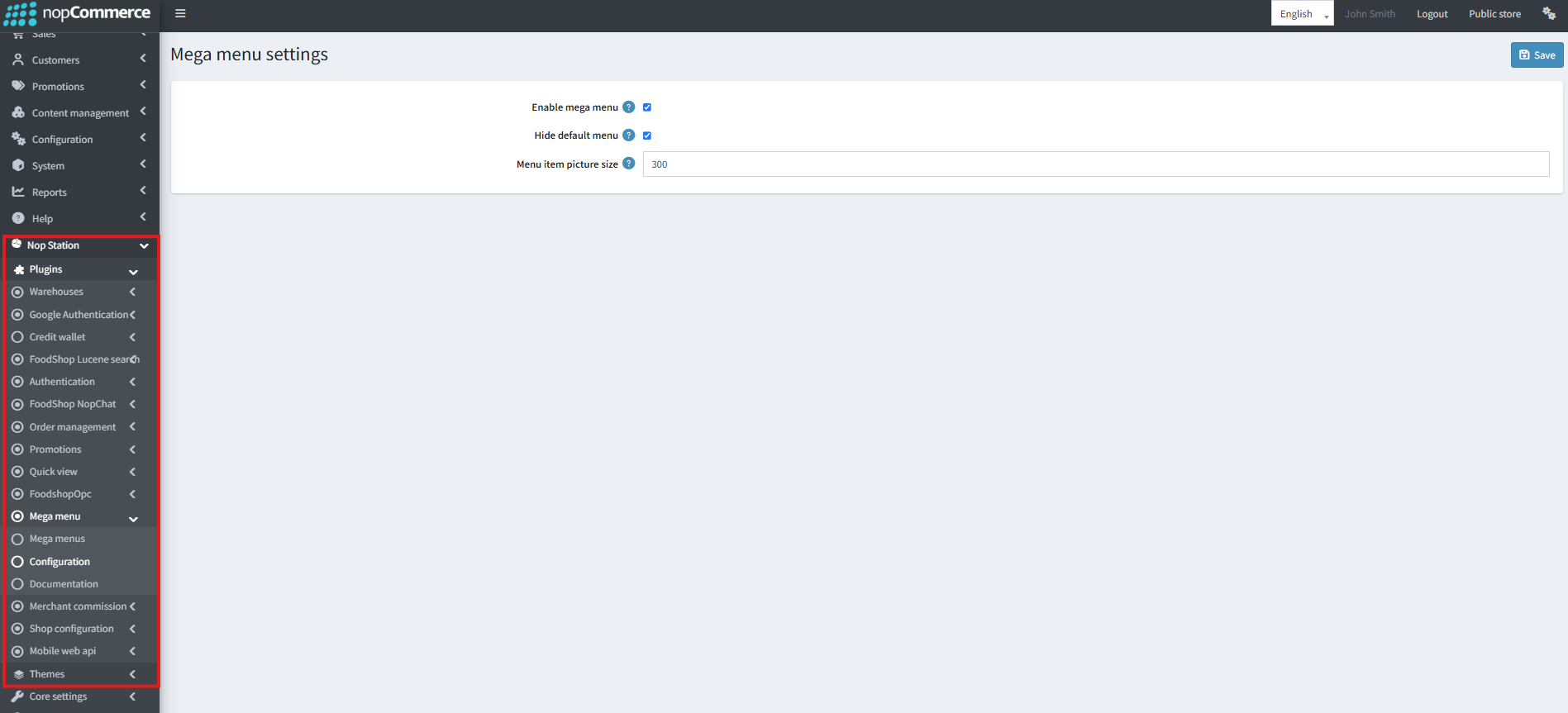
A plugin Configure card (Mega menu) — every plugin follows this shape
| # | Friendly Name | System Name | Role |
|---|
| 1 | Merchant Inventory | FoodShop.Merchants | Hub — warehouses, coverage, inventory, shipping rates |
| 2 | Order Management | FoodShop.OrderManagement | Lifecycle, riders, OTP/POD, cash, SignalR |
| 3 | Merchant Commission | FoodShop.Merchant Commission | Take rate, payouts, tips |
| 4 | One Page Checkout | FoodShop.Opc | Single-page checkout, tip, notes |
| 5 | Shop Configuration | FoodShop.ShopConfiguration | Sliders, carousels, tabs, ribbons, campaigns |
| 6 | Promotions | FoodShop.Promotions | Affiliate, refer, cashback, deals, tiers |
| 7 | NopChat | FoodShop.NopChat | Multi-role chat |
| 8 | Smart Mega Menu | FoodShop.Smart Mega Menu | Cuisine/brand/merchant menu |
| 9 | Quick View | FoodShop.QuickView | Product modal |
| 10 | FoodShop Theme | Theme.FoodShop | Colors, header/footer, CSS |
| 11 | Web API | Misc.FoodShop.WebApi | Mobile REST + JWT |
| 12 | Lucene Search | Search.FoodShop.Lucene | Indexed search |
| 13 | Credit Payment | Payments.FoodShop.CreditWallet | Store-credit payment |
| 14 | Pickup In Store | Nop.Plugin.Pickup.FoodShop.PickupInStore | Pickup points from warehouses |
Also needed: NopStation.Core; Authentication (app OTP); WidgetManager (mega menu). Shipping: live rates in Merchants (IShippingRateComputationMethod). FixedByWeightByTotal is review-only under plugins/code review/.
Feature Summary
- Discovery: coverage, cuisines/brands, favorites, reviews, Lucene, mega menu, quick view
- Checkout: OPC, tip/notes, Buy Now / bypass cart, pickup points, wallet
- Ops: status board, riders, POD, cash, auto-miss/cancel, SignalR, track order
- Commerce: commission, payouts, tips, affiliates, cashback, deals, tiers, shop widgets
- UX/mobile: Theme, chat, Web API, WebP/image resize
Plugin dependencies diagram
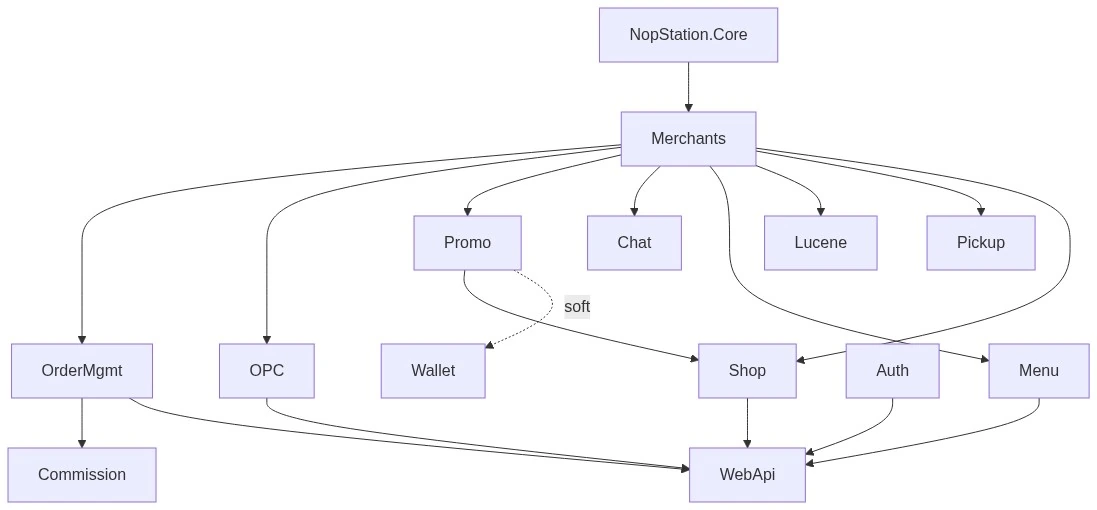
Plugin dependencies
B3. How Each Role Uses the Product
- Customer (web): location → /merchants → shop → OPC → track → optional wallet/deals/chat.
- Customer (app): appstart / JWT → same flows; respect force-update.
- Merchant: own warehouse/stock/orders/ribbons; not global rates.
- Rider: /deliveryman/orders → POD → cash → /deliveryman/tips → chat.
- Platform admin: install → maps/coverage/WH → OPC/OM → riders → Theme/Shop → optional commission/promos/Lucene/API → smoke tests.
B4. Architecture Diagrams
API prefixes: api/home, merchants, catalog, product, shoppingcart, checkout, order, customer, deal, chat.
System context / sequences
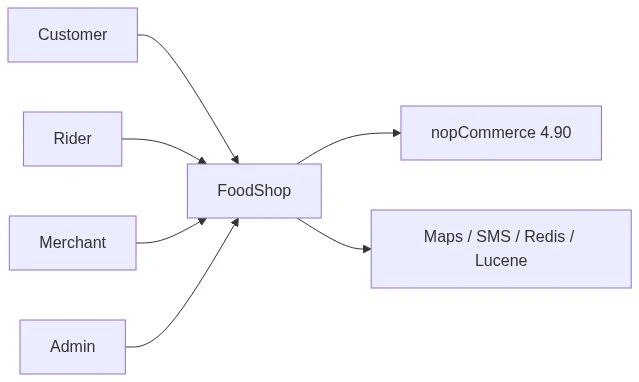
System context
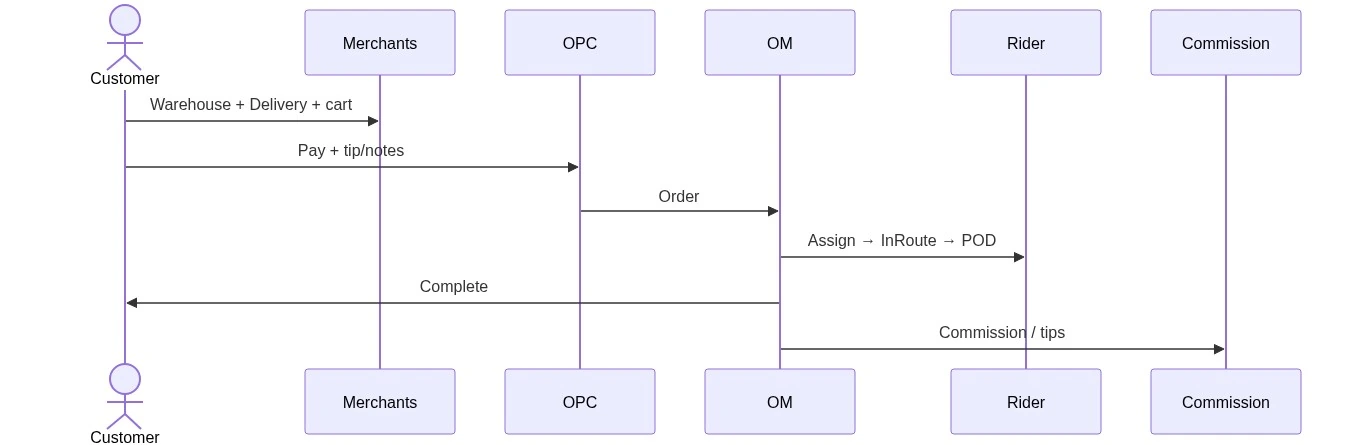
Sequence — delivery order
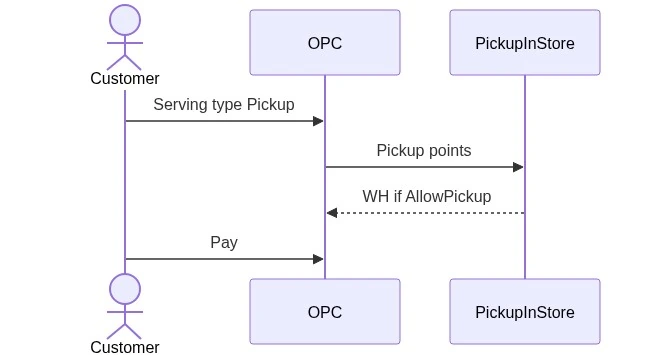
Sequence — pickup order
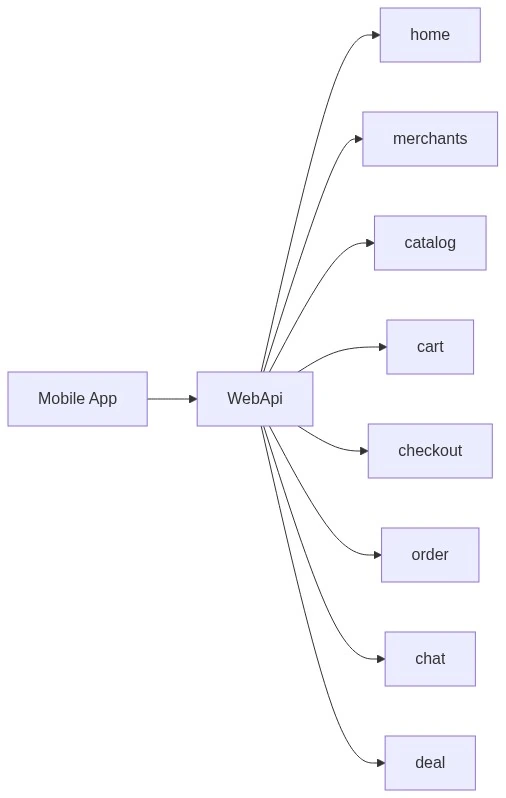
Sequence — order lifecycle (customer / kitchen / rider / ops)
Real-time (SignalR)
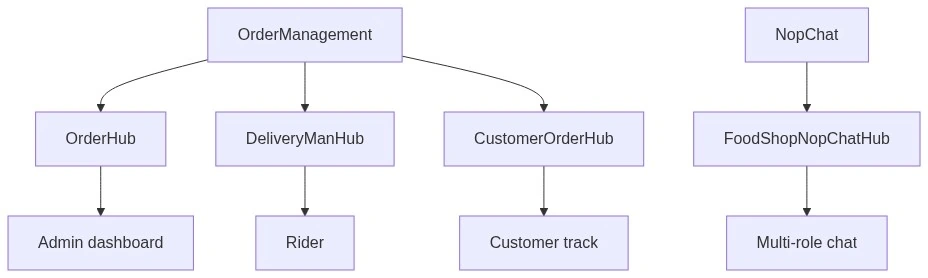
Real-time (SignalR)
Security zones
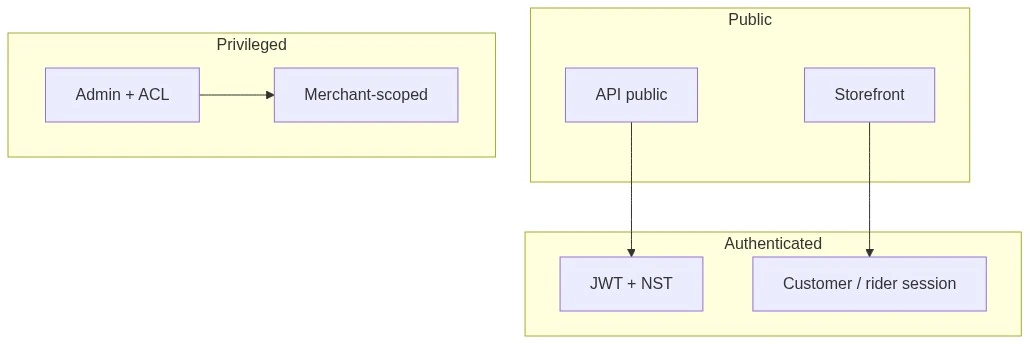
Security zones
B5. Roles, Permissions, Limits
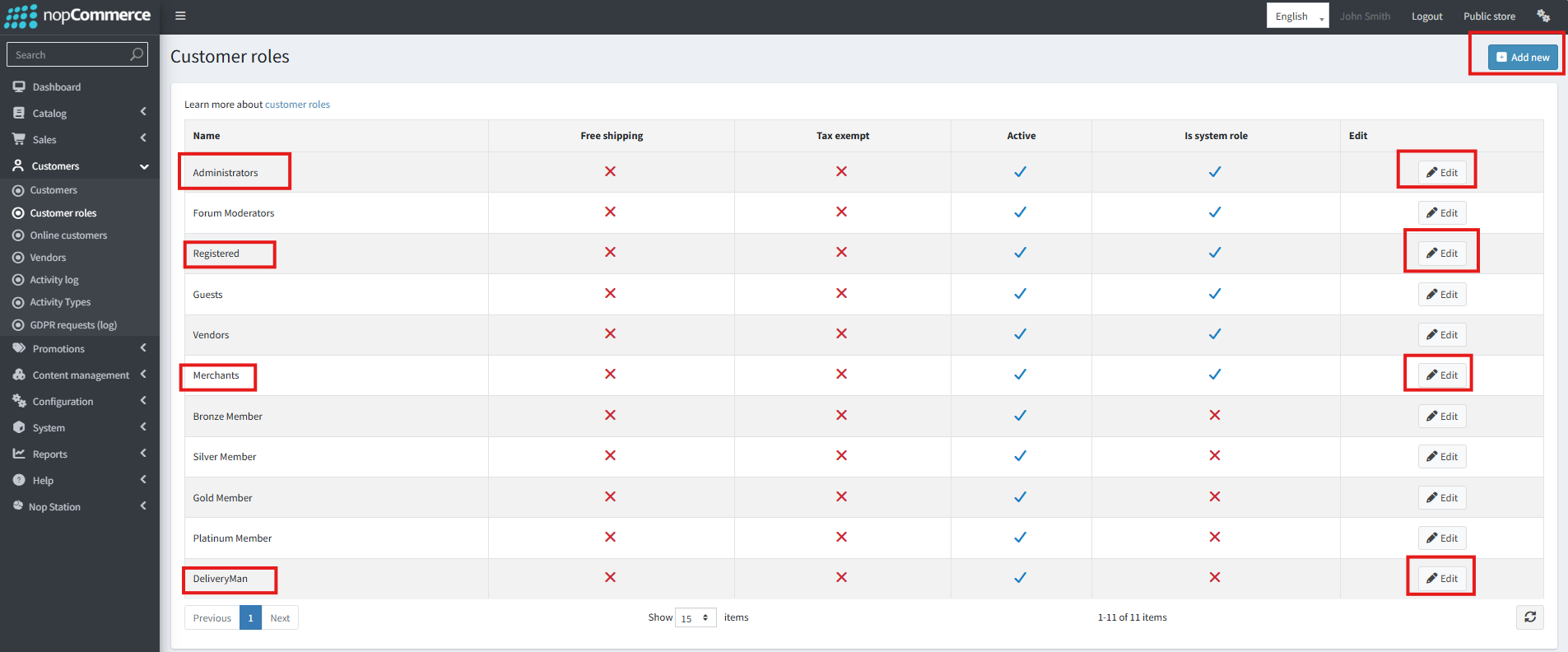
Customer roles — Merchants and DeliveryMan drive the permission model
| Role | Access |
|---|
| Platform Admin | All Configure, warehouses, commission, OM, WebApi, Lucene |
| Merchant | Own WH/products/orders/ribbons |
| Delivery man | Assigned orders, tips, chat, location |
| Affiliate | Public affiliate info only |
| Customer | Own wallet/orders/chat |
Permission keys live in each plugin's *PermissionProvider (e.g., ManageWarehouses, ManageOrders, ManageNopStationMerchantCommissionConfiguration). NopChat has no dedicated PermissionProvider.
Unsupported / Do Not Promise
| Topic | Status |
|---|
| Split tender (partial wallet + other PM) | Unsupported |
| Pickup opening-hours hard block | Not guaranteed |
| Standalone FixedByWeightByTotal shipping package | Review-only; use Merchants rates |
| Silent commission reverse on every refund | Unsupported until implemented |
Part C — Configuration & Operations
Menu convention: most items under NopStation; Theme under Themes. Multi-store: use store scope + override checkboxes where shown.C1. Prerequisites & Install Order
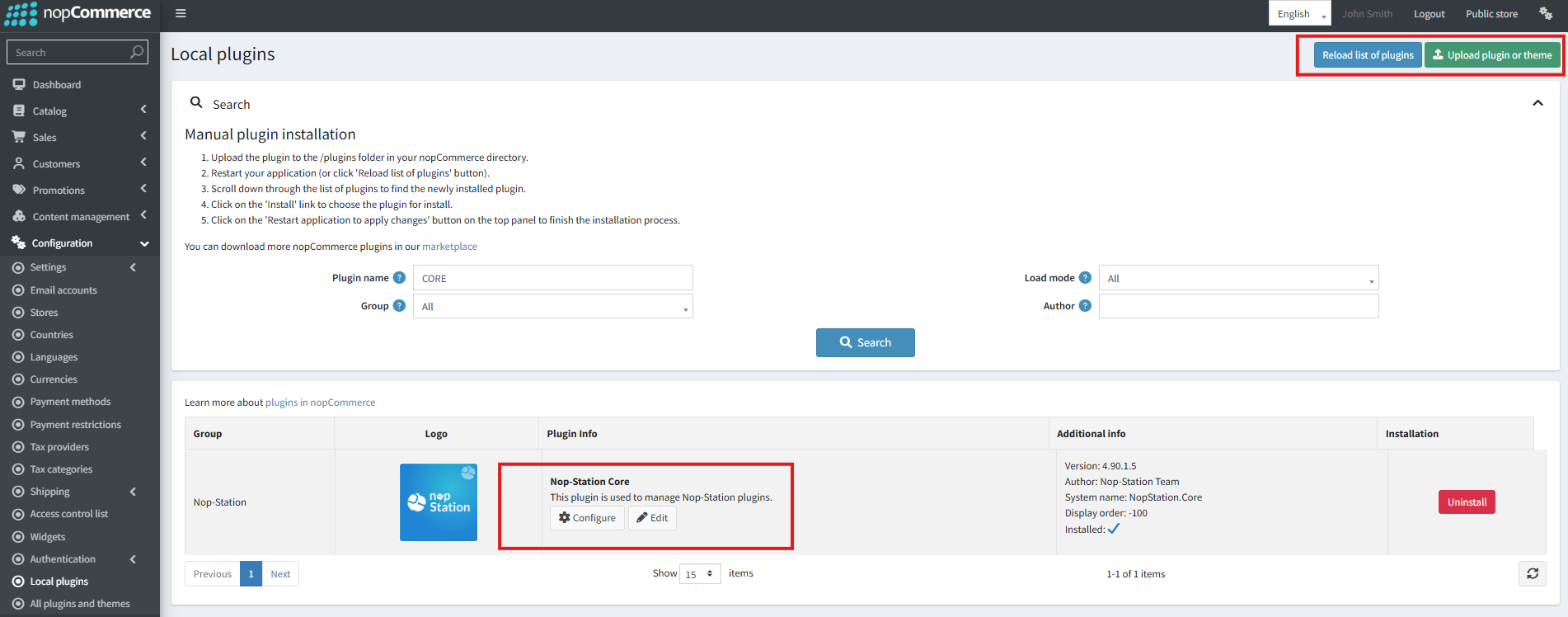
Configuration → Local plugins — install starts here
Need: nopCommerce 4.90 admin; NopStation.Core; FoodShop packages; Maps key; working email; optional SMS, Redis, Authentication, WidgetManager.
Install via Configuration → Local plugins in this order:
| Step | Plugin |
|---|
| 0 | Core → Authentication (if app OTP) → WidgetManager (if mega menu) |
| 1 | Merchants |
| 2 | Promotions, Lucene, Pickup, NopChat, OPC, OrderManagement |
| 3 | Merchant Commission |
| 4 | Shop Configuration |
| 5 | Smart Mega Menu |
| 6 | Theme, QuickView, CreditWallet |
| 7 | WebApi last |
After install: confirm ACL permissions; Theme sets store theme to FoodShop; sample assets seed on Install only (not Update).
Uninstall notes: localization/tasks removed; confirm table retention; OPC should clean auto tip/notes attributes; don't leave dependents if Merchants disabled.
C2. Day-Zero Go-Live
| # | Action | Done When |
|---|
| 1 | Install §C1 order | No install errors |
| 2 | Merchants: Maps key + default address in coverage | Map works |
| 3 | Coverage area + delivery group | Saved |
| 4 | Warehouse Active + lat/lng + AllowShipping (+ Pickup if needed) | Listed |
| 5 | Map products to warehouse stock | ≥1 SKU |
| 6 | OPC: enable + tip/notes UI | Checked |
| 7 | OM: POD + OTP email (tune minutes for QSR) | Saved |
| 8 | Delivery man verified + available | Can open /deliveryman/orders |
| 9 | Theme + Shop slider/carousel; Mega menu on, hide default | Storefront OK |
| 10 | Optional: commission rates, promos, wallet, Lucene rebuild, WebApi JWT | As needed |
| 11 | Smoke Delivery + Pickup | Orders complete |
C3. Configure Merchants & Warehouses
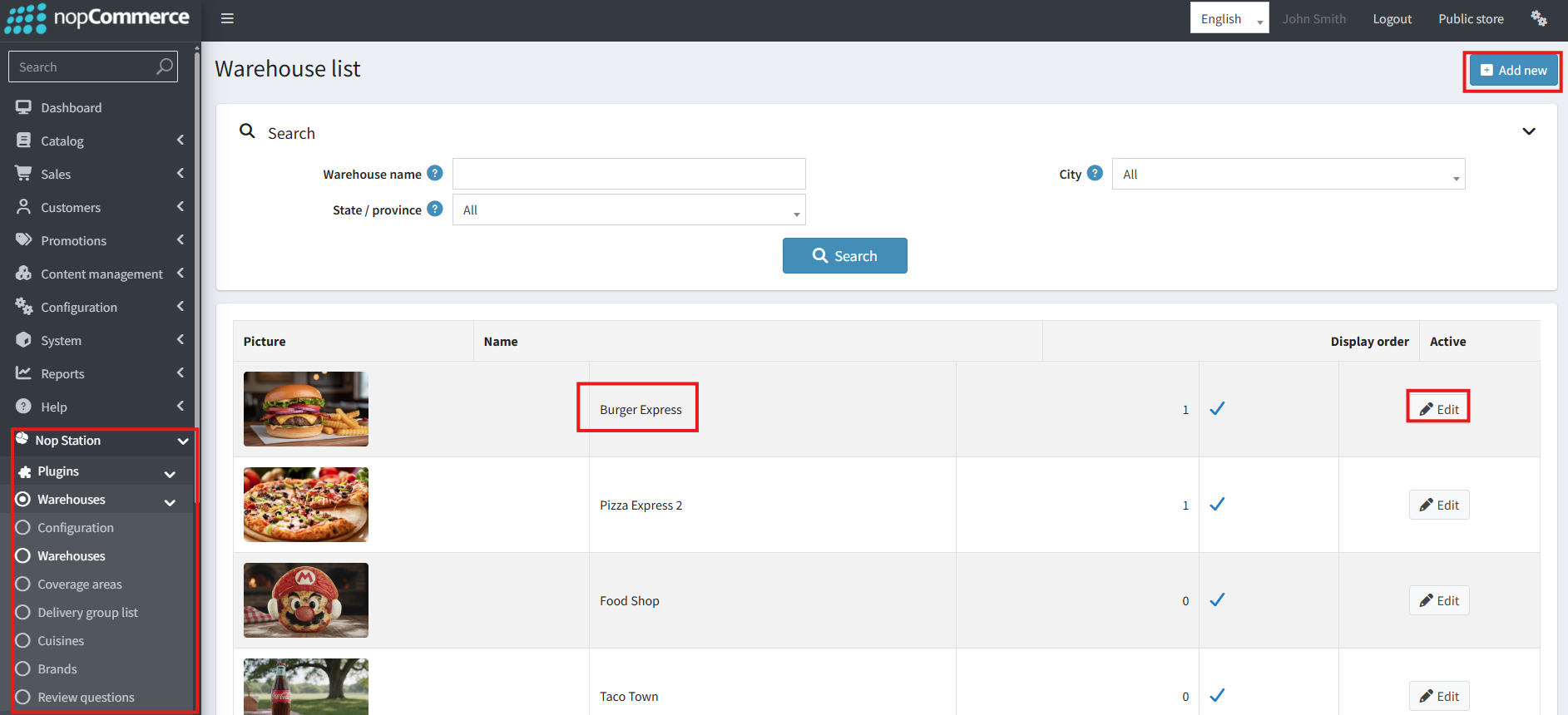
Warehouse list — one warehouse per restaurant
Menu: NopStation → Warehouses → Configuration (/Admin/Warehouse/Configure). Also: Warehouses list, Delivery coverage, Delivery group, Cuisines, Brands, Review questions.
Install defaults to replace
EnableDefaultMerchant/Address true; sample NYC address; DistanceToAddNewAddress 100; discount filtering on; list grid 12,24,48. For multi-merchant production: often turn default merchant off; set real city center.
First save
- Google Maps API key (Places + Maps JS).
- Default merchant on/off + Default warehouse.
- Default address via Places/map.
- Dine-in %; keep discount filtering on; WebP ~80.
- Optional: Map custom address attributes (Customer settings → Address form fields).
Coverage
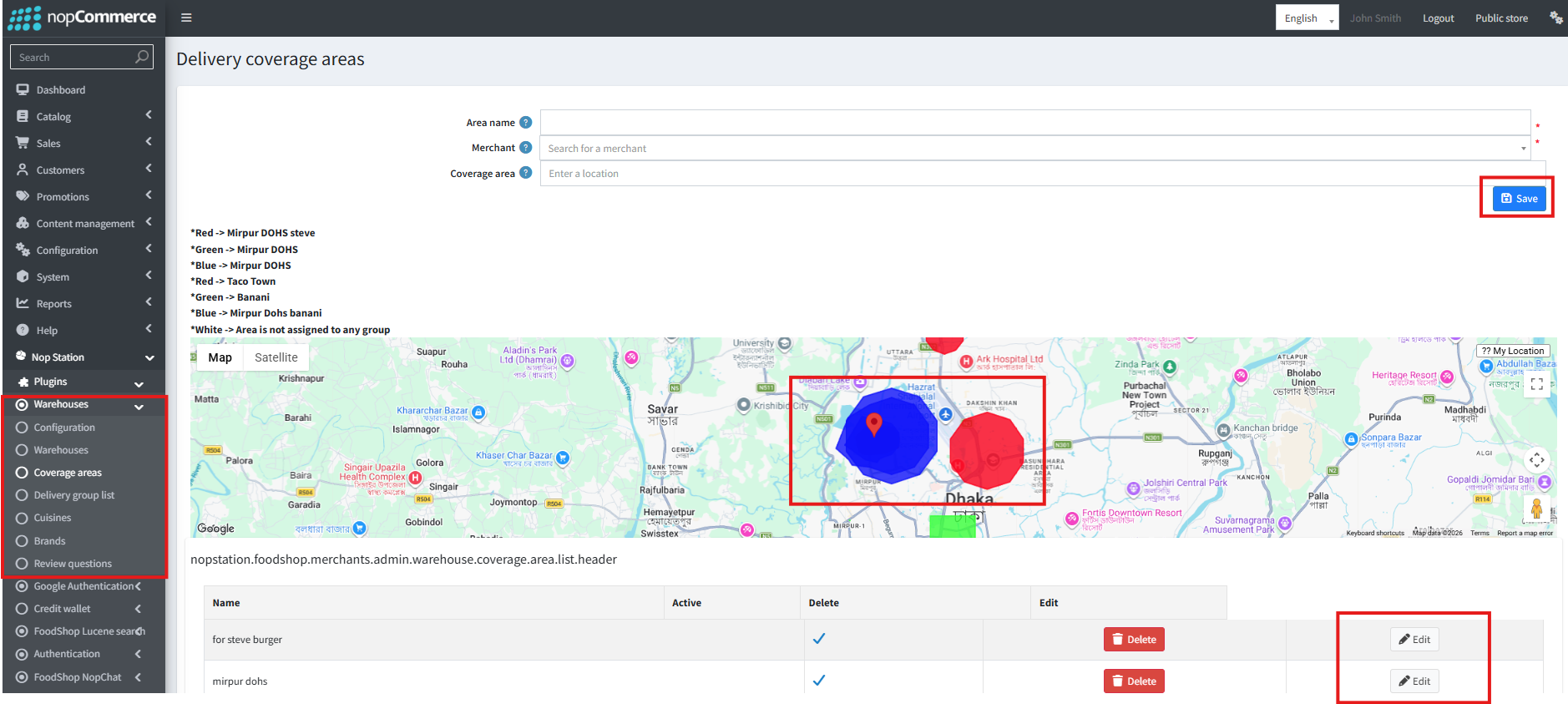
Delivery coverage areas — draw zones, then assign to a delivery group
States/cities/areas if required → Delivery coverage list → Delivery group → assign to warehouse (groups typically exclusive to one WH).
Warehouse fields (must-get-right)
Active, Name, lat/lng, address, AllowShipping + ShippingRate, AllowPickup + PickupFee, AllowDineIn + %, Serving option, Coverage group, pictures, SEO. Then map stock + cuisines/brands.
Common mistakes
- Invalid Maps key
- Attributes not mapped
- Inactive WH / no coverage
- AllowPickup off
- Default merchant on without DefaultWarehouse
- WebpQuality outside 1–100
C4. Configure OPC, Orders, Pickup
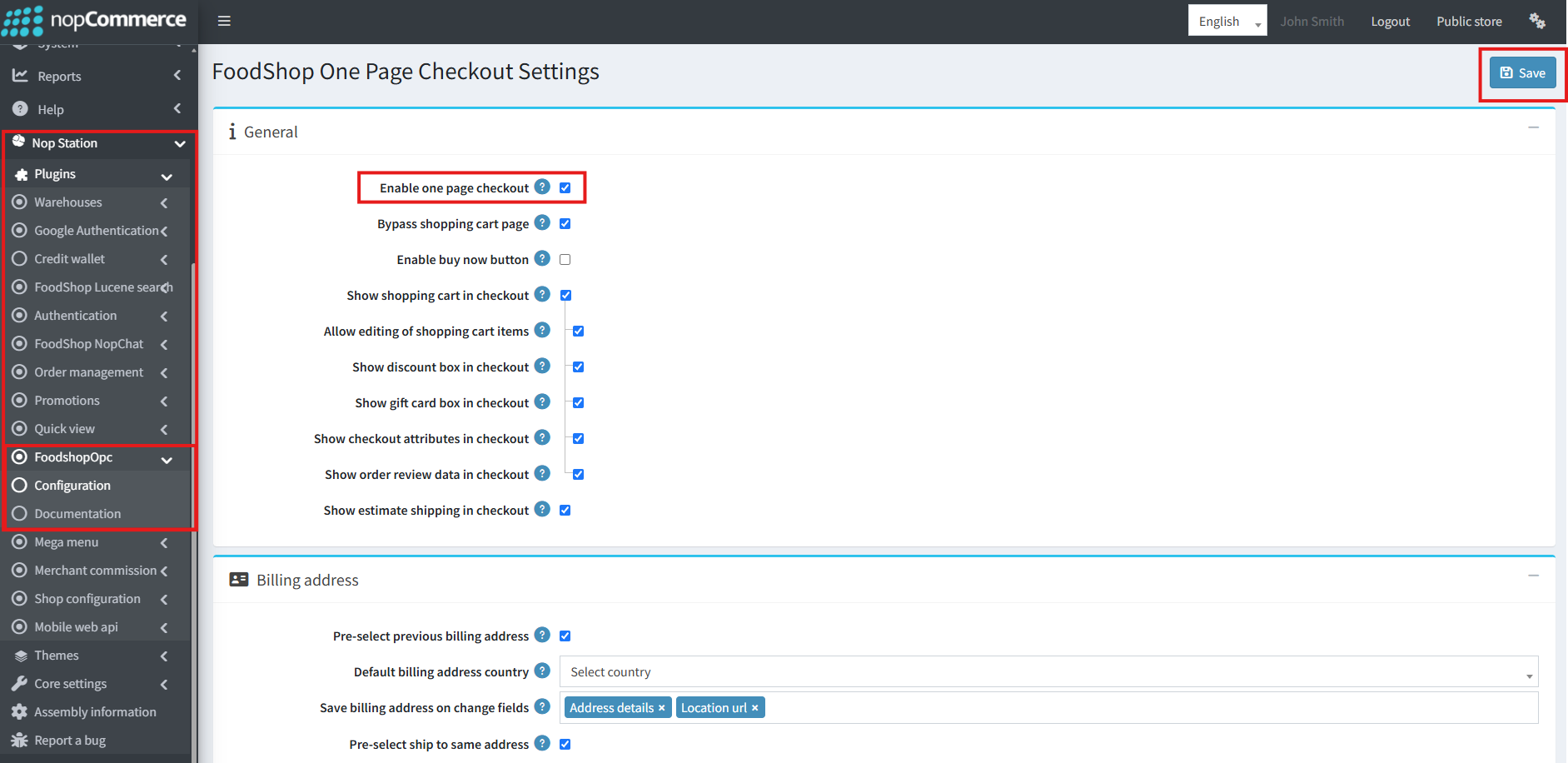
FoodShop OPC settings
OPC — NopStation → Foodshop OPC (/Admin/FoodshopOpc/Configure)
Install creates: Tip your rider (10/20/50/100, default 20) + Notes to Restaurant (max 500); OPC + bypass cart + panels + tip/notes UI on. Re-check attribute IDs after reinstall.
Minimum: Enable OPC; show editable cart; show attributes; tip + notes UI; discount/GC as needed. Tip is for delivery carts. Address field lists control when shipping/payment methods refresh — unlisted fields do not refresh.
Order Management — NopStation → Order management
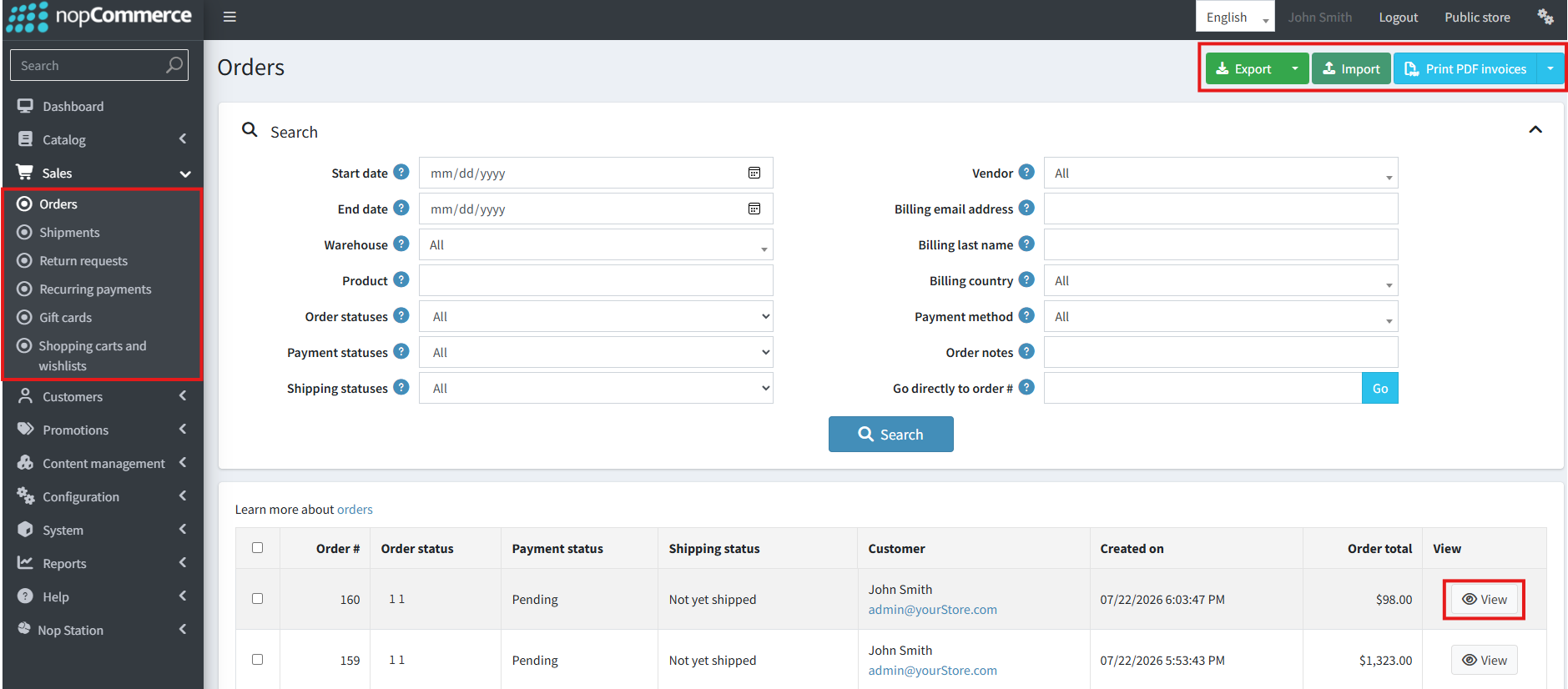
Sales → Orders — the list the dashboard works from
Configure: /Admin/OrderStatusDashboard/Configure · Dashboard: …/Dashboard
Install defaults: auto-miss 1440m on; auto-cancel 2880m on; POD required; mode OTP only; OTP 4; email on; SMS off.
Production: choose Photo / OTP / Both; OTP 4–10; email and/or SMS (+ ActiveSMSPluginSystemName); tune SLA; enable location history cleanup in prod.
Delivery man: customer account → Delivery Man form (merchant, area, phone, KYC pics, Verified, Available) → /deliveryman/orders.
Daily board: New → Processing → Ready → assign rider → In Route → POD → Complete; COD → Cash Collection.
Pickup
No plugin Configure page. Warehouse AllowPickup (+ fee). Serving type Pickup → point appears only if AllowPickup. Hours may display without blocking checkout.
C5. Configure Commission, Promos, UX, Search, API
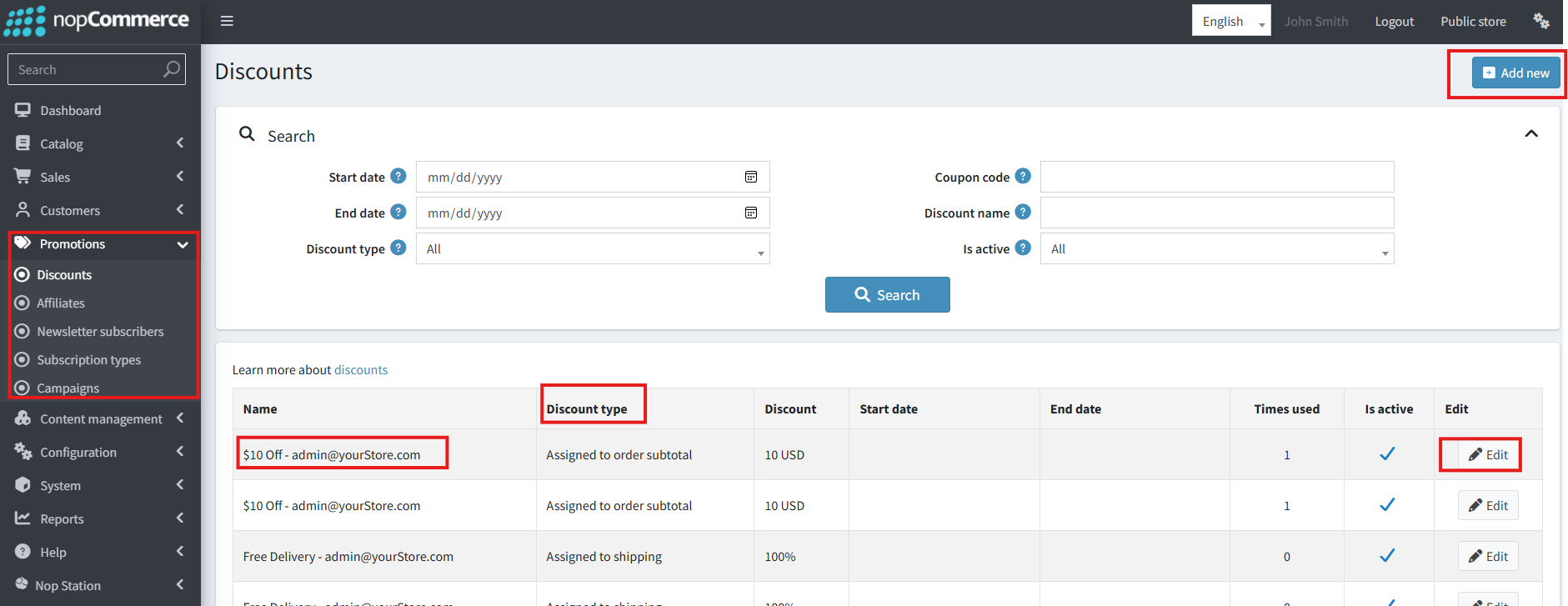
Promotions → Discounts
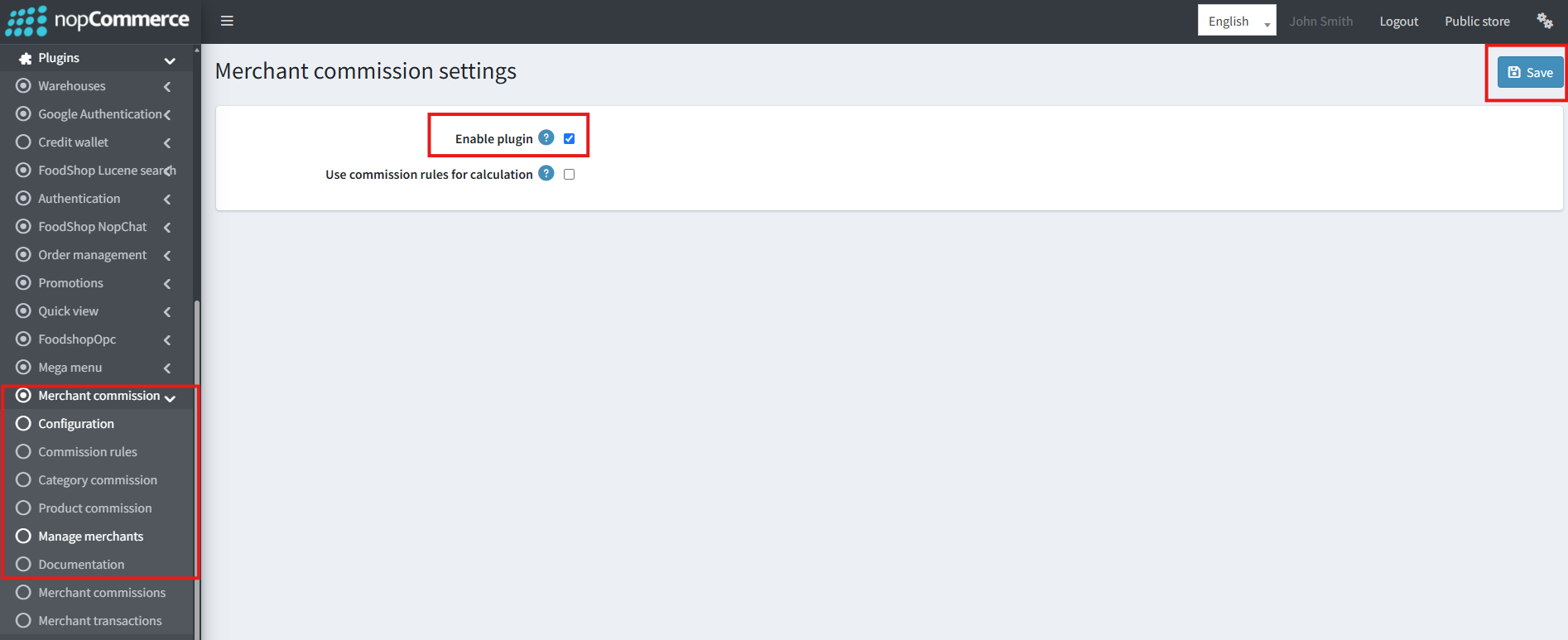
Merchant commission — Configure card
Commission — NopStation → Merchant commission
Configure card mainly: Enable plugin + Use commission rules. Rates on Rule/Category/Product screens. Enable Plugin defaults true; daily payout task registered. Rules mode with no published rules ⇒ commission 0. Tips need OPC tip UI; riders see /deliveryman/tips.
Theme — Themes → FoodShop
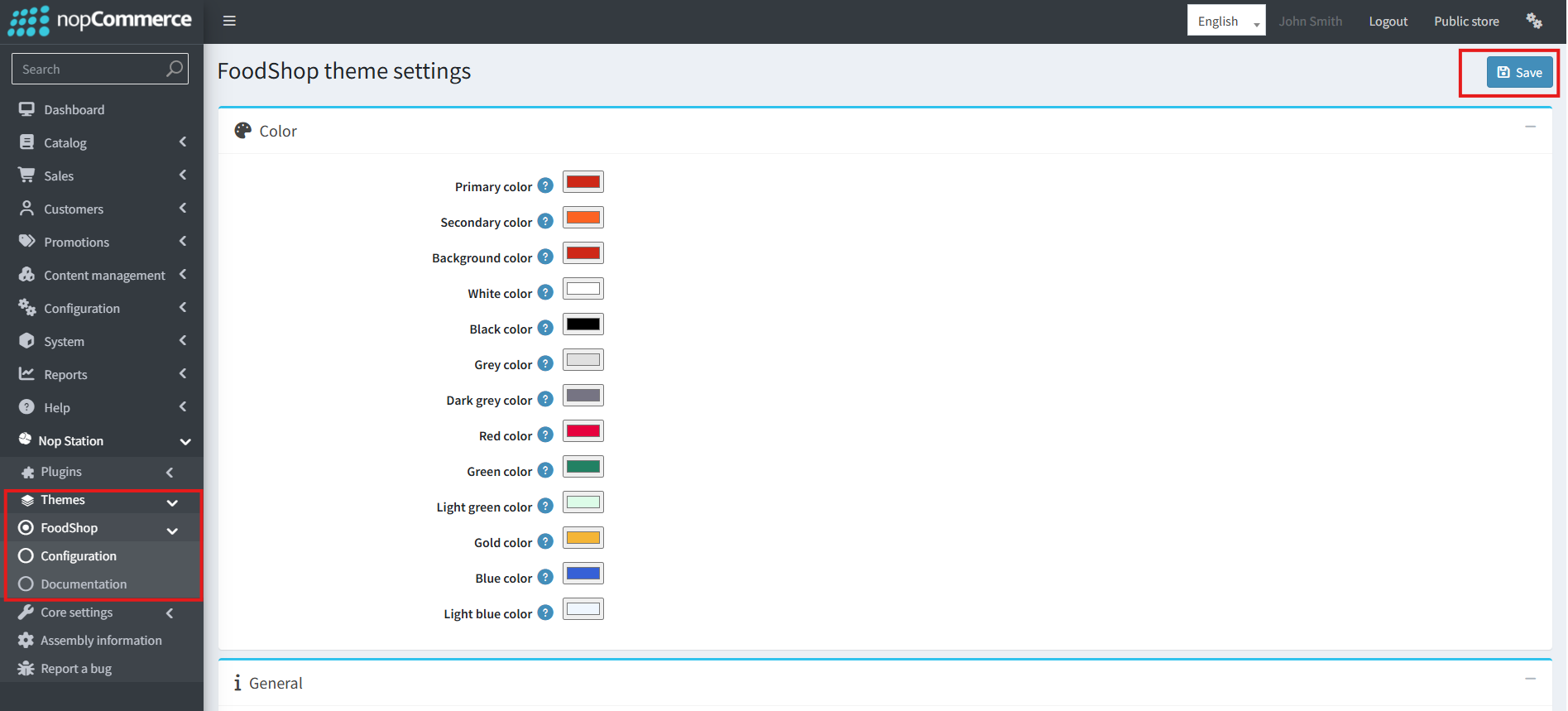
FoodShop theme settings
Theme = FoodShop; brand colors; phone/social; sticky/lazy; hide core homepage blocks if Shop widgets replace them; header shortcuts; footer boxes/logo/cards.
Shop — NopStation → Shop
Install: carousel/slider/tabs/campaign/CSS/ribbons on; flipbook off. Create slider + carousel/tab; ribbon caches (discount cache short); image resize 1920/768. CRUD: sliders, carousels, tabs, flipbooks, ribbons, subscribers.
Smart Mega Menu / Quick View / Chat
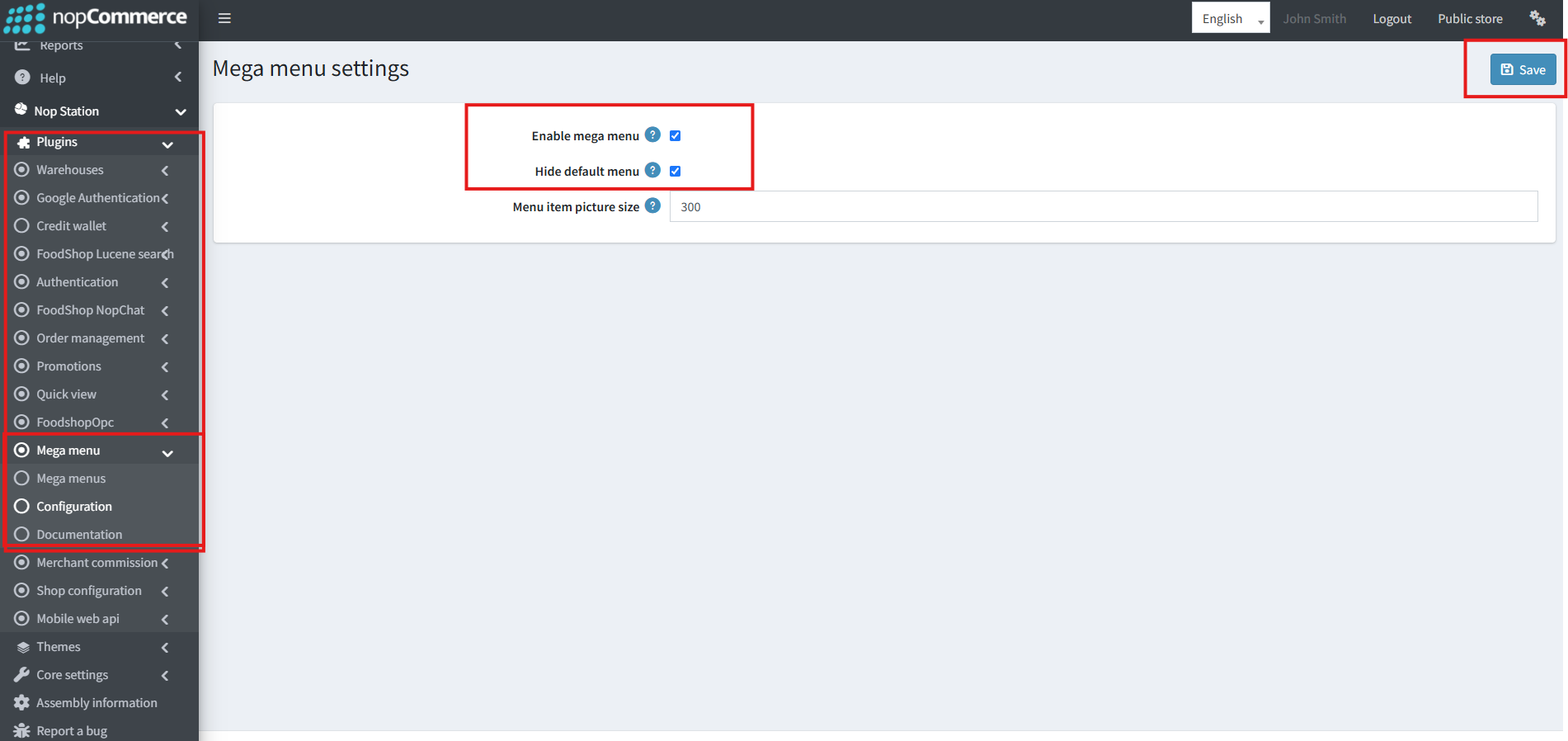
Mega menu settings
Mega menu on + hide default menu; picture size 300. Quick View: enable food-relevant sections; picture zoom needs Picture Zoom plugin. Chat: logo + weekday open flags.
Promotions & Wallet
Refer-and-earn, affiliate defaults, cashback, wallet transfer (only CreditWallet), tiers, banners/deals — promos cost margin. Activate payment method Credit Payment; show credit on checkout; max invoices; test full wallet pay only.
Lucene
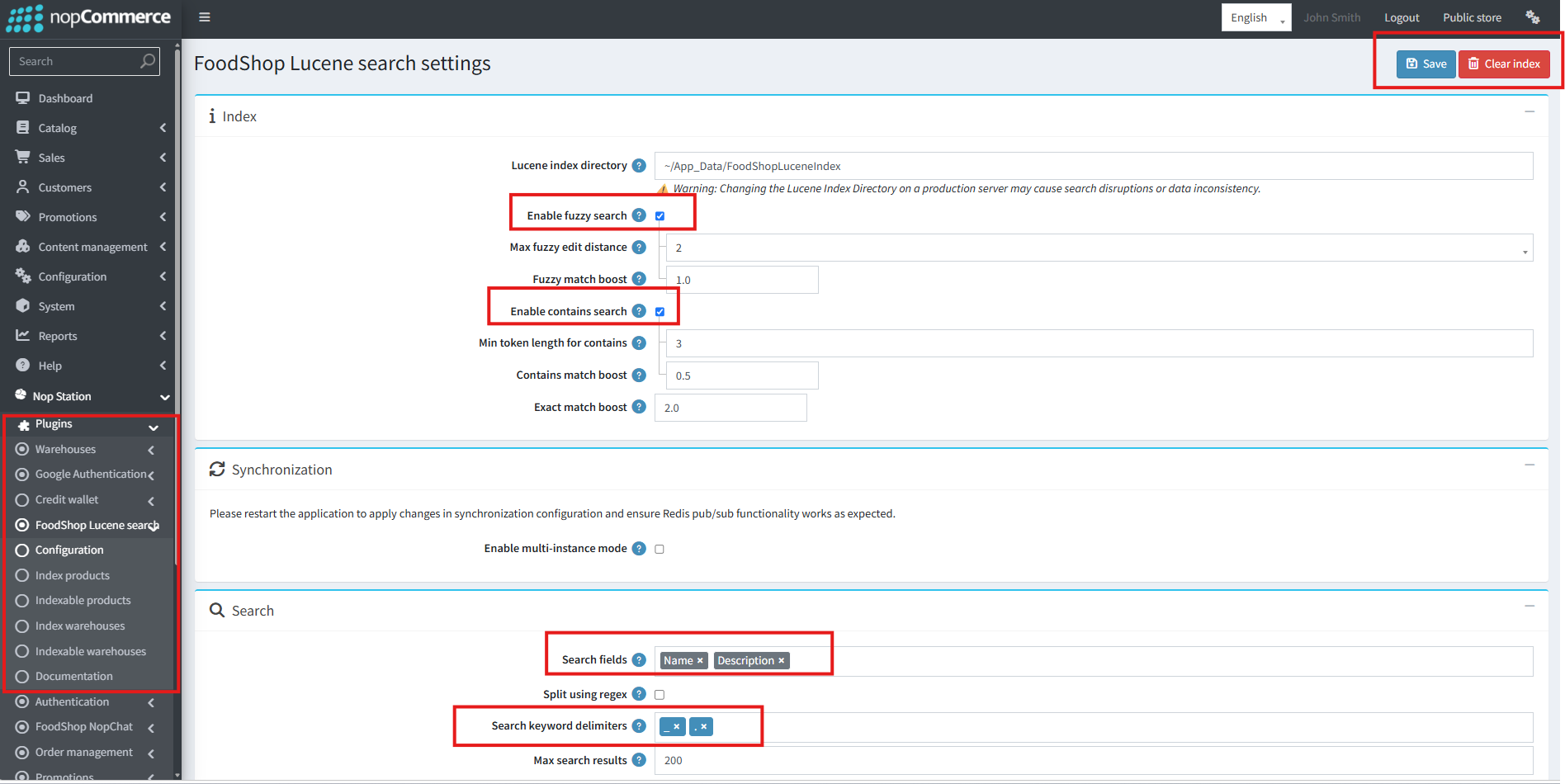
FoodShop Lucene search settings
Writable Index Directory; fuzzy (distance 1) + contains; Exact boost highest; multi-instance + Redis only on farms; rebuild after catalog import.
Web API (last)
Strong secrets; Enable JWT (NST header); token lifetime; Show change base URL = Off in prod; home rails + theme colors; Android/iOS versions & force flags independent; GDPR delete account if needed. App OTP needs Authentication.
C6. Users, Verify, Troubleshoot
Merchant user: Customers → Merchants role → link warehouse. Rider: customer + Delivery Man Verified/Available. ACL: grant Administrators FoodShop manage permissions (warehouses, orders, commission, OPC, Shop, Promotions, Theme, WebApi, Lucene, etc.).
Verify
Delivery: in-coverage address → cart → OPC pay → New→ Ready→ rider→ POD→ Complete (+ commission). Pickup: Pickup serving → AllowPickup Point → Pay → merchant fulfill. Negatives: out of coverage; empty cart; low wallet; wrong OTP; other rider's order denied.
Sign-off checklist: Maps; ≥1 Active WH+stock+coverage; OPC tip/notes; POD; ≥1 rider; Theme/Shop; Lucene; optional wallet/API; multi-store if used.
Troubleshooting
| Symptom | Fix |
|---|
| No restaurants | Coverage, Active WH, location, serving type |
| No products on shop | Map warehouse inventory |
| Old multi-step checkout | Enable OPC |
| Tip/notes missing | Enable UI; remap attributes |
| Shipping methods stale | Add field to update lists |
| Rider stuck | POD mode; OTP channel; phone |
| SMS silent | SMS plugin + system name |
| Commission 0 | Enable plugin; add rates/rules |
| Cashback→ wallet fails | Install CreditWallet or disable transfer |
| Search empty | Rebuild; IndexDirectory permissions |
| API 401 / OTP fail | JWT/NST; install Authentication |
| Force-update loop | Align version strings |
| Double menu | Hide default menu |
| Shop menus empty | Grant permissions; fill carousel IDs |
Admin Menu Map
| Area | Path |
|---|
| Merchants | NopStation → Warehouses |
| Orders | NopStation → Order management |
| Commission | NopStation → Merchant commission |
| OPC | NopStation → Foodshop OPC |
| Shop / Promos / Menu / QV / Lucene / API / Wallet / Chat | NopStation → … |
| Theme | Themes → FoodShop |
Configure URLs
| Plugin | URL |
|---|
| Merchants | Admin/Warehouse/Configure |
| OM | Admin/OrderStatusDashboard/Configure |
| Commission | Admin/Merchant Commission/Configure |
| OPC | Admin/FoodshopOpc/Configure |
| Shop | Admin/Shop/Configure |
| Promotions | Admin/FoodShopPromotions/Configure |
| NopChat | Admin/FoodShopNopChatAdmin/Configure |
| Mega Menu | Admin/SmartMegaMenu/Configure |
| QuickView | Admin/FoodShopQuickView/Configure |
| Theme | Admin/FoodShop/Configure |
| WebApi | Admin/WebApi/Configure |
| Lucene | Admin/FoodShopLuceneSearch/Configure |
| Wallet | Admin/CreditWallet/Configure |
| Pickup | (none) |
Part D — Reference
D1. Settings Reference (All Plugins)
Each row: setting — admin hint / use. Suggested values noted where critical.
Merchants (MerchantSettings + discount admin fields)
| Setting | Hint / Use |
|---|
EnableDefaultMerchant | If on, show default merchant when no location; if off, require location first — off for multi-merchant |
DefaultWarehouseId | Default warehouse when default merchant on |
GoogleMapsApiKey | Maps/Places API key |
DistanceToAddNewAddress | Min distance before new cart address (default 100) |
EnableLogging | Log WH/coverage/group changes |
DineInServiceChargePercentage | Extra % for dine-in (WH can override) |
AddressDetails / Location URL custom attribute IDs | From Customer address custom attributes |
EnableMerchantDiscountFiltering | Warehouse-based discount filter — on |
AllowMerchantsToCreateDiscounts / ShowWarehouseInDiscountList / AutoAssociateDiscountsWithWarehouse | Discount admin UX |
EnableDefaultAddress + DefaultAddress + Lat/Lng | Lookup WH when customer has no location |
AllowMerchantSorting / ViewModeChanging / DefaultMerchantListViewMode | List UX (grid) |
Page size options / default | e.g., 12, 24, 48 / 12 |
EnableWebpConversion / WebpQuality | WebP (1–100, default 80) |
Cuisine/Brand/Category Desktop/Mobile widths | Resize targets |
OrderManagement (OrderStatusDashboardSettings)
| Setting | Hint / Use |
|---|
EnableAutoMissedStatus / AutoMissedStatusTimeInMinutes | Auto Missed for aged New (default 1440) |
EnableAutoCancelOrder / AutoCancelOrderTimeInMinutes | Auto cancel Pending/New (default 2880) |
EnableLocationHistoryCleanup / LocationHistoryRetentionDays | Purge GPS history (default 7 days) |
ProofOfDeliveryRequired | Require POD |
DeliveryProofMode | 0 Photo / 1 OTP / 2 Both |
OtpLength | 4–10 |
SendOtpViaSms / ActiveSMSPluginSystemName / SendOtpViaEmail | OTP channels |
Merchant Commission
| Setting | Hint / Use |
|---|
Enable Plugin | Master switch |
UseCommissionRules | Rule engine vs catalog precedence |
EnableTaxInclusiveCommissionCalculation | Tax-inclusive base (may be off Configure card) |
ActivePayoutMethodSystemNames | Enabled payout methods |
UseScheduleTask / PaymentPeriodId / PaymentMethodId | Scheduled payouts where UI exposes |
Precedence (rules off): MerchantProduct → Product → max(MerchantCategory) → max(Category).
OPC (FoodshopOpcSettings)
| Setting | Hint / Use |
|---|
EnableOnePageCheckout | Use /order/checkout |
BypassShoppingCartPage / EnableBuyNowButton | Independent shortcuts |
ShowShoppingCart / Discount / GiftCard / Attributes / Review / EstimateShipping | OPC panels |
IsShoppingCartEditable | Qty edit on checkout |
EnableRiderTipUI + RiderTipCheckoutAttributeId | Tip (delivery) |
EnableNotesToRestaurantUI + Notes attribute Id | Kitchen notes |
Preselect previous billing/shipping / ship-to-same / default countries | Address UX |
SaveOnChangeFields / UpdateShippingMethods / UpdatePaymentMethods* | Which field changes save address or refresh methods |
Shop (ShopSettings)
EnableOCarousel / Slider / ProductTabs / FlipBook / ShopCampaign / ShopCustomCss; FlipbookDefaultPageSize; MerchantRibbon (+ dynamic, auto-sync, intervals/caches); MinimumReviewsToShowRating (default 3); EnableAutoImageResize; SliderDesktop/Mobile widths (1920/768).
Promotions (FoodShopPromotionsSettings)
Affiliate defaults (amount/%); ReferAndEarnEnabled + reward + max orders (0=unlimited); cashback HistoryPageSize / MinimumBalanceToDisplay / MinimumGiftcardAllowed; EnableCashBackToWalletTransfer + MinimalWalletTransferAmount; announcement/deal banner fields; Bronze→ Platinum thresholds and points rates.
NopChat / MegaMenu / QuickView
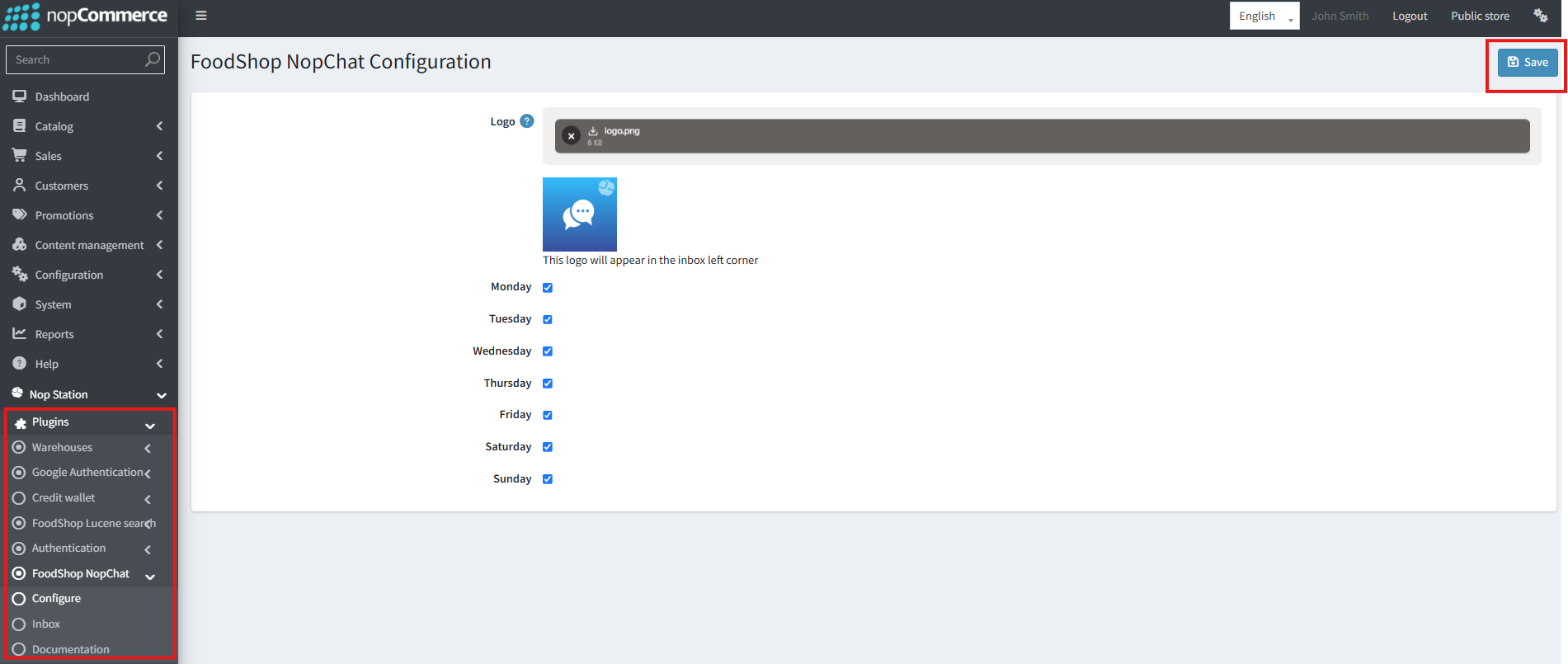
FoodShop NopChat configuration
Chat Logo + OpenOnMonday…Sunday. MegaMenu Enable + HideDefaultMenu + MenuItemPictureSize. QuickView toggles for related/also-purchased/zoom/descriptions/buttons/reviews/manufacturers/availability/delivery/specs/tags.
Theme (FoodShopSettings)
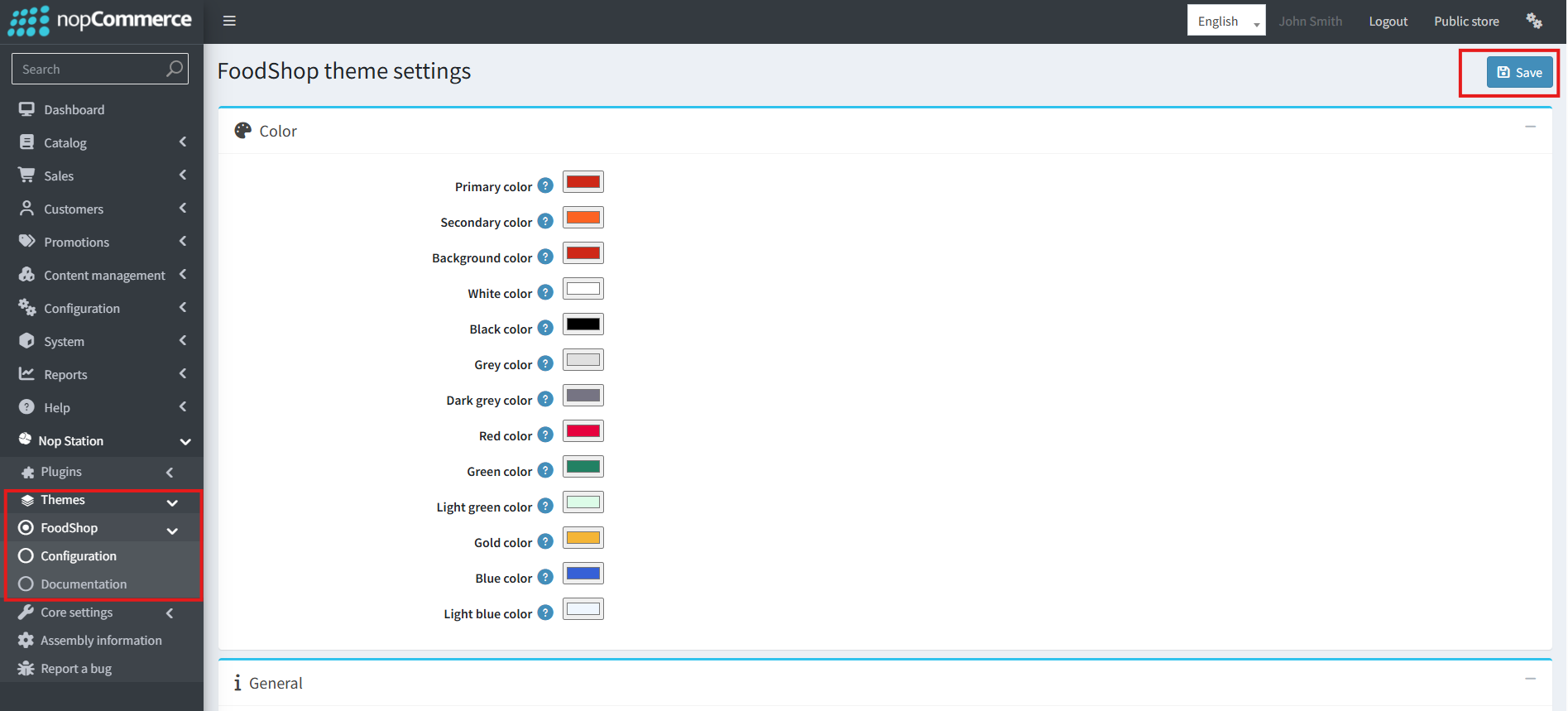
FoodShop theme settings
Color palette; Phone/Instagram/Pinterest; login box; lazy load; sticky header; hide review/buttons; CustomCss; footer contact/logo/cards; hide homepage bestsellers/categories/products; Header menu one/two; Footer description boxes 1–4.
WebApi (WebApiSettings)
EnableJwtSecurity; SecretKey/TokenKey/TokenSecret; CheckIat; TokenSecondsValid; home slider/featured/bestsellers/category/manufacturer rails; price text sizes; Android/iOS version + force + store URLs; Logo; ShowChangeBaseUrlPanel (off prod); theme/gradient colors; ProductBarcodeScanKeyId; AllowCustomersToDeleteAccount.
Lucene (FoodShopLuceneSearchSettings)
IndexDirectory; Fuzzy/Contains/Exact boosts + distances; MultiInstance + Redis*; Search Fields; Delimiters/regex; MaxSearchResults; SignalRKeepAliveMinutes.
CreditWallet
ShowAvailableCreditOnCheckoutPage; ShowInvoicesInCustomerWalletPage; MaxInvoicesToShowInCustomerWalletPage.
Pickup
No ISettings. Warehouse AllowPickup, PickupFee, address/geo/hours.
D2. Q&A
- Quick Bite vs FoodShop? Brand/Figma vs plugin suite.
- MVP plugins? Core + Merchants + OPC + OM + Theme (+ Pickup if needed).
- Multi-store? Yes — use overrides; isolate location/cart.
- No restaurants? Coverage, Active WH, location, serving type.
- Two restaurants in one cart? Not supported by design.
- Split wallet + card? No.
- Pickup hours block checkout? Not guaranteed.
- Missed vs Cancelled? Missed = New SLA fail; Cancelled = stopped/unpaid paths.
- Commission choice? Catalog precedence or UseCommissionRules.
- Cashback needs wallet? Only for transfer-to-wallet.
- API OTP fails? Needs Authentication plugin.
- Android force not iOS? Independent flags.
- Search on farm? Enable Lucene multi-instance + Redis.
- Customer delete? Purge FoodShop PII (verify per plugin).
D3. Glossary, Routes, Tables, Widgets
Glossary
| Term | Admin | Developer |
|---|
| Restaurant | Selling location | MerchantWarehouse |
| Zone | Delivery area | Coverage / delivery group |
| Board | Kitchen screen | Order Status Dashboard + SignalR |
| Rider | Delivery person | DeliveryMan |
| Take rate | Platform cut | Commission calc |
| POD | Proof delivered | Photo/OTP records |
| OPC | One-page checkout | FoodShop OPC plugin |
| Soft dependency | Optional integration | Must not crash if missing |
| Hyperlocal | Geo-limited marketplace | Coverage-scoped discovery |
Public Routes
| Route | Plugin |
|---|
| /merchants, /merchant_shop/{SeName}, /favorites | Merchants |
| /order/checkout | OPC |
| /deliveryman/orders, TrackOrder | OM |
| /deliveryman/tips | Commission |
| /refer-and-earn, /cashback/*, /deal/{id}, … | Promotions |
| /deliveryman/chat | NopChat |
| /wallet/details | CreditWallet |
| api/* | WebApi |
| Merchant/product search | Lucene |
Representative NS_* Tables
- Merchants: NS_MerchantWarehouse, coverage/group, cuisine/brand, reviews, favorites…
- OM: NS_DeliveryMan*, NS_OrderOtp, NS_DeliveryProof, cash…
- Commission: product/category/rule commissions, NS_MerchantOrderInfo, payouts, NS_RiderTip*…
- Shop / Promotions / Chat / MegaMenu / WebApi / Lucene / Wallet: see enterprise spec & migrations.
- OPC / Theme / QuickView / Pickup: mostly settings-driven.
Widget Zones (High Level)
Merchants (account/order/header/address); OM (account/order); OPC (product/footer); Shop (widgetZones.json, ribbons); Promotions (announcement body-start); Chat footer; MegaMenu via WidgetManager; Theme header/footer; Wallet checkout/account.
Schedule Tasks
OM auto miss/cancel + location cleanup; Merchants sync; Lucene rebuild; Commission payout (daily).
D4. Related Docs
| Doc | Path |
|---|
| This complete guide | docs/quickbite_hyperlocal_marketplace_complete_guide.md |
| Enterprise specifications (FS_* test catalog) | docs/foodshop-specifications.md |
| Test report | docs/foodshop-test-report.md |
| Sample install data plan | docs/foodshop-install-sample-data-plan.md |
| Staging screenshots | docs/_staging_screenshots/ (from foodshop.nop-station.site) |
| Coding standards | plugins/AGENTS.md, plugins/AGENTS-SHORT.md |
| Unit / Playwright tests | plugins/src/Tests/NopStation.Plugin.FoodShop.* |
Former split guides (redirect stubs only): quickbite_business_and_domain_guide.md, quickbite_hyperlocal_marketplace_product_publishing.md, quickbite_hyperlocal_marketplace_configuration_handbook.md.
Part E — Enterprise Governance
E1. Capability Model & Maturity
| Level | Capabilities | Typical Plugins |
|---|
| L1 Core | Geo discovery, one-WH cart, checkout, theme | Core, Merchants, OPC, Theme, Pickup optional |
| L2 Ops | Board, riders, POD, cash, auto-miss/cancel | + OrderManagement |
| L3 Monetize & grow | Take rate, tips payout, deals, cashback | + Commission, Promotions, CreditWallet |
| L4 Scale channels | Mobile parity, search farm, chat, merchandising | + WebApi, Lucene(+Redis), NopChat, Shop, MegaMenu, QuickView |
Use this model in SOWs: sell L1+L2 for launch city; add L3/L4 by phase.

Capability maturity
E2. Deployment Topologies
Single-node (pilot / single city)
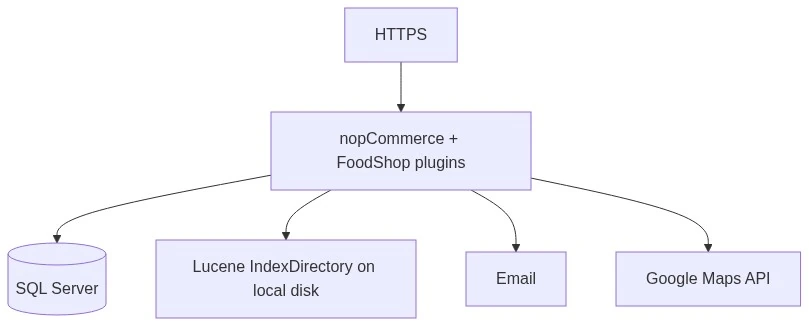
Single-node (pilot / single city)
Multi-node farm (enterprise)
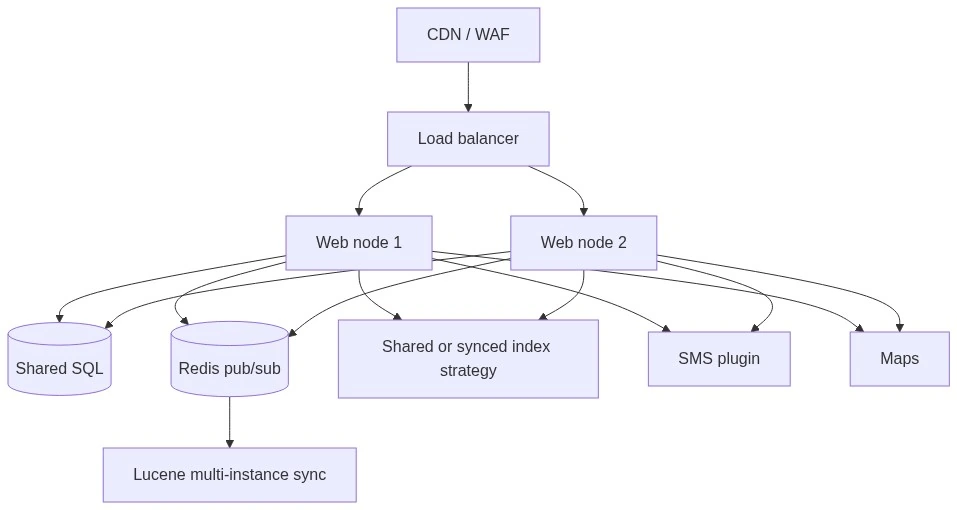
Multi-node farm (enterprise)
Farm requirements: sticky sessions or SignalR backplane as per hosting; Lucene EnableMultiInstanceMode + Redis; durable IndexDirectory; shared secrets for WebApi JWT; store-scoped settings reviewed per node.
Environment Strategy
| Env | Purpose | Data | Force-update / JWT panel |
|---|
| Dev | Feature build | Sample seed OK | Base URL panel may be on |
| Staging | UAT / partner demo | Anonymized or synthetic | Prod-like JWT; force-update off |
| Production | Live city | Live PII | JWT on; change-base-URL off; secrets vaulted |
E3. Non-Functional Requirements (NFR)
Aligned with foodshop-specifications.md:
| ID | Category | Requirement | Evidence |
|---|
| NFR-01 | Performance | Merchant list P95 < 3s (warm) | Perf / Playwright |
| NFR-02 | Performance | Lucene search P95 < 2s | Perf |
| NFR-03 | Performance | OPC confirm P95 < 5s | Perf |
| NFR-04 | Security | Admin/API/rider isolation; JWT on protected API | FS_SEC_* |
| NFR-05 | Reliability | SignalR reconnect; idempotent wallet ops | E2E / review |
| NFR-06 | Observability | Plugin logging toggles; no PII in E2E artifacts | Process |
| NFR-07 | Compatibility | nopCommerce 4.90 / net9.0 | Build |
| NFR-08 | Standards | plugins/AGENTS.md | Code review |
| NFR-09 | Multi-store | Overrides isolate settings/data | FS multi-store |
| NFR-10 | GDPR | Customers delete purges FoodShop PII | FS_GDPR_* |
| NFR-11 | i18n | Locale resources; second language | FS_I18N_* |
| NFR-12 | Design | QuickBite Figma parity (web/mobile) | FS_UI_* |
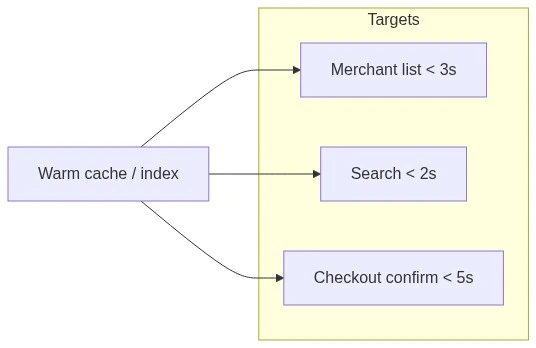
Performance targets
E4. Security & Trust Architecture
| Control | Implementation |
|---|
| Admin ACL | FoodShop *PermissionProvider / ConfigManager |
| Merchant isolation | Own warehouse/orders only |
| Rider isolation | Assigned orders only |
| API | EnableJwtSecurity + NST header; rotate secrets |
| OTP | Email/SMS; length 4–10; requires phone for SMS |
| POD | Photo and/or OTP before Complete |
| Wallet | Full amount only; concurrent spend must be safe |
| App | Independent Android/iOS force-update |
| Logging | Enable Merchants logging in stabilize phase; scrub PII in artifacts |
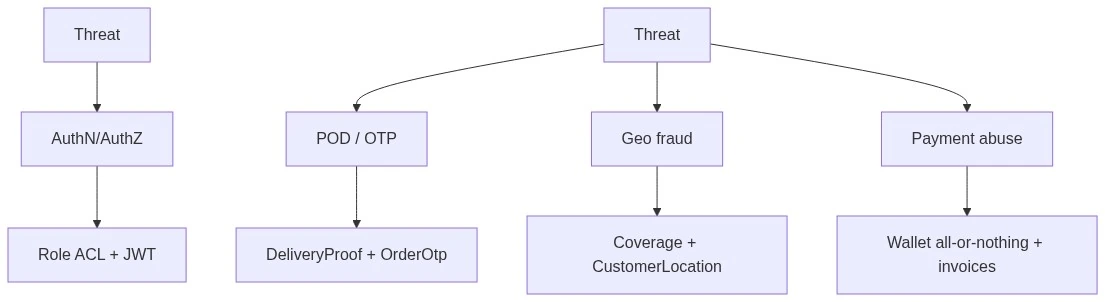
Threat controls
E5. GDPR / PII Map
On customer delete, verify purge or documented retention for:
| Data | Plugin |
|---|
| Wallet, activity, invoices | CreditWallet |
| Chat messages | NopChat |
| Favorites | Merchants |
| CustomerLocation | Merchants |
| Shop subscribers | ShopConfiguration |
| Referral / affiliate mappings | Promotions |
| Delivery-man link | OrderManagement |
| App consent flags | WebApi + Authentication |
WebApi AllowCustomersToDeleteAccount must align with Authentication consent flows.
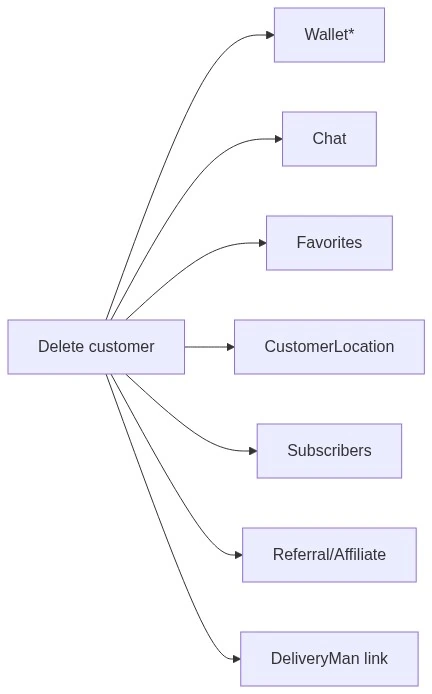
GDPR delete
E6. Multi-Store Enterprise Pattern
Checklist: OPC/Theme/Chat/WebApi/Commission overrides reviewed per store; catalogs isolated; Maps key may be shared or per-store; WebApi theme colors per brand store.
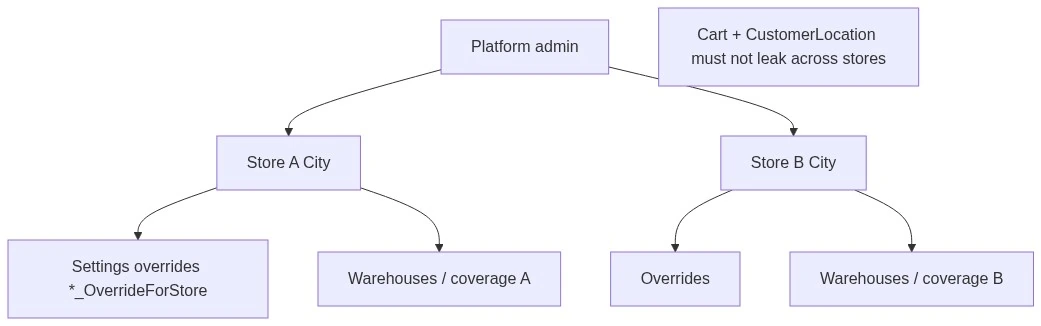
Multi-store enterprise pattern
E7. KPIs & SLA Catalog (Ops)
| KPI | Definition | Typical Target (tune per city) |
|---|
| Coverage fill | % of peak-hour sessions with ≥1 restaurant | ≥ 95% |
| Accept time | New → Processing median | < kitchen SLA (e.g., 5–10 min) |
| Ready time | New → Ready median | Per cuisine class |
| Missed rate | Missed / New | < 2% |
| Delivery Complete rate | Complete / Delivery orders | ≥ 97% |
| POD success | Completed with valid POD when required | ~100% when POD on |
| COD reconciliation lag | Cash collected vs due | Same day |
| Commission accuracy | Sampled order calc vs contract | 100% of samples |
| Search usefulness | Top query has ≥1 result | ≥ 90% |
| App crash / force-update false positive | Incorrect force | 0 |
Map timers: AutoMissed / AutoCancel minutes must match Accept-time KPI.
E8. RACI (Enterprise Roles)
| Activity | Platform Admin | Merchant | Rider | Ops/Dispatch | Dev/SRE | Marketing |
|---|
| Coverage & WH create | A/R | C | I | C | I | I |
| Menu/stock | C | A/R | I | I | I | I |
| OPC / Theme / Shop | A/R | I | I | I | C | C |
| Assign rider / POD policy | A | C | R | R | I | I |
| Commission rates | A/R | I | I | I | C | I |
| Deals / refer-and-earn | A | C | I | I | I | R |
| WebApi JWT / Redis | A | I | I | I | R | I |
| Incident (checkout down) | A | I | I | C | R | I |
R = Responsible, A = Accountable, C = Consulted, I = Informed.
E9. Release & Go-Live Gates
Mandatory before production
- Install order verified; Merchants hub healthy.
- Maps + ≥1 Active WH with stock + coverage.
- Delivery E2E with POD; Pickup E2E if offered.
- Rider isolation + admin ACL spot-check.
- Commission sample calc signed by finance (if L3).
- Lucene rebuild; WebApi JWT secrets not default; change-base-URL off.
- GDPR delete path tested on staging.
- Rollback plan: disable OPC flag / theme / payment method as emergency levers.
- Support runbook (§E10) published.
- P0 FS_TC_* Pass or Blocked+Bug ID in test report.
Normative test IDs and packs: docs/foodshop-specifications.md §§8–9.

Release gates
E10. Support Runbooks (Short)
| Severity | Example | First Actions |
|---|
| Sev-1 | Checkout 500 / no orders | Check site health, OPC enable, payment methods, logs; disable Buy Now/bypass if needed |
| Sev-1 | Empty /merchants city-wide | Maps key, default address, coverage, WH Active |
| Sev-2 | Riders cannot complete | POD mode, OTP email/SMS, phone on order |
| Sev-2 | Commission 0 on payday | EnablePlugin, rates/rules, schedule task |
| Sev-3 | Search stale | Rebuild Lucene; Redis sync on farm |
| Sev-3 | App force-update loop | Align version strings / force flags |
Escalation: L1 Support (handbook Part C) → L2 Implementer (settings) → L3 Engineering (spec + AGENTS).
E11. Integration Landscape
| Integration | Required For | Failure Mode |
|---|
| Maps | Address UX | Autocomplete blank |
| SMTP | OTP email, order mail | OTP email silent |
| SMS plugin | OTP SMS | Silent OTP if misconfigured |
| Authentication | App phone OTP | Graceful fail on SendOtp |
| Redis | Lucene multi-node | Stale search across nodes |
| Payment methods | Checkout | Cannot confirm |

Integration landscape
E12. Data & Domain ER (Conceptual)
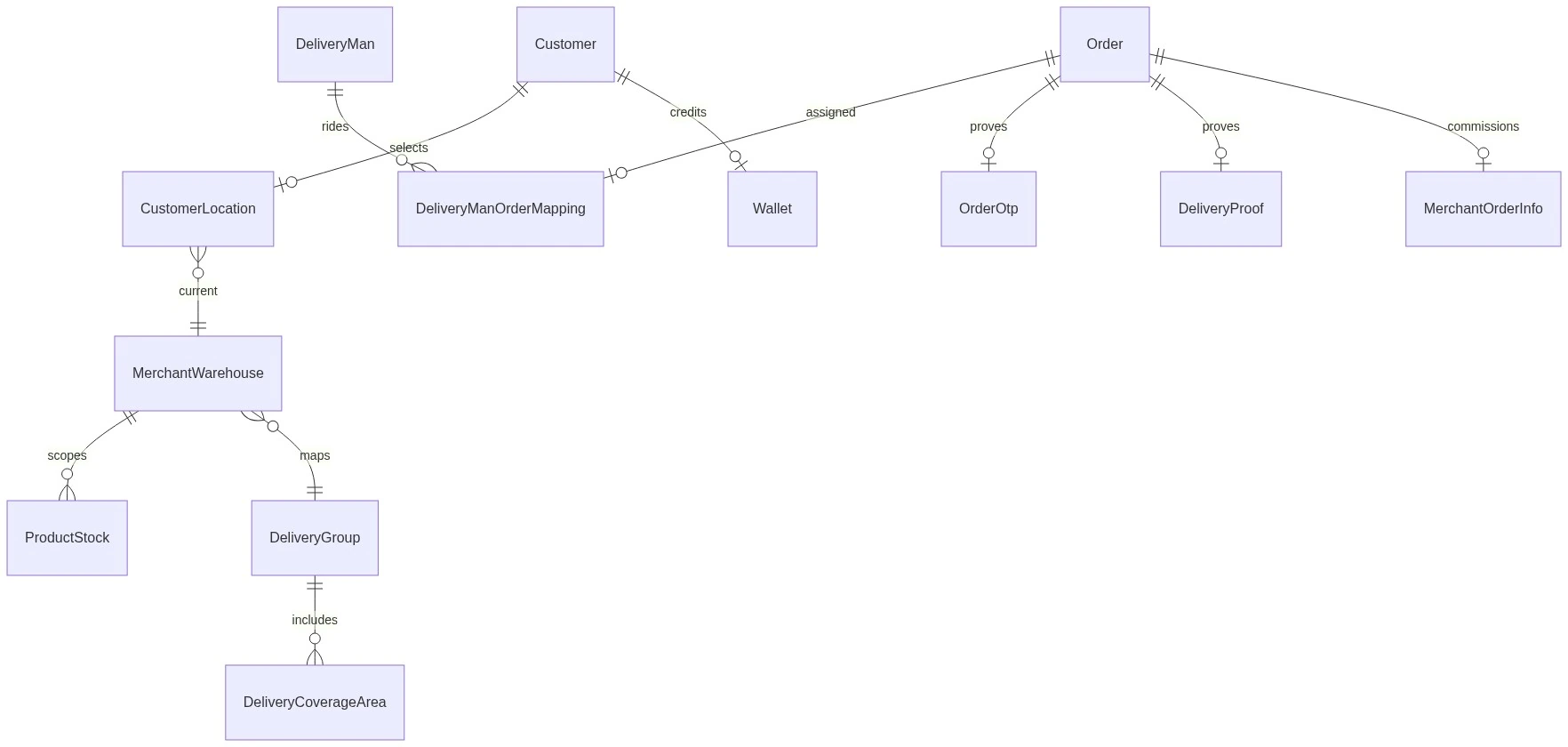
Conceptual ER
E13. Wallet & Promotions Cashflow
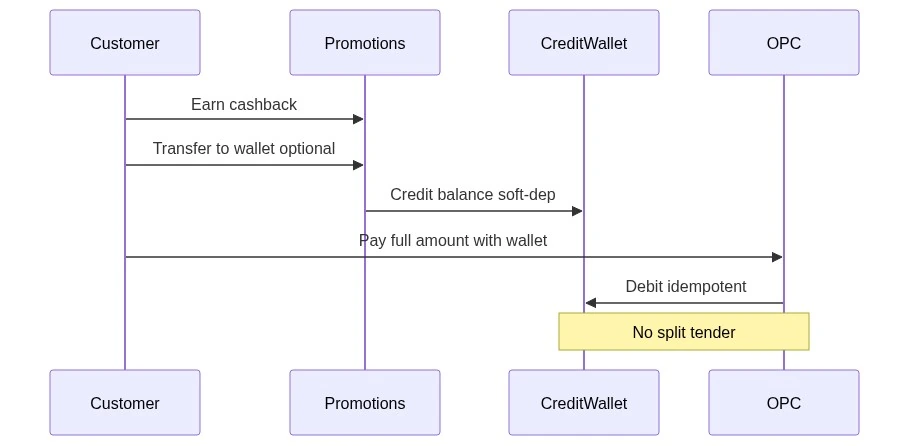
Wallet & promotions cashflow
E14. Lucene Multi-Instance
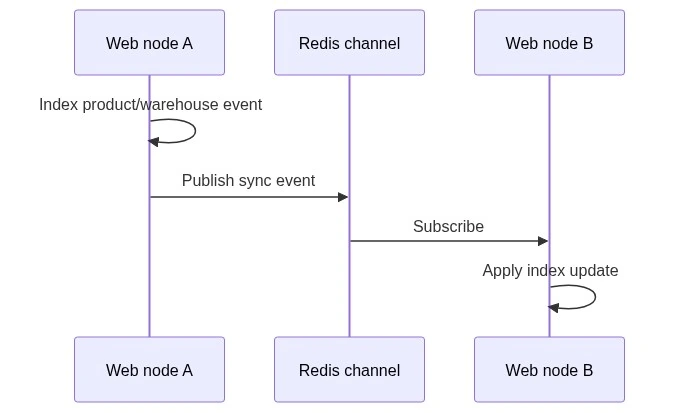
Lucene multi-instance (Redis sync)
E15. Diagram Gallery Index
| Diagram | Location |
|---|
| Money flow | A1 |
| Value chain | A1 |
| Commission decision | A3 |
| Tip vs food | A3 |
| Geo eligibility | A4 |
| Merchant onboarding | A4 |
| Order state machine | A5 |
| Plugin dependencies | B2 |
| System context / sequences | B4 |
| SignalR / security zones | B4 |
| Capability maturity | E1 |
| Single vs farm deploy | E2 |
| Perf targets | E3 |
| Threat controls | E4 |
| GDPR delete | E5 |
| Multi-store | E6 |
| Release gates | E9 |
| Integrations | E11 |
| Conceptual ER | E12 |
| Wallet sequence | E13 |
| Lucene Redis sync | E14 |
E16. Change Management
| Change Type | Process |
|---|
| Settings / content | Admin change + UAT checklist; no code release |
| Plugin version upgrade | Staging install order → migrate → FS_TC P0 → prod |
| Contract take-rate change | Finance sign-off → Commission rates → sample orders |
| Breaking API | Bump Android/iOS version + force-update with store URLs |
| Spec / AC change | Update foodshop-specifications.md + test report |
Part F — Persona Playbooks ("I am a…")
Use this part as training / onboarding. Each section: who you are → what you can do → step-by-step → FAQ → training checklist.
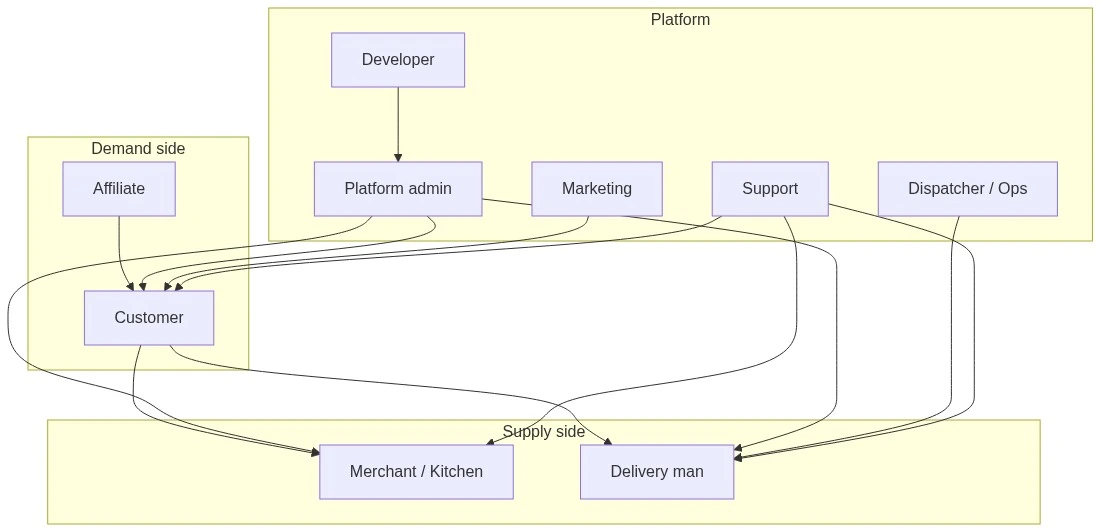
Persona ecosystem — demand side, platform, supply side
F1. Customer Playbook
Who You Are
You order food from nearby restaurants on the website or mobile app. You do not use the admin panel.
What You Can Do
| Goal | Where |
|---|
| Set delivery location | Home / location picker (Maps) |
| Browse restaurants | /merchants |
| Open a restaurant menu | /merchant_shop/{SeName} |
| Favorite restaurants | /favorites (+ heart toggle) |
| Search | Store search / Lucene-powered search |
| Checkout | One-page checkout /order/checkout |
| Tip rider / note to kitchen | On checkout (Delivery tip; notes always when enabled) |
| Pay with wallet | Checkout + /wallet/details |
| Track order | Order details → Track Order |
| Refer friends | /refer-and-earn (when enabled / approved) |
| Cashback | /cashback/history (+ transfer to wallet if enabled) |
| View deals | /deal/{id} · announcement banners |
| Chat | Chat widget on merchant pages (when open hours) |
| Reviews | After orders — my merchant reviews |
Delivery Order (Step-by-Step)

Customer delivery order flow
- Open the store → set your address / pin (must be in a delivery zone).
- Choose serving type Delivery.
- Open /merchants → pick a restaurant → add items (you order from one restaurant at a time).
- Go to checkout → confirm address → choose payment → optional tip and notes to restaurant.
- Place order → watch status (accepted → cooking → on the way).
- When the rider arrives, share OTP or allow photo proof if the platform requires it.
- Optional: favorite the restaurant, leave a review, check cashback.
Pickup Order
- Choose Pickup.
- Select a restaurant that allows pickup.
- Checkout selects the restaurant as the pickup point.
- Pay → go to the restaurant → collect (no rider).
Mobile App Notes
- App may require update (force-update).
- Sign-in may use phone OTP.
- Same flows as web via FoodShop API.
Customer FAQ
| Question | Answer |
|---|
| Why don't I see restaurants? | Address outside delivery zone, or try Pickup. |
| Why can't I mix two restaurants? | Each cart is one restaurant's kitchen. |
| Why did wallet payment fail? | Wallet must cover the full total (no partial wallet + card). |
| Where is my OTP? | Email and/or SMS — check spam; tell rider the code. |
| Can I chat? | When chat is open that weekday and you're logged in on a merchant page. |
Training Checklist (Customer Success / UAT)
- Place Delivery order end-to-end
- Place Pickup order
- Tip appears on Delivery checkout
- Track Order updates
- Favorites add/remove
- Wallet pay (if enabled)
- Refer / cashback pages open (if enabled)
F2. Merchant / Kitchen Playbook
Who You Are
You run a restaurant (warehouse) on the marketplace. You use the admin site with the Merchants role — usually only at your restaurant.
What You Can Do (Typical)
| Can | Cannot (Platform Admin Only) |
|---|
| Edit own warehouse (hours, fees, Active, AllowPickup/Shipping/DineIn) | Global Configuration Merchants (Maps key, defaults) |
| Coverage / delivery groups for own scope | Create global cuisines / review questions |
| Manage own products / stock | Global commission rates/rules |
| Order Status Dashboard (accept, process, ready, assign rider) | Order Management Configure (POD/SLA timers) |
| Delivery men (if permitted) | Promotions platform config / create all deals |
| Cash collection for own orders | Process all pending payouts marketplace-wide |
| Own ribbon / shop widgets (carousel, slider, tabs) | Full merchant ribbon admin for all restaurants |
| Participate in deals | Affiliate admin |
| View order commission / rider payout lists (scoped) | Change take-rate % for the whole platform |
| Chat with customers (APIs/widget) | NopChat admin configure |
Kitchen Board Flow

Kitchen board flow
- Sign in to admin → Order status dashboard.
- When New appears → accept → Processing while cooking.
- Mark Ready when bag is packed.
- Delivery: ensure a rider is assigned (you or dispatcher).
- Pickup: give the order to the customer when they arrive.
- Keep stock updated; wrong stock = customer complaints.
- Answer chat if a customer asks about the order.
- Check payout / commission lines for your orders (not global %).
Merchant FAQ
| Question | Answer |
|---|
| Customers don't see me | Ask platform: Active? Coverage? AllowShipping/Pickup? In zone? |
| Order went Missed | You didn't accept New in time — contact ops to tune SLA. |
| Why is my payout less than order total? | Platform commission + tips go to riders, not kitchen. |
| Can I change the 15% take rate? | No — platform admin sets rates. |
Training Checklist
- Login as merchant → see only own WH
- Update hours / AllowPickup
- Move a test order New → Ready
- Assign or see rider
- Update one product stock
- Open deal participation (if used)
F3. Rider Playbook
Who You Are
You are a delivery man. You use the public store (not full admin) after the platform links your customer account as a delivery man (Verified + Available).
Screens
| Screen | URL / Action |
|---|
| My orders | /deliveryman/orders |
| Order detail | /deliveryman/orders/{orderId} |
| Complete with photo | Upload proof |
| Complete with OTP | Enter customer OTP |
| Tips | /deliveryman/tips |
| Chat | /deliveryman/chat |
| Availability / location | Toggle availability; location sharing / GPS APIs |
Delivery Run (Step-by-Step)

Rider delivery run
- Log in → set Available.
- Open /deliveryman/orders — you only see your assignments.
- Go to restaurant when order is Ready → pick up.
- Navigate to customer; keep location sharing on if required.
- Complete with photo and/or OTP (as configured). Wrong OTP = rejected.
- Check /deliveryman/tips for tip history.
- Use /deliveryman/chat if customer/merchant messages you.
Note: Recording COD cash into Cash collection is typically done by admin/merchant, not on the rider public menu.
Rider FAQ
| Question | Answer |
|---|
| Empty order list | Not assigned / not Verified / not Available. |
| Cannot complete | POD required — photo or OTP missing. |
| Don't see other riders' jobs | By design (security). |
Training Checklist
- Verified + Available
- Complete one OTP delivery
- Complete one photo delivery (if mode allows)
- Tips page loads
- Cannot open another rider's order
F4. Platform Admin / Dispatcher Playbook
Who You Are
You own the marketplace: zones, restaurants, settings, take rates, riders, SLA, theme, apps.
Daily Ops (Dispatcher)
- Morning: Maps OK, key WH Active, riders Available.
- Watch the Order status dashboard for new backlog.
- Assign riders when Ready.
- Chase Missed/Cancelled spikes → tune timers or staffing.
- Afternoon: COD Cash collection reconciles.
- Payday: commission / payout queues.
Setup (First Time)
Follow Part C (install → day-zero → Merchants → OPC → OM → Theme). Enterprise gates: Part E release checklist.
Admin FAQ
See Part D Q&A and Part C for troubleshooting.
Training Checklist
- Day-zero path complete
- Create WH + coverage + stock
- Create rider
- Delivery + Pickup smoke tests
- POD email OTP works
- ACL: merchant cannot open commission Configure
F5. Affiliate / Refer-and-Earn Playbook
Who You Are
You drive traffic and may earn affiliate / referral rewards.
| Goal | URL |
|---|
| Apply / affiliate info | /affiliate-info |
| Refer-and-earn (approved) | /refer-and-earn |
| Share link / code | As shown on refer page |
Platform admin manages affiliates and commissions in FoodShop Promotions admin. Note: An /affiliatedorder/history route may exist in routing; confirm the Orders action is implemented in your build before promising order-history UI.
Affiliate FAQ
| Question | Answer |
|---|
| Can't open refer-and-earn | Need approved/active affiliate (or feature off). |
| When do I earn? | Per promotions rules (first-order friend reward; max orders for commission). |
F6. Marketing Playbook
Who You Are
You run growth: banners, deals, cashback, refer program, homepage merchandising — without changing geo/take-rate engineering.
| Lever | Where to Configure |
|---|
| Announcement / deals banners | FoodShop Promotions + Announcement Banner |
| Deals | Deals admin; merchants participate |
| Refer-and-earn | Promotions Configure |
| Cashback rules | Cashback admin |
| Homepage sliders/carousels | Shop Configuration |
| Header shortcuts / theme | FoodShop Theme |
| Ribbons ("free delivery") | Shop merchant ribbons |
Remember: every promo costs margin — agree funding with finance (Part A money).
Training Checklist
- Publish one deal + banner
- Refer-and-earn amounts set
- Homepage slider live
- Cashback→wallet only if CreditWallet installed
F7. Developer Quick Start
Who You Are
You change FoodShop plugins safely under nopCommerce 4.90 / AGENTS standards.
- Read A8 invariants — do not break warehouse scope, coverage, status Ids, wallet split, soft deps.
- Map feature → plugin (A8 table).
- Follow plugins/AGENTS.md (no EF, thin controllers, FluentMigrator, permissions).
- Install order Part C; never reverse hard dependencies.
- Add/adjust FS_* cases in foodshop-specifications.md; evidence in test report.
- Unit:
dotnet test …FoodShop.Tests · E2E: Playwright project. - UI changes: QuickBite Figma + Figma MCP.
- Farm search: Lucene multi-instance + Redis (Part E).

Developer workflow — feature request to release gate
F8. Support Playbook
Who You Are
You help customers, merchants, and riders. You change settings only with admin rights; you escalate code bugs to engineering.
| Caller | First Questions | Likely Fix Area |
|---|
| Customer — no restaurants | Address? Serving type? | Coverage / Active WH |
| Customer — checkout old UI | — | Enable OPC |
| Customer — wallet failed | Full balance? | All-or-nothing wallet |
| Merchant — Missed orders | Accept time? | SLA timers / staffing |
| Merchant — invisible | Active? Coverage? | Merchants config |
| Rider — can't complete | Photos/OTP? | POD mode / SMS-email |
| Rider — empty list | Assigned? Available? Verified? | Delivery man record |
Severity table: Part E10. Config deep-dive: Part C.
Support Training Checklist
- Reproduce customer "no restaurants" with map
- Know Missed vs Cancelled
- Know tip ≠ merchant payout
- Escalate Sev-1 using E10
F9. Persona → Document Map (Quick)
| Persona | Must-Read Sections |
|---|
| Customer | F1 · A4 · A5 (status meanings) |
| Merchant | F2 · A5 · A6 merchant day |
| Rider | F3 · A5 |
| Admin / Ops | F4 · Part C · Part E |
| Affiliate | F5 · A3 promotions |
| Marketing | F6 · A3 · C5 promos/shop |
| Developer | F7 · A8 · B2 · E |
| Support | F8 · C6 · D2 · E10 |
| Sales / Exec | A1–A3 · B1 · E1 · E7 |
F10. Cross-Persona Communication Diagram
When chat is enabled, Customer ↔ Merchant ↔ Rider ↔ Admin can message on open weekdays (customer widget) or /deliveryman/chat (rider).
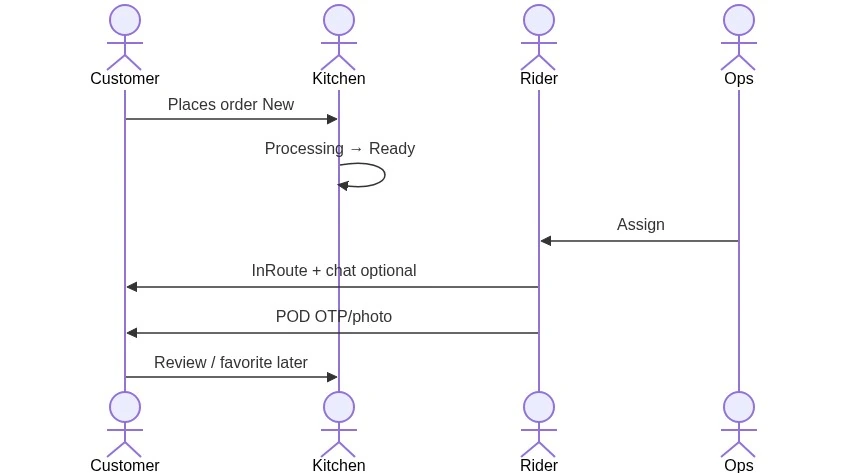
Cross-persona communication
Part G — Annexes (Recommended Extras)
G1. Visual Training (Figma + Staging)
Design Mockups (Customer UX)
| Persona / Screen | Surface | Figma |
|---|
| Customer home / browse | Web | QuickBite web (892:2312) |
| Customer mobile | Mobile | QuickBite mobile (0:1) |
| Merchant shop / cards | Web+Mobile | Same file — search frames for restaurant / menu |
| Checkout / tracking | Web+Mobile | Same file — checkout & order status frames |
Trainers: open Figma for browse → cart → checkout; side-by-side with Part F. UI QA: Figma MCP + FS_UI_*.
Live Staging (Admin + Public Not in Mockup)
Source: https://foodshop.nop-station.site/. Optional capture folder: docs/_staging_screenshots/ (add images yourself — do not embed in this doc). Regenerate helper: plugins/src/Tests/NopStation.Plugin.FoodShop.E2E/scripts/capture-staging-screenshots.mjs.
Public Storefront — Capture Checklist
| Screen | Path | Suggested File |
|---|
| Theme homepage | / | 01-home.png |
| Restaurant list | /merchants | 02-merchants.png |
| Merchant shop | /merchant_shop/{SeName} | 12-merchant-shop.png |
| Favorites | /Favorites | 03-favorites.png |
| Login (email → Continue → password) | /login | 04-login.png |
| Cart | /cart | 05-cart.png |
| Search | /search | 06-search.png |
Auth-gated (need customer/rider session): /wallet/details, /cashback/history, /refer-and-earn, /deliveryman/orders (07–11).
Admin (Not in Figma) — Capture Checklist
| Screen | Path | Suggested File |
|---|
| Admin dashboard | /Admin | a01-admin-dashboard.png |
| Warehouses list | /Admin/Warehouse/List | a02-warehouse-list.png |
| Merchants / Warehouse configure | /Admin/Warehouse/Configure | a03-warehouse-configure.png |
| Order status dashboard | /Admin/OrderStatusDashboard/Dashboard | a04-order-status-dashboard.png |
| OM configure | /Admin/OrderStatusDashboard/Configure | a05-om-configure.png |
| One Page Checkout | /Admin/FoodshopOpc/Configure | a06-opc-configure.png |
| Merchant Commission | /Admin/MerchantCommission/Configure | a07-commission-configure.png |
| Shop Configuration | /Admin/Shop/Configure | a08-shop-configure.png |
| Promotions | /Admin/FoodShopPromotions/Configure | a09-promotions-configure.png |
| NopChat | /Admin/FoodShopNopChatAdmin/Configure | a10-nopchat-configure.png |
| Smart Mega Menu | /Admin/SmartMegaMenu/Configure | a11-megamenu-configure.png |
| Quick View | /Admin/FoodShopQuickView/Configure | a12-quickview-configure.png |
| FoodShop Theme | /Admin/FoodShop/Configure | a13-theme-configure.png |
| Web API | /Admin/WebApi/Configure | a14-webapi-configure.png |
| Lucene Search | /Admin/FoodShopLuceneSearch/Configure | a15-lucene-configure.png |
| Credit Wallet | /Admin/CreditWallet/Configure | a16-wallet-configure.png |
| Plugins list | /Admin/Plugin/List | a17-plugins-list.png |
| Orders list | /Admin/Order/List | a18-orders-list.png |
| Customers | /Admin/Customer/List | a19-customers-list.png |
| Message templates | /Admin/MessageTemplate/List | a20-message-templates.png |
Notes from Staging
- Staging login is multi-step (Email → Continue → Password → Continue); /Admin/Login is not used (404 theme page).
- FoodShop admin menus live under Nop Station → Plugins.
- Order Status Dashboard cards: New / In Progress / Delivered / Missed.
- OPC shows Enable rider tip UI + Enable notes to restaurant UI.
- Sample merchant shop: warehouse-1-new-york (Burger Express) — catalog may still include demo non-food SKUs.
G2. Email / SMS Message Templates
FoodShop-Installed Email Templates (Order Management)
| System Name | Subject (default) | When Sent | Key Tokens |
|---|
| Dashboard.OrderStatusUpdate.Notification | Your order has been %Order.Status% | Status changes (missed/cancel notes, etc.) | %Order.Status%, %Order.OrderNote%, %Order.OrderNumber%, %Order.OrderURLForCustomer%, billing/shipping tokens, %Order.Product(s)% |
| Dashboard.OrderOtp.Notification | Your Delivery OTP Code - Order %Order.OrderNumber% | OTP generated for POD | %Order.OtpCode%, %Order.CustomerFullName%, %Order.OrderNumber% |
Admin path: Configuration → Email accounts (SMTP) · Content management → Message templates → search Dashboard.Order.
SMS OTP
- Not a nopCommerce message template — sent via Active SMS plugin (ActiveSMSPluginSystemName) when Send OTP via SMS is on.
- Requires customer/order phone.
- Test: place Delivery order → trigger OTP → check SMS gateway logs.
Other Notifications
| Channel | Source | Notes |
|---|
| Shop campaign emails | ShopConfiguration subscriber campaigns | Merchant/admin compose; uses workflow mail |
| Core order placed / paid | nopCommerce built-in templates | Still apply alongside FoodShop |
| Chat | SignalR real-time | Not email by default |
Ops checklist: SMTP works → both Dashboard templates Active → OTP email received → (optional) SMS plugin configured.
G3. Mobile API Samples (JWT / NST)
When Enable JWT security is on, protected APIs expect header NST = JWT string signed with TokenSecret, containing claim NST_KEY = configured TokenKey. Optional iat claim validated against TokenSecondsValid when Check Iat is on.
Generate a Sample NST Token (Node Example)
// npm i jsonwebtoken
const jwt = require('jsonwebtoken');
const tokenSecret = process.env.FOODSHOP_TOKEN_SECRET; // WebApi TokenSecret
const tokenKey   = process.env.FOODSHOP_TOKEN_KEY;     // WebApi TokenKey
const nst = jwt.sign(
  { NST_KEY: tokenKey, iat: Math.floor(Date.now() / 1000) },
  tokenSecret,
  { algorithm: 'HS256' } // match JwtHelper used by the plugin
);
console.log(nst);
(Confirm algorithm with your JwtHelper implementation if HS256 fails.)
Sample Calls
POST /api/appstart HTTP/1.1
Host: your-store.example
Content-Type: application/json
NST: {paste-jwt-here}
DeviceId: {stable-device-guid}

{
  "Data": {
    "AppVersion": "1.0.0",
    "SubscriptionId": ""
  }
}
GET /api/merchants HTTP/1.1
Host: your-store.example
NST: {paste-jwt-here}
DeviceId: {stable-device-guid}
# Bash sketch (set env vars first)
curl -s -X POST "https://your-store.example/api/appstart" \
  -H "Content-Type: application/json" \
  -H "NST: $NST" \
  -H "DeviceId: $DEVICE_ID" \
  -d '{"Data":{"AppVersion":"1.0.0"}}'
Common failures: 401 → missing/invalid NST, wrong TokenKey/Secret, expired iat, or JWT security on while client sends none. Phone OTP endpoints need Authentication plugin.
Prefixes: api/appstart, api/home, api/merchants, api/catalog, api/product, api/shoppingcart, api/checkout, api/order, api/customer, api/deal, api/chat, …
G4. i18n / Second-Language Checklist
| Step | Action | Done |
|---|
| 1 | Admin → Languages → add second language; publish | [ ] |
| 2 | Confirm FoodShop resources installed (Admin.NopStation.* / Plugins.NopStation.*) for default language | [ ] |
| 3 | Export/import or translate critical strings: merchants list, OPC, order statuses, rider POD, wallet | [ ] |
| 4 | Switch storefront language → /merchants, checkout, Track Order strings change | [ ] |
| 5 | Admin UI second language (optional) for merchant users | [ ] |
| 6 | Message templates: duplicate/localize OTP + status subjects/bodies per language | [ ] |
| 7 | WebApi string resources / app copy for both languages | [ ] |
| 8 | Figma/design: RTL only if market requires (not default FoodShop) | [ ] |
NFR-11 in Part E: second language switches UI strings — verify with FS_I18N_* in the enterprise spec.
G5. Backup / Disaster Recovery (DR)
What to Back Up
| Asset | Why |
|---|
| SQL database | Orders, WH, commissions, wallets, settings |
| Lucene IndexDirectory | Or accept full rebuild after restore |
| App_Data / plugin wwwroot uploads | Pictures, theme assets |
| WebApi secrets / Maps / SMS keys | Prefer vault; never only in DB backups without encryption |
| appsettings / hosting config | Connection strings, Redis |
RPO / RTO Guidance (Tune with IT)
| Tier | RPO | RTO | Notes |
|---|
| Pilot | ≤ 24h | ≤ 8h | Nightly DB backup |
| City production | ≤ 1h | ≤ 2h | Hourly DB + geo-redundant storage |
| Multi-city farm | ≤ 15m | ≤ 1h | Always-on replica + Redis HA |
Restore Drill (Quarterly)
- Restore DB to staging.
- Point staging appsettings at restored DB.
- Rebuild Lucene index.
- Smoke: /merchants, OPC, one Delivery order, API appstart.
- Record time-to-green as actual RTO.
Failover Levers (No Full Restore)
- Disable OPC → emergency fallback to core checkout (degraded UX).
- Disable payment method / wallet.
- Force-update mobile to known-good build.
- Scale out web nodes; enable Lucene Redis sync if search skew.

Failover / recovery sequence
G6. Commercial SOW / Packaging Annex
Use Part E capability levels in proposals (illustrative packaging — not a price list):
| Package | Includes | Typical Plugins |
|---|
| QuickBite Launch (L1+L2) | Geo marketplace, OPC, kitchen board, riders, POD, theme | Core, Merchants, OPC, OM, Theme, Pickup optional |
| QuickBite Grow (L3) | + take rate, tips payout, deals, cashback, wallet | + Commission, Promotions, CreditWallet |
| QuickBite Omnichannel (L4) | + mobile API, search, chat, shop widgets | + WebApi, Lucene, NopChat, Shop, MegaMenu, QuickView |
| Add-ons | Multi-store cities, Redis farm, SMS OTP, Figma UI QA, training | Infra + services |
SOW must-state exclusions (from Part B limits): no split wallet tender; pickup hours not hard-enforced by default; commission reverse-on-refund not assumed; FixedByWeight shipping package review-only.
Acceptance: Part E9 gates + Part F training checklists signed by customer UAT lead.
G7. Document Changelog
| Version | Date | Summary |
|---|
| 1.0 | 2026-07-23 | Merged business + product + config into complete guide |
| 2.0 | 2026-07-23 | Enterprise Part E (NFR, security, DR-ready ops, diagrams) |
| 2.1 | 2026-07-23 | Part F persona playbooks (customer → support) |
| 2.2 | 2026-07-23 | Part G annexes: Figma visuals, templates, API samples, i18n, DR, SOW, changelog |
| 2.3 | 2026-07-23 | G1 staging captures from foodshop.nop-station.site (public + admin outside Figma) |
Complete guide v2.3 — Parts A–G. Spec/test catalogs remain in docs/foodshop-specifications.md.


