
Never Miss a nopStation Update
Enable notifications for new plugins, updates, and exclusive offers from nopStation.

Discovering nopStation plugins just got easier. Browse, filter and install nopStation products directly from your nopCommerce Admin area — without switching tabs to find the right plugin.
Available through the nopStation Core plugin, starting with nopCommerce 4.90.
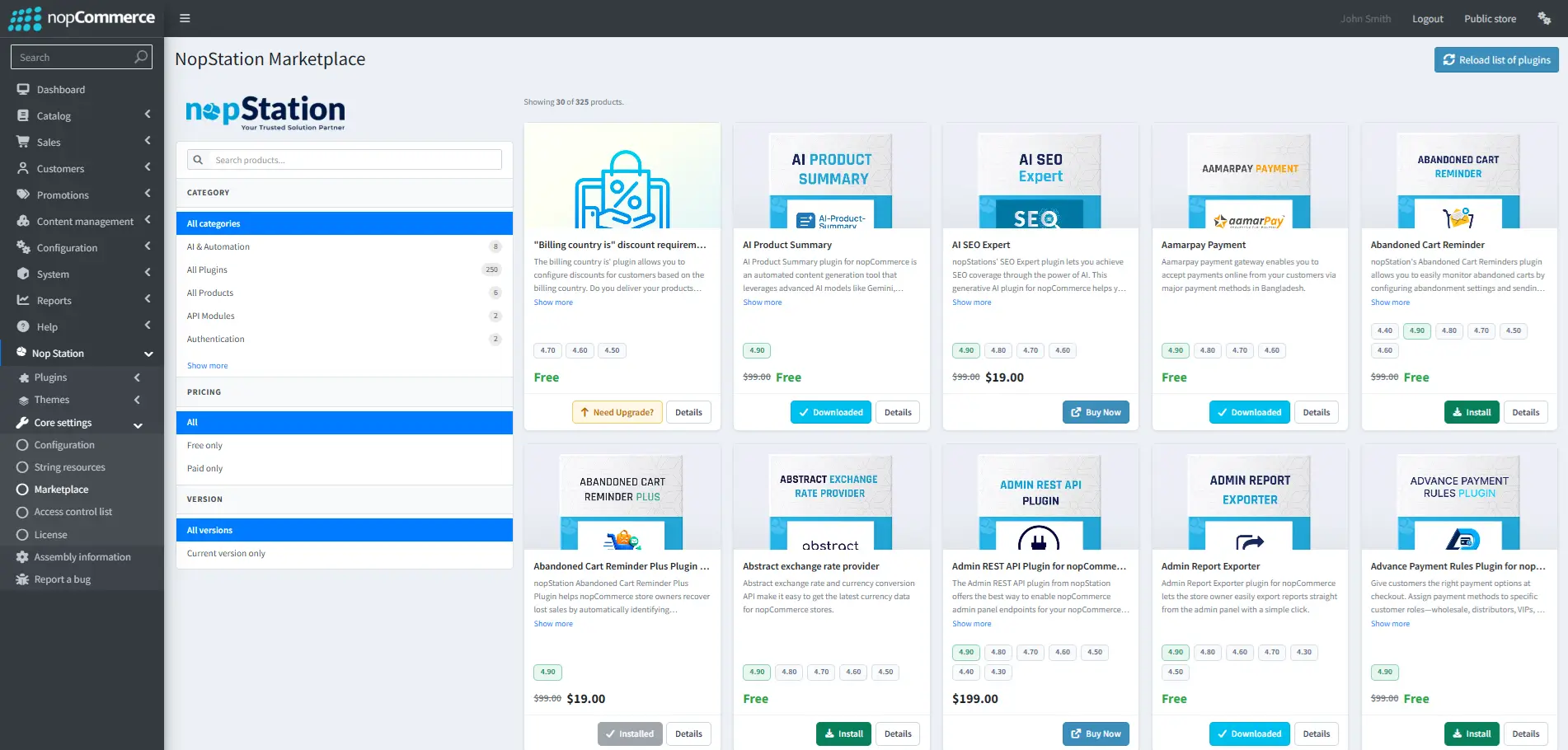
nopStation Marketplace is a new, built-in way to discover nopStation plugins without ever leaving your nopCommerce Admin area. It is provided through the nopStation Core plugin.
Starting with nopCommerce 4.90, nopStation customers will have access to the nopStation Marketplace through the nopStation Core plugin. This is the beginning of the Marketplace experience — more capabilities will be added over time.
Everything you need to find the right plugin is built into the Marketplace screen — no external catalogue, no separate account to check.
Search across the nopStation catalogue by plugin name or keyword to quickly land on the product you need.
Explore products grouped by category, so you can see everything nopStation offers for a given area of your store.
Narrow the catalogue down to free plugins, premium products, or both — depending on what you are looking for.
Filter products by supported nopCommerce version, so you only see what will actually work with your store.
Every listing shows a clear description and pricing, so you know exactly what a plugin does before you act on it.
Downloaded and installed products are clearly marked, so you always know what is already part of your store.
Eligible free plugins can be installed directly from the Marketplace — no download, no manual upload.
Selecting Install adds the plugin to your store immediately, and the listing updates to show it is installed.
Ready to install directly from the Marketplace.
Example listing showing how a free nopStation product appears in the Marketplace. Show more
Premium nopStation products can be explored in full detail from inside the Marketplace, right up to the point of purchase.
Premium listings show Details and Buy Now instead of Install. Premium products are not installed directly from the Marketplace — they require purchasing and licensing first.
Review details, then purchase and license to install.
Example listing showing how a premium nopStation product appears in the Marketplace. Show more
Every product shows which nopCommerce versions it supports, so you know it will work before you install or buy it.
Filter by your nopCommerce version to see only compatible products — no manual checking required.
Bringing product discovery into nopCommerce Admin changes how you find and adopt nopStation plugins.
Four steps between where you are today and browsing the Marketplace inside your own store.
Make sure a compatible version of the nopStation Core plugin is installed and up to date on your nopCommerce store.
Find nopStation Marketplace from your nopCommerce Admin area, right where the nopStation Core plugin lives.
Look for what you need by keyword, category, pricing or supported nopCommerce version.
Install eligible free plugins directly, or explore and purchase premium products.
Update your nopStation Core plugin and discover nopStation plugins directly from your nopCommerce Admin area.
Explore nopStation Plugins
Enable notifications for new plugins, updates, and exclusive offers from nopStation.