
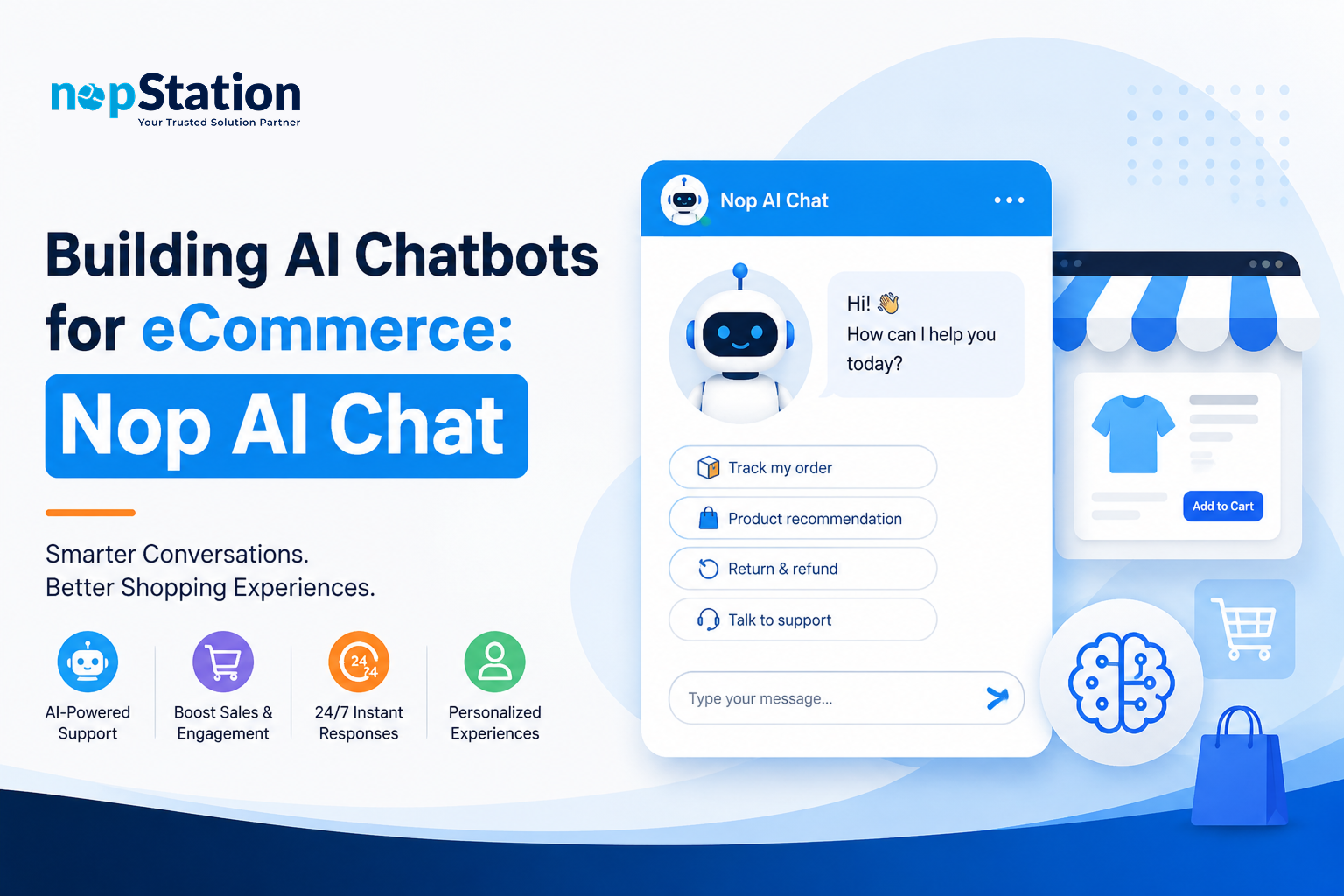
Running customer support around the clock is expensive. Shoppers want fast, accurate answers, and a growing business cannot always staff for that. Most stores end up either overspending on agents or leaving customers waiting. The AI chatbot for eCommerce built into nopStation's Nop AI Chat plugin is designed to fix exactly that.
Nop AI Chat connects OpenAI's GPT models directly to your nopCommerce storefront. It handles routine queries about products, orders, shipping, and promotions without any human involvement, day or night. This article covers how the plugin works, what it costs to run, and how to get the most out of it.
Why AI Chatbots Are Essential for Modern eCommerce
What the numbers show
The business case for AI-powered support is not theoretical. Research from Zendesk and Forrester shows that a majority of online shoppers now expect immediate answers at the point of purchase. IBM and Gartner put the potential support cost reduction from AI chatbot deployment at 30% or more. Stores with live chat report measurable lifts in both customer satisfaction and conversion.
Where traditional support breaks down
Email tickets take hours. Phone queues frustrate buyers mid-decision. Rule-based bots hit a wall the moment a question falls outside their script. AI chatbots powered by large language models (LLMs) work differently. They parse natural language, pull accurate product and order data, and improve as they handle more conversations.
For nopCommerce merchants, adding this kind of intelligence has historically meant months of custom development work. Nop AI Chat removes that barrier.
Introducing Nop AI Chat: nopCommerce's AI customer service plugin
What Nop AI Chat actually is
Nop AI Chat is a plug-and-play generative AI plugin built exclusively for nopCommerce. It was developed by nopStation, a nopCommerce Gold Partner and AI-driven eCommerce company, and it adds a full conversational AI assistant to your store without any custom development.
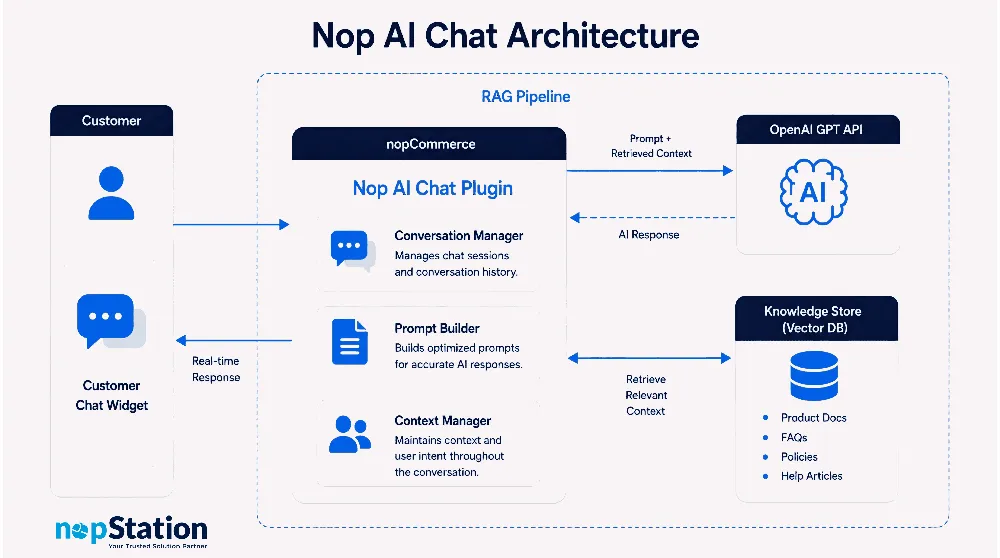
The plugin connects to OpenAI's GPT models and can pull from your own knowledge bases: product docs, FAQs, return policies, anything you want the bot to know. That means it answers questions about products, orders, shipping, and promotions with your information, not generic guesses.
Key Features at a Glance
- Seamless integration into nopCommerce - No need to alter your current workflow in any way.
- OpenAI-powered responses - Answers obtained using the Open AI API can be applied to any frequently asked questions on your website, including but not limited to product-related queries, order processing, shipment tracking, and discount systems.
- Custom knowledge sources - you supply URLs (product docs, help articles, FAQs) and the plugin grounds every answer in your official content.
"Nop AI Chat is defined as a nopCommerce-native AI customer service plugin that connects OpenAI's GPT models to your storefront knowledge base, delivering context-aware support responses 24/7 without human agents."
Key features of Nop AI Chat
1. AI reply messages
This plugin relies heavily on large language models to generate natural sounding, fluent, and easily intelligible responses to questions posed to it. This means that asking one question and then another question after is effectively asking both questions together.
2. Custom knowledge source integration
You will provide URLs as a knowledge source. The plugin will perform a vector similarity search on all provided URLs before giving a response. This means it will never use information that isn't part of your knowledge source, as those would be outside of the provided URLs.
3. Chat history and traceability
All chats are logged. You can see the transcripts and see what's causing issues, and update the knowledge source to help the bot respond better. This lets your bot improve over time without requiring you to do anything.
4. Round-the-clock availability
The AI handles queries at 3am on a public holiday the same way it handles the Monday morning rush. You stop losing sales because no agent was online to answer a last-minute shipping question.
5. Configurable response behaviour
Admins can adjust response style (tone, length, creativity level) from the nopCommerce backend. No developer needed after the initial setup.
How Nop AI Chat works
The query-to-reply flow
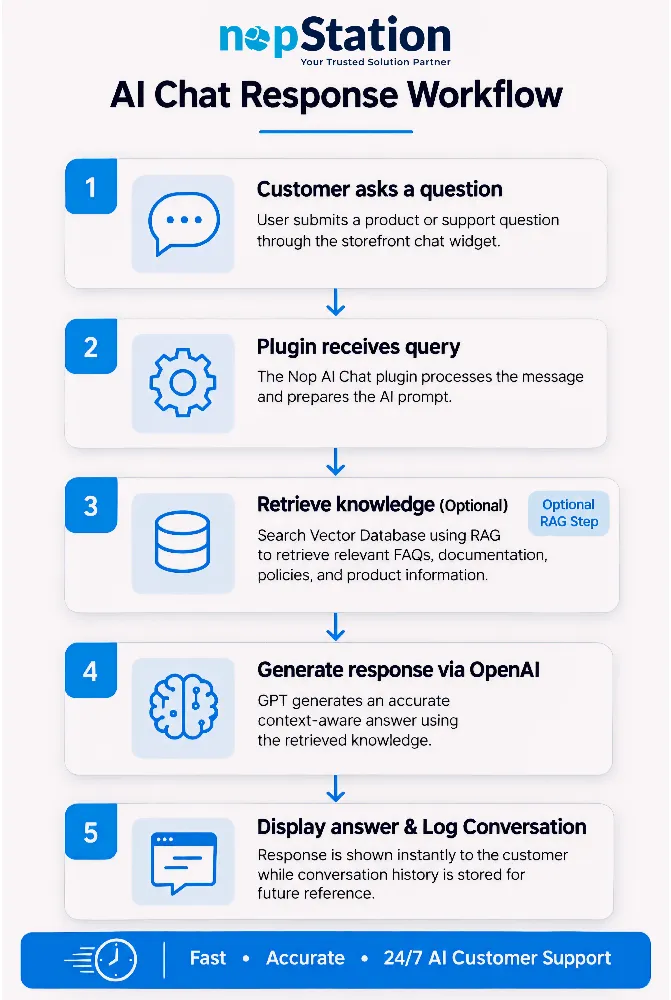
- Customer query - a shopper types a question in the chat widget on your storefront.
- Context extraction - the plugin forwards the query and the full conversation history to the OpenAI API.
- Knowledge retrieval (optional) - if you have added knowledge source URLs, the plugin runs a vector similarity search to pull the most relevant documents and injects that context into the prompt.
- LLM generation - OpenAI's GPT model produces a response that draws on your knowledge base and its own training data.
- Response delivery - the answer appears in the chat widget in real time, and the interaction is saved to the log.
The whole process takes seconds. You can adjust latency and quality trade-offs from the admin panel without touching any code.
Why RAG matters here
Retrieval-Augmented Generation (RAG) is the method that makes Nop AI Chat answers accurate rather than just fluent. Before the model generates a reply, it retrieves the most relevant passages from your knowledge sources and uses those as the basis for the answer. That significantly cuts the hallucination risk that plain LLM calls carry.
Business benefits and ROI
What merchants actually see
nopStation's data from live deployments on mid-sized and enterprise nopCommerce stores shows support costs drop by 40-60% after rolling out the plugin. Most stores recover the implementation cost within the first month. Here is how that breaks down:
| Metric | Impact |
|---|---|
| Response Time | Instant, real‑time replies compared to hours or days with traditional channels |
| Support Cost | Reduction of 40–60% by automating routine customer queries |
| Customer Satisfaction | Measurable improvements in CSAT scores due to faster, more accurate answers |
| Conversion Rate | Positive uplift when shoppers receive immediate assistance at critical decision points |
How it compares to other support options
| Feature | Nop AI Chat | Traditional Email/Phone | Rule‑Based Chatbot |
|---|---|---|---|
| Response Time | Instant | Hours–Days | Pre‑defined, slow |
| Context Awareness | High (LLM + RAG) | High (human) | Low (scripted) |
| 24/7 Availability | Yes | No (limited hours) | Yes |
| Scalability | Unlimited concurrent conversations | Limited by headcount | Limited by rules |
| Learning Ability | Can improve with new data | Depends on training | Static |
| Cost per Interaction | Very low | High | Medium |
Best practices for deploying an AI chatbot for eCommerce
1. Start with a focused knowledge base
Pull together your top 20 customer queries, your FAQs, and your key product pages before going live. A narrow, accurate knowledge base outperforms a broad, patchy one every time.
2. Read the logs and act on them
Set a weekly reminder to scan chat transcripts. When the bot gets something wrong or deflects a question it should be able to answer, trace the gap back to a missing knowledge source and add it. That feedback loop is what separates a bot that stays useful from one that goes stale.
3. Build a clear handoff path
Some queries need a human: refunds in dispute, complaints, anything legally sensitive. Wire up an email or live chat handoff so the bot passes those conversations cleanly rather than going silent or giving a vague non-answer.
4. Test different tones before launch
Run a few test conversations at different formality levels. What reads as "friendly" to one audience reads as "unprofessional" to another. A/B test tone settings against real users if your traffic allows it.
5. Put the widget where buyers actually hesitate
Product pages, cart, and checkout are where shoppers stop and second-guess themselves. Those are the pages where a quick AI answer can recover a sale that would otherwise be abandoned.
Conclusion
Stores that still rely on email-only support are losing sales to competitors who respond in seconds. The AI customer service plugin in Nop AI Chat gives nopCommerce merchants a practical way to close that gap: OpenAI's language models grounded in your own product data, running without agents, around the clock.
If you want to see how it fits into a broader AI strategy for your store, visit the nopStation AI solutions hub. To go straight to the plugin details and pricing, head to the Nop AI Chat product page.
Frequently Asked Questions
1. What is the AI Chat Plugin for nopCommerce?
The AI Chat Plugin for nopCommerce by nopStation is a generative AI-powered customer support solution that integrates OpenAI into your nopCommerce store. It provides instant, automated responses to customer queries using your store's knowledge sources, such as FAQs, product documentation, and help pages, improving customer experience while reducing support workload.
2. How does the nopCommerce AI Chat Plugin answer customer questions?
The plugin uses OpenAI's GPT model along with your configured knowledge source URLs to generate accurate, context-aware responses. It can understand customer questions, retrieve relevant information from your knowledge base, and deliver fast, AI-generated replies without requiring human intervention.
3. What are the benefits of using an AI-powered chat plugin for an eCommerce store?
An AI-powered chat plugin helps online stores provide 24/7 customer support, reduce response times, lower customer service costs, improve customer satisfaction, and automate repetitive inquiries. It also ensures consistent answers by using your store's documentation and FAQs as knowledge sources.
4. Can I customize the AI responses in the nopCommerce AI Chat Plugin?
Yes. The plugin allows you to configure AI behavior by adjusting parameters such as response creativity (temperature), maximum token limit, response frequency, and knowledge source URLs. This gives you greater control over the quality and style of AI-generated responses.
5. What are the requirements for using the nopStation AI Chat Plugin?
To use the AI Chat Plugin, you need a valid OpenAI API key. The current version supports OpenAI GPT-3.5 Turbo and can be quickly installed and configured on your nopCommerce store to deliver AI-powered customer chat support.


.webp)