
How a Machinery Manufacturer Made Its Support Manuals Searchable
AI Assistants That Answer From Your Own Documents
nopStation designs and builds retrieval-augmented generation (RAG) systems for organisations whose working knowledge sits in manuals, drawings, catalogues and procedures. The assistant answers from your documents, stays within a defined scope, and does not produce facts of its own.
Measured on a production build for industrial machinery support — the full engineering story is further down this page.
In short
- Your manuals, catalogues and procedures already contain the answers your customers and staff are hunting for.
- Ordinary search cannot read them, because most of the meaning sits in drawings, tables and page layout — not in sentences.
- We build an assistant that reads those documents the way a person does, and answers from them — without inventing anything.
- It fits the platform you already run, and stays current the moment somebody uploads a new version of a document.
- Everything below is explained in plain language first. The engineering detail is kept to the end, for the people who want it.
What Retrieval-Augmented Generation Actually Does
A general-purpose AI model knows a great deal about the world and nothing at all about your business. Retrieval-augmented generation closes that gap without retraining anything.
The idea is straightforward. Before the AI is allowed to answer a question, the system searches your documents for the passages that actually address it, hands those passages to the model, and instructs it to answer from that material and nothing else. The model supplies the language; your documents supply the facts.
That distinction is what makes RAG suitable for businesses where a wrong answer has consequences. Because every answer traces back to a specific passage in a specific document, it can be checked, cited and audited — and when the underlying document is revised, the answer changes with it. There is no retraining cycle and no model that quietly remembers last year's specification.
The hard engineering is almost entirely in step one and step three. Most disappointing AI projects have a perfectly good model reading badly prepared content.
When a Business Actually Needs RAG
RAG is worth building when knowledge exists, is correct, and simply cannot be found by the people who need it. It is the wrong tool for several problems it is frequently sold for.
Strong signals that RAG will pay for itself
- Answers exist in documents, but finding them takes an expert — or a phone call to one
- The same questions reach your support team over and over, and each one costs specialist time
- Documentation is large, versioned, and spread across manuals, catalogues, spec sheets and procedures
- Content is visual: drawings, exploded assemblies, schematics, tables where layout carries meaning
- A wrong answer carries real cost — downtime, a returned part, a safety incident, a compliance finding
- Different customers, products or regions must never see one another's documentation
- Documents are revised regularly, and any static solution goes stale within months
Where RAG is the wrong answer
- The knowledge is not written down anywhere — RAG retrieves, it does not invent what was never recorded
- The documents themselves are wrong or contradict each other — the assistant will faithfully show both versions
- What is really wanted is a report from a database — that is a reporting job, not a document problem
- A well-built search page and a decent FAQ would solve it for a fraction of the cost
- Nobody owns the content, so no one will maintain it after launch
We say this openly during scoping, because the failure mode of AI projects is rarely the technology. It is building a search system on top of documentation that nobody trusted in the first place.
Complex Businesses We Build For
The common thread is not an industry. It is documentation that is technical, visual, versioned and consequential — the kind ordinary search has never handled well.
Industrial machinery and manufacturing, where equipment runs for decades on customer floors and the manuals that support it are largely drawn rather than written. Regulated and safety-critical operations — medical devices, pharmaceuticals, energy and utilities — where an invented answer is not an inconvenience but a liability, an audit finding, or a harmed person. And B2B commerce and distribution, where catalogues run to tens of thousands of lines and the buyer knows what they need but not what you call it. If your team is currently acting as the search engine, the rest of this page will be familiar.
What We Deliver in a RAG Engagement
Six things the assistant has to get right. Each one is here because the simpler version failed first.
None of it is tied to one particular system. The parts that do the work — reading your documents, applying access rules, searching and matching photos — run separately, so the assistant can sit inside a commerce site, a service portal, an intranet, or connect straight to software you already use.
Your documents, read properly
Tables, drawings and safety notices stay intact — instead of being flattened into loose text that no longer makes sense.
A photo can be the question
Someone photographs a part and gets a match — no part number, no typing, no guessing what it is called.
Answers stay where they belong
Each product, customer or region sees only its own documents. Never anyone else's.
Nothing is invented
If the answer is not in your documents, the assistant says so — rather than producing something that sounds right.
You upload, it updates
Publish a new version of a document and the answers change with it. No developer involved.
It works where you already work
It sits inside the portal or platform you already run, instead of becoming another system to log into.
How an Engagement Runs
The sequence matters, because the expensive mistakes are all made early.
The document audit comes first for a reason. A set of clean, typed policy documents and a set of thirty-year-old scanned assembly drawings need genuinely different handling, and finding that out after everything is connected up is the most expensive way to learn it.
Case Study: An AI Assistant for Industrial Machinery Support
A machinery manufacturer's support knowledge lived in PDF manuals that were largely drawn rather than written. This is what it took to make them answerable in seconds — including the two approaches that failed first.
'A machine stops. Somewhere there is a manual that explains exactly why. Nobody can find the page.'
The Problem: Support That Lives on a Phone Number
Industrial machinery runs for decades on customer production floors — fastener-installation lines, drill-drive frames, vibratory feeder bowls. The knowledge that keeps it running sits in manuals full of exploded diagrams, photographs, air-line schematics and tables whose meaning depends on which column something sits in. When a machine jams, none of it is reachable in the moment: the operator flips through paper, cannot match what they are seeing to a page, and calls the regional technician. Everything after that is waiting.
The assistant escalates to a human only when it genuinely cannot help — which is the point: the routine questions stop consuming expert time.
The Documents: Mostly Pictures, and Meaning in the Layout
Two representative manuals decided the entire architecture. The first is a two-page troubleshooting guide with no images at all — and it is the harder of the two, because it is a two-column table where nothing in the text says which fix belongs to which fault. The only thing connecting them is that they sit side by side on the page.
The second is a 29-page operation manual for a drill-drive machine. Two thirds of it is imagery. Each square below is one page.
Nineteen of these pages contain a picture. Eleven are essentially a picture with a caption — and those are the pages a technician needs most when something has come apart.
The hardest page in the book
One page shows an air-line circuit with numbered markers, and underneath, a table saying what each number is. A question as ordinary as "which valve controls the drive cylinder?" can only be answered by reading the diagram and the table together. No sentence anywhere on that page contains the answer.
Why the Standard RAG Recipe Failed
Pull the text out, make it searchable, and have an AI write a description of each picture. Both halves failed — and neither failure announced itself.
Failure one: reading the words destroys the table
Pulling text out of a PDF returns the words but discards the layout. A neat two-column table comes back as one run-on sentence, with the end of one fault glued to the start of another fault's fix.
| Problem | Fix |
|---|---|
| Parts not advancing in the bowl | Confirm the electric supply and increase the amplitude dial |
| Feeder bowl does not shut off | Sensor out of position or damaged |
The highlighted stretches are where a problem and a fix have fused into one sentence. Nothing in the text marks where one ends and the next begins, so the content is later split in the wrong places — mixing one machine fault with another machine's remedy.
The dangerous part is that it looks fine
A search engine has no way to know it is holding a scrambled answer. The match still scores well, the response still reads confidently, and the only person who finds out is the technician following instructions that belong to a different fault. This is the single most under-appreciated risk in enterprise RAG.
On the pages that are mostly diagrams, the same method returns a handful of stray part codes with no sentence around them, in no particular order, sometimes rotated sideways. A part code on its own carries no meaning a search engine can use — so the eight most valuable pages in the manual contributed almost nothing.
Failure two: describing a photo instead of comparing it
Our first attempt at "what is this part?" followed the common recipe: have an AI describe each catalogue photo, do the same to the technician's photo, then compare the two descriptions. It is a game of telephone, and it loses the thing that actually matters.
Two photos of the same object look alike. Two English descriptions of the same object often do not — one writer says "cylindrical spacer", the other says "metal sleeve". Every extra translation step is a chance to lose the resemblance.
What We Built Instead
One idea runs through all of it: treat each thing as what it actually is. A table is a shape. A schematic is a picture. A part is an object you recognise by sight.
Read the page, don't scrape it
Every page is turned into a high-resolution picture and read by an AI that can actually look at it, the way a person does — layout included. What comes back is a clean, properly organised version of the page instead of a stream of loose words.
- Tables stay tables — each fault stays attached to its own fix
- Drawings become readable — every label and part number is captured, along with what the diagram shows
- Warnings and numbered steps survive — a safety notice can be quoted in full, not half of one
- It fails safely — if a page cannot be read this way, the system falls back to plain extraction rather than dropping the document
This runs once, when the file is uploaded — not every time somebody asks a question. A full manual is processed in under a minute.
The gain is largest exactly where it matters most: the assembly and schematic pages a technician turns to when something has come apart. Underlying figures are in the technical notes.
Compare pictures with pictures
For part identification the describe-it-in-words step was removed entirely. Both the catalogue photo and the technician's photo become the same kind of visual fingerprint and are compared directly, on our own servers — no charge per photo, and nothing sent to an outside service.
- A confidence floor — if nothing is a close enough visual match, the assistant says so rather than offering its best guess
- Only parts from that machine — because the technician scanned the machine first, recognition chooses between a few dozen candidates, not the whole catalogue
- The confidence number means something — visual similarity of two photographs, not wording similarity of two captions
Every answer stays on the right machine
One manual often covers several machines, one machine needs several documents, and some knowledge lives in no PDF at all. Documents and curated notes are grouped into a shared bundle, and that bundle is mapped to whichever machines need it.
- Shared without duplication — a manual covering six machines is processed once and reused by all six
- Knowledge that lives nowhere else — curated notes are answerable without editing a PDF
- Scanning the machine sets the boundary — the code on the frame decides what may be searched
- If nothing is mapped, the assistant stops — falling back to "some other manual" would eventually answer from the wrong machine
Troubleshooting guide
FAQs · Curated notes
Because each bundle gets its own shelf rather than a section of one big shelf, a question about the wrong machine has nowhere to go. Removing a customer or a product line is one deletion, with nothing left behind.
What Changed
What It Does Not Do Yet
Three current limits, stated up front so nobody discovers them halfway through a project.
- Answers take a few seconds, not an instant Far quicker than finding the right page in a manual, but there is a short pause while the assistant looks things up. Most of that wait is one external service call, and it can be reduced.
- Typing an exact part code is not its strongest skill Describing a symptom in your own words works very well. Looking up an exact code works better with a second, more literal kind of search, which we add where a catalogue needs it.
- You can photograph a part, but not a diagram Photographing a component and getting a match works today. Pointing a camera at a printed schematic and asking about it is a different problem, and it is not solved yet.
How accuracy gets proved on your project
The results above measure how much of a manual the assistant can work with and how the system is built. They are not a scored accuracy test, and we would rather say so than imply otherwise.
A real accuracy figure needs your questions: a graded set of things your customers and engineers actually ask, each with a known-correct answer. Building that set with you is step one of any engagement — without it, an accuracy claim from any vendor is an opinion.
Where This Goes Next: Diagnosis Mode
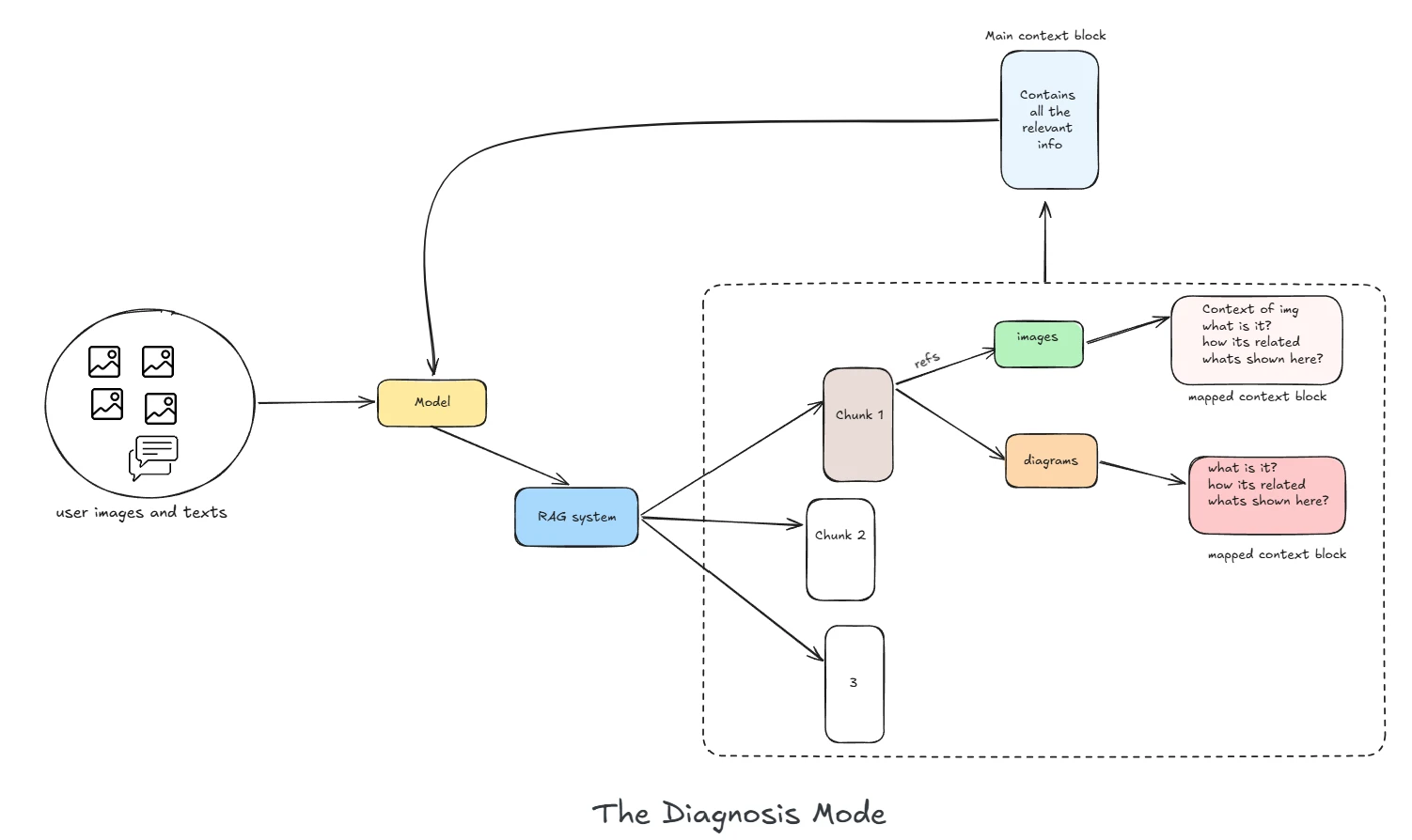
The next step applies the same principle to diagnosis. A technician sends a photograph and a description together; the assistant gathers the relevant sections of the manual, and each section brings along the diagrams and photographs it depends on. Those are assembled into one complete picture of the situation before any answer is written.
Five Lessons That Apply to Any RAG Project
These generalise to any organisation trying to make old, visual, technical documentation useful.
Treat each thing as what it actually is
A table is a shape, a schematic is a picture, a part is an object you recognise by sight. Every failure in this project came from forcing one of those into a form that could not hold it.
The dangerous failures are the quiet ones
A scrambled table and an empty section both look completely normal to a search engine. If correctness matters, it has to be enforced by how the system is built — not inferred from how confident an answer sounds.
Never destroy something you will have to rebuild
Reading each page as a picture preserved everything text extraction was throwing away — at about a second per page, once, at upload, rather than on every question.
Design so the unsafe path does not exist
Giving every bundle of documents its own shelf means a question that has not been tied to a product has nowhere to go. That is a far stronger guarantee than trusting every future query to remember its filter.
The obvious improvement is often the one that breaks things
Attaching shared background notes to every section felt clearly helpful. It made everything look equally relevant and quietly ruined the ranking. Measure the effect, not the intention.
Frequently Asked Questions About RAG
The questions we are asked most often when a business is deciding whether retrieval-augmented generation is the right investment.
What is retrieval-augmented generation (RAG)?
Retrieval-augmented generation is a way of making an AI assistant answer from a specific body of content rather than from its own training. Before the model responds, the system searches your documents for the passages that address the question and supplies only those passages as the basis for the answer. The model provides the language; your documents provide the facts.
The practical consequence is that every answer traces back to a source you control, and updating a document updates the answers — with no retraining involved.
How is this different from using ChatGPT or a general AI assistant?
A general assistant knows a great deal about the world and nothing about your products, your part numbers or your procedures. Ask it a specific question about your equipment and it will produce a fluent, plausible answer that is not grounded in anything.
A RAG system built on your documentation answers from your content, stays inside a defined scope, and can decline when the answer is not there. For a support or compliance context, being able to decline is a feature, not a limitation.
Can RAG work with PDFs that are mostly diagrams, drawings and scans?
Yes, but not with the standard approach. Ordinary text extraction returns almost nothing from a drawing page — a handful of stray part codes with no sentence around them — and it silently flattens tables into run-on text.
We turn each page into a picture and have an AI that can actually look at it read the page the way a person does, so tables stay tables and the labels on a diagram are captured along with what the diagram is showing. On a real machinery manual this recovered roughly twice as much usable content from the drawing pages, and about a third more from the manual as a whole.
How do you stop the AI from making things up?
The assistant is held to your documents at three separate points, rather than simply being asked nicely to behave. When a document is processed, any section that has a heading but no actual content is thrown away, so it can never come back as an answer. When a question is asked, the search is locked to the product or machine the question is about, and a weak match is refused rather than stretched. When the answer is shown, anything that has to be exact — price, stock, ticket status, document links — is taken live from your business systems instead of being written by the AI.
The model is allowed to understand the question and point at the right thing. It is not allowed to produce the authoritative fact itself.
Where does our data go? Are our documents sent to an AI provider?
It depends which parts you want hosted. In the build described on this page, pictures of each page are read by an outside AI service, and the text is prepared for search by another outside service. Photo matching for part identification runs entirely on our own servers, with nothing sent outside at all.
The store that holds your searchable documents behaves the same whether it runs inside your own network or in the cloud, so keeping everything in-house is a setup choice rather than a rebuild. Where rules about where data may live are strict, we agree which parts must stay inside your own environment before any code is written.
Which platforms can a RAG assistant be integrated with?
The parts that do the work — reading documents, applying access rules, searching and matching photos — are separate from any one platform. Only the admin screen and the chat window need connecting, so the same engine can sit behind a commerce site, a service portal, an intranet page, or a direct connection to your own systems.
The first version we built runs as a nopCommerce plugin, simply because that is where it was first used — not because the design requires it.
How do you keep the assistant current when documents change?
Uploading a revised document is an administrator's task, not an engineering ticket. Re-processing is safe to repeat: nothing is duplicated, nothing is left stranded, and the assistant's copy is checked back against the original document rather than assumed to still be correct. Knowledge that lives in no document — a safety rule, a model-number decoder, a policy note — is maintained as curated content and replaced wholesale when edited.
How do you keep one customer's documents from reaching another customer?
By keeping them physically apart rather than relying on a filter. Each bundle of documents lives on its own separate shelf, created automatically when an administrator sets one up. A question that has not been tied to a specific product has nowhere to search, instead of quietly searching everything and relying on a filter being remembered.
It also makes removal clean: deleting a customer's knowledge is a single operation with nothing left behind, which matters when a data-protection request arrives.
How do you measure whether the answers are actually correct?
With a graded evaluation set: real questions drawn from your support history, each with a known-correct answer and the passage it should come from. The system is then scored on whether it retrieved the right passage and whether the answer matches.
We are direct about this: on the machinery build, improvements were argued from content coverage and architecture rather than from a scored evaluation set. Building that set is the first thing we scope on a new engagement, because without it every claim about accuracy is an opinion.
What drives the cost of running a RAG system?
Three things. Processing each document costs something once, when it is uploaded — roughly a second per page in our machinery build. Answering a question costs one call to the AI, and that is the ongoing cost that grows with use. Storing the searchable copy of your documents costs comparatively little.
The choice that matters most is what runs on our own servers. Moving photo matching in-house removed a charge from every picture uploaded and every picture asked about — a permanent saving on the busiest part of the system.
Is a RAG assistant a replacement for our support team?
No, and building it as one produces a worse outcome. The value is that routine, repetitive questions stop consuming expert time, so specialists spend their day on the problems that genuinely need them. The assistant escalates to a human whenever it cannot answer confidently — and it is built so that escalating is always preferable to guessing.
A Few Terms, in Plain English
If you have sat through an AI vendor presentation recently, these five words probably came up. Here is what each of them actually means.
Look it up first, then answer. The system finds the right passages in your own documents and the AI writes an answer using only those passages.
When an AI states something confidently that is simply not true. It is not lying — it is filling a gap. The whole job of a well-built system is to make sure there is no gap to fill.
Keyword search finds the words you typed. Search by meaning finds the passage that answers what you meant — so "the bowl keeps jamming" reaches the right page even though the manual never uses the word "jamming".
The system handles pictures as well as words — reading a diagram, or matching a photograph a technician has just taken against a catalogue.
Every part of the answer can be traced back to a specific passage in a specific document of yours. If it cannot be traced, it does not get said.
Technical Notes
The figures and implementation detail behind the plain-language claims above.
The corpus
- Document A — troubleshooting guide: 2 pages, 145 KB, 6,152 characters, zero images; 12 issue blocks in a two-column table.
- Document B — drill-drive operation manual: 29 pages, 672 KB. 19 of 29 pages carry an embedded raster image; 11 pages hold under 250 characters of text. Page inventory produced with pypdf.
What naive extraction returns
Verbatim pypdf.extract_text() output over the troubleshooting guide — the issue title and the first remedy step fuse into one sentence, with no tab, newline or marker to split on:
On diagram pages the same call returns 79–188 characters per page — bare callout labels (tool, body and pin part codes), extracted with no spatial order, no relationships, and rotated 90°. By contrast, prose pages return 1,400–2,400 characters.
Ingestion pipeline and measured throughput
Each page is rendered to a 2× JPEG and read by a vision OCR model into structured Markdown (headings, pipe-delimited tables, bulleted diagram callouts), then structure-aware chunked, embedded and upserted into the resource group's collection. If Vision OCR fails, ingestion falls back to pypdf rather than dropping the document.
- Total characters indexed, same 29-page manual: 21,648 naive → 29,351 Vision OCR (+36%).
- Diagram pages 19–24: 960 → 2,027 characters (2.1×).
- Render 29 pages: 547 ms. 15 OCR batches at concurrency 5 — 103.8 s of model time in 24.7 s wall clock (4.2×) via an asyncio semaphore with two-page batching.
- Chunk, embed and upsert: 4.4 s. Total 29.7 s (≈1 s per page), once, at upload.
- Text embeddings: 1536-dimensional dense vectors.
Image recognition: v1 versus v2
v1 was describe-then-embed (vision LLM → text embedding → text-space search): four lossy translations, asymmetric query and index representations, and one vision call per ingested image plus one per user query. Accuracy was too low to ship — a qualitative assessment, not a scored benchmark.
v2 embeds both sides with the same CLIP ViT-B/32 model via fastembed, local and in-process, producing 512-dimensional vectors. Two guardrails ship in the code: a server-side score_threshold of 0.75 (a weak match returns "no sufficiently similar parts found") and a filter_part_ids constraint limiting recognition to parts on the scanned machine — turning an open-world problem into a closed-world one. Zero LLM calls on this path, at ingest or at query.
Vector store selection
Qdrant was chosen on requirements rather than a formal bake-off. The decisive properties: collections created at runtime by name (a new resource group is a new collection created by the backend, not a migration); 1536-d text and 512-d CLIP image vectors in one store; named and unnamed vector support; native hybrid search with RRF fusion server-side; payload indexes and delete-by-filter; server-side score thresholds; and drop-a-collection lifecycle for data-protection requests, identical locally and in the cloud.
| Ruled out | Why |
|---|---|
| pgvector | Postgres is already in the stack — but per-tenant collections become per-tenant tables, and hybrid RRF is hand-rolled SQL |
| Pinecone | Managed-only: no local dev parity, and the namespace model fights per-bundle isolation |
| Weaviate / Milvus | Capable, but schema-first and heavier to operate than a lean product team should have to run |
| Elasticsearch | Excellent lexical search with dense vectors bolted on. We need the reverse |
Scoping, sync and known gaps
- Query-time scope resolution:
scan QR → machineCode → Product.Id → CollectionIds[] → scoped search. An unmapped machine returns nothing rather than falling back to a default collection. - Curated notes are indexed as their own points and replaced wholesale on edit. Prefixing them onto every chunk before embedding — the original approach — flattened ranking across the collection.
- Idempotent sync: deterministic UUID5 point IDs, a transactional outbox between host-application and vector-store writes, and drift detection against the source of truth.
- Turn latency 8–11 s (n=7) across three sequential round-trips (planner → embed → presenter); retrieval alone is 3.0–5.7 s, dominated by the remote embedding call rather than by the vector store.
- Knowledge collections are dense-only — no sparse leg — so exact part-code lookups would benefit from hybrid search, a pattern the product collection already proves.
- Image recognition is catalogue-only: diagram callouts are indexed as text, not as searchable images.
References
- 1 Machinery QR Support Assistant — Functional Requirements Baseline — nopStation, 2026. Defines the five support journeys and the omnichannel scope inside an existing commerce or service portal.
- 2 Document A — Machine Troubleshooting Guide (PDF) — representative machinery documentation used for benchmarking. 2 pages, 145 KB, 6,152 characters. A two-column issue/remedy table.
- 3 Document B — Drill-Drive Operation Manual (PDF) — representative machinery documentation used for benchmarking. 29 pages, 672 KB. Prose, photographs, CAD drawings and pneumatic schematics; page inventory produced with pypdf.
- 4 Qdrant Vector Database — Documentation — runtime collection creation, hybrid search with RRF fusion, payload indexes and server-side score thresholds https://qdrant.tech/documentation/
- 5 CLIP: Learning Transferable Visual Models From Natural Language Supervision — Radford et al., OpenAI. The ViT-B/32 model used for symmetric image-to-image matching via fastembed https://openai.com/research/clip

